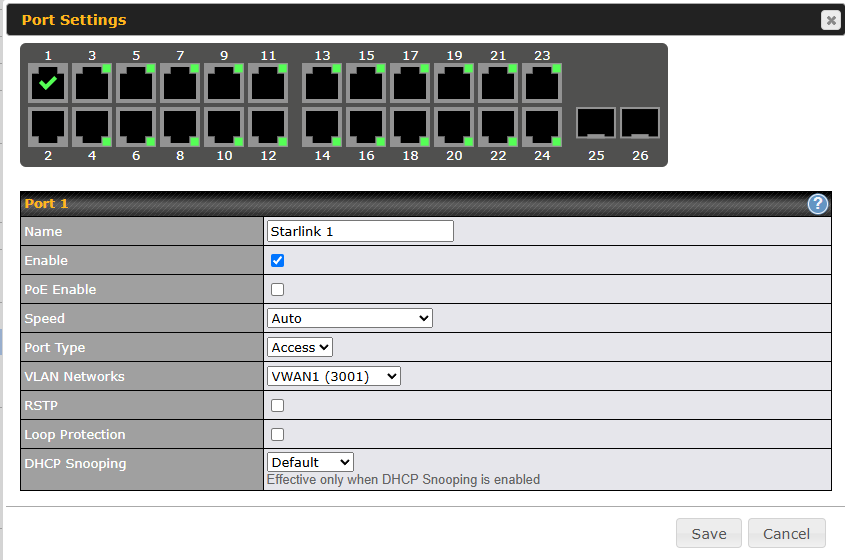
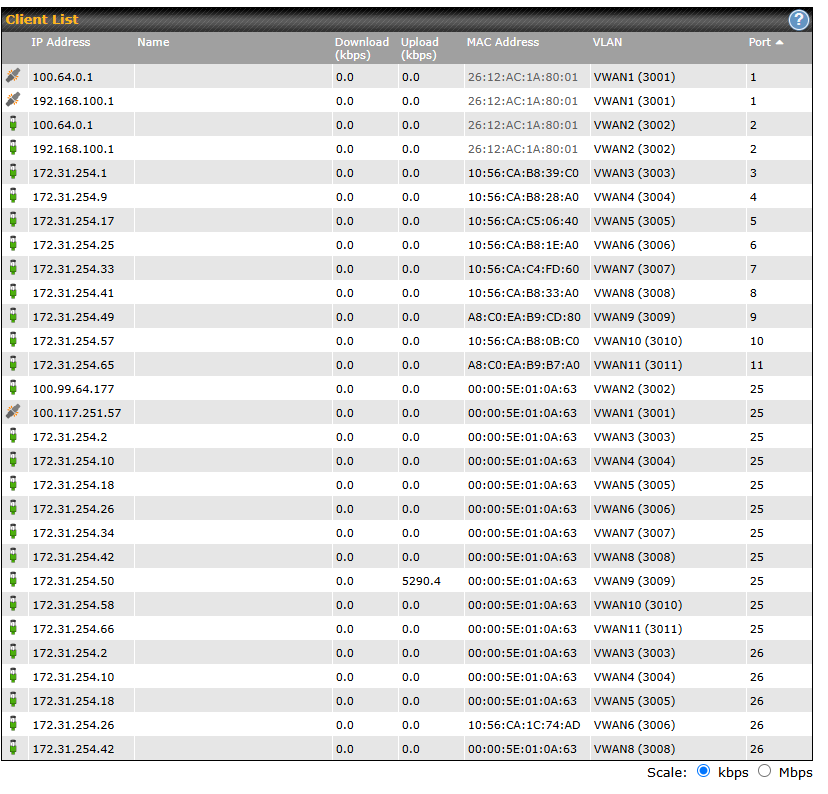
Hello everyone, I have a large PepLink deployment for one of my customers. We have 4 Starlink dishes. Over the past few days, we’ve been receiving WAN failure notifications. On my Starlink account, the dishes show as online and working, but in my SDX (currently running 8.5.2 build 6049) connected via VLAN WAN, they show as failed (see screenshot). When I try to ping that WAN port, it fails. If I disable the WAN interface and then reenable it, it goes back online for at most an hour, then fails again. While it’s working, it does seem to send data.
Has anyone experienced this issue before? All my other deployments are working just fine, but this is the only one where I’m using Starlink VLAN as the WAN.
Not seen this issue before. See you are using http and dns based healthchecks which both require dns. try a ping test and see what happens.
Then grab a diag report before and after the issue happens and log a ticket for engineering review.
Also for test purposes, get a device on the lan you can control, add an enforced rule for that as source IP and send it via one of the failed starlink wans. That way you can test if its a false positive on the health test or an actual routing / dns issue.
I’m going to suggest that you put a switch with a span/monitor port and do a complete packet capture on the failing Vlan. your Pcap must also include the ethernet mac addresses.
Don’t trust that a tcpdump on the Peplink shows 100% of the packets. I had a bug with Peplink and starlink last year where a DHCP packet was leaking from a wireless VLAN out to the WAN and interfering with starlink. Ever since about April 2024 starlink will only accept a single MAC address for communication, and any extra packets or interference makes the connection unstable.
There was a parameter on the starlink side that they could turn back to handle the instability, but were reluctant to generally support that and implied it could go away.
Starlink Support: "Having more than 1 L3 devices behind the UT is currently unsupported, I apologize for any inconvenience. We put some measures in place to work around this for you, but I cannot guarantee this will work indefinitely. "
I have one of each on different tests to see if one was causing the health outage. But I have not been able to get anything to happen from both Supports. Seems I am in a finger pointing match at this point.
I did a packet cap from the router and have absolutely 0 packets on the WAN side. Ill have to try and setup port mirroring to see if I am missing packets somewhere else. PepLink packet cap is not great as it only does 1 second worth of capture. I was thinking this has some weird DHCP issue and you might be correct.
Well 0 packets is clearly wrong. I thought the default internal pcap was size limited not time.
to get longer packet captures you run a remote packet capture:
on macos you can use
nc -l 12345 | tcpdump -enlv -r -
On linux It is:
nc -l -p 12345 | tcpdump -enlv -r -
You might have to run the pcap on the interface that is supporting ll of those Vlans… I don’t have a Virtual Wan to check, and my b20X routers don’t have PCAP since 8.4.0
I did a pcap with port mirroring. Seems that the this might be MAC issue, i see a physical MAC broadcasting and not the mac of the virtual interface anywhere
You don’t say what type of switches you are using for the VLAN traversal, but could they be denying traffic due to security controls if the ports were set to host access security.
I would also look at the mac forwarding table in the .Q fabric. The packet capture via port mirroring at the peplink and at the starlink should be simple and clean.
You could also switch from using a direct Vlan to a hard wired ethernet and have the switch do all of the vlan work. Just for testing.
Is DHCP snooping configured? That would cause problems.
but I think this is mac related, in that starlink uses the same mac for the default router. Can the switch handle the same MAC address in multiple VLANs?
100.64.0.1 is 26:12:ac:1a:80:01 on every system.
What does the client list look like? does it properly have each entry of 26:12:ac:1a:80:01 for all of the Vlans?
You might also try this CLI (ssh) command: (pick the correct Wan # for your needs)
support arping 100.64.0.1 Wan 1
ARPING 100.64.0.1 from 100.126.170.201 wan0
Unicast reply from 100.64.0.1 [26:12:ac:1a:80:01] 0.734ms
Sent 5 probe(s) (1 broadcast(s))
Received 1 response(s) (0 request(s), 0 broadcast(s))
A couple of days ago they released new software that restricted my ability to have more than one mac on the WAN network. After a reboot today the health checks wouldn’t clear, but I could ping 100.64.1.1. After I ran the arping commands the health checks came right up. The next time I see this condition I will have to look at the PCAP.
The issue appears to be related to a recent Starlink update, which is causing the MAC address binding on the Starlink UT to function incorrectly. We have reported the issue to the Starlink team, and they are currently investigating and working on a improvement.
Based on our latest investigation and feedback, the issue most commonly occurs when the Starlink UT and the Peplink router’s WAN interface are not directly connected but instead communicate through a switch. If any ARP requests—whether sent intentionally or unintentionally—originate from the switch level, the Starlink UT may incorrectly bind its MAC address to the MAC address of the switch. As a result, the Starlink UT returns traffic to the wrong MAC address, which leads to network disruption.
If you are using a Peplink switch to connect the Starlink UT and the Peplink router’s WAN interface, we can confirm that this issue will occur. This is because the Peplink switch sends ARP requests to discover active devices connected to its ports and to gather port information. These ARP requests can trigger incorrect MAC address binding on the Starlink UT.
For switches from other vendors, the behavior depends on whether the configured VLAN is designed to send similar ARP requests. If such requests are sent, the same MAC binding issue is likely to occur.
@Paul_Mossip provided a useful test using the arping tool, demonstrating that sending an ARP ping can indirectly update the Starlink UT’s MAC binding back to the WAN interface MAC address, thereby restoring the connection.
In addition to the arping method, disconnecting the WAN or rebooting the Starlink UT can also temporarily restore the connection, as either action triggers the UT to update its MAC binding.
Hope the above explained the issue clearly. Please stay tuned, I will post again when we get the latest update from the Starlink Team
Are you using the Starlink in Bridge mode, or router-mode?
I seem to have the same issue, although I am not using a switch between Peplink and Starlink…
For me, connections FROM the peplink device are working, while connections from “behind” the router, that are NATed are not working…