Seeking diagnostic strategy for single device that may be blocked from internet by new B One router

Request: I’m looking for assistance to understand why one specific device can’t connect to the internet through my new Peplink B One router, while more than twenty other devices are working fine.

About me: I want to give you a sense of my knowledge and skills so you can tailor your responses appropriately. I’m not a network engineer, but I likely know more about setting up a secure and private small office/home office (SOHO) network than 90% of consumers.

Scenario - short version:
I’m in the process of configuring a brand new Peplink B One router, which is positioned between my ISP’s gateway device and my home network—a mix of wired and wireless connections. Currently, I’m setting up VLANs on the router, but I’m only using the untagged LAN (default) for wired device connections.

All but one of these devices can connect to the internet as they did before the B One was added. The device that isn’t connecting is a 2019 MacBook Pro. It shows an active connection on the Ethernet adapter (in System Settings/Network) and displays an IP address and settings that match what I expect for the B One. I can also see the laptop in the device table on the B One. However, the laptop can’t open a Google page or connect to other internet destinations.

What tools or logs should I enable or check on the B One to diagnose the potential blockage for this single device?

Scenario - Long Version:
I’m in the process of configuring a brand new Peplink B One router, which sits between my ISP’s gateway device and my home network, consisting of both wired and wireless connections. While I’m setting up VLANs on the router, I’m currently only using the untagged LAN (default) for wired devices connected via Ethernet.

All but one of these devices can access the internet as they did before the B One was added. The device that isn’t connecting is a 2019 MacBook Pro. It shows an active connection on the Ethernet adapter (in System Settings/Network) and displays an IP address along with other information consistent with what I expect for the B One. The laptop is also visible in the device table on the B One, but it fails to load a Google page or connect to any other internet destinations.

More Information on My Environment:

  1. Before purchasing the B One, I used a lower-quality router connected to the ISP gateway.
  2. An Ethernet cable ran from a single LAN port on the previous router to an 8-port unmanaged switch.
  3. From that switch’s output, eight Ethernet cables connected to a basement distribution panel, which feeds separate Ethernet runs to eight rooms in the house, each terminating with an RJ-45 wall jack.
  4. Some rooms have a single device (e.g., a desktop computer) connected to the jack, while others have a Wi-Fi-enabled router in bridge mode, providing additional Ethernet ports for multiple devices (e.g., laptops and media streamers). These routers also support wireless networks for phones and tablets, but the wireless functionality is not the issue here.

[ I plan to replace the upstream unmanaged switch with a managed switch, as I believe that will be necessary to fully utilize wired isolation between my VLANs. Is that correct? ]

Returning to the laptop in question, I have performed two additional troubleshooting steps:

  1. I disconnected all other devices from the B One that were connected to LAN port 1, then connected the problematic laptop directly to LAN port 2. However, it still could not reach the internet. (I noted the date and time of this step, in case it aids in searching logs.)

  2. I connected the problematic laptop directly to a LAN port on the ISP gateway, and it worked perfectly, reaching the internet without issues.

BTW, I repeatedly and sequentially powered down then powered up every single piece of the environment many times during this process.

Another detail about the MacBook Pro is that it’s an employer-issued device with significant security profiling and controls installed while it was on my home network (not before issuance).

This leads me to suspect that the problem may stem from those controls rather than the B One router. Why else would the employer’s laptop not connect when all my other devices—computers, tablets, phones, streaming devices, IoT, etc.—work just as they did before the B One installation?

However, despite several escalations of tech support, the employer insists that there’s nothing in their security or account setup that would inherently block a new IP address. Since the laptop functions properly when connected to the ISP gateway, they believe the issue lies with the router.

What tools or logs should I enable or check on the B One to diagnose the possible blockage of this single device?

I look forward to learning from this process, and I appreciate your assistance in advance. Thank you.
At first read, this sounds like a DNS problem.
On the MacBook, open Terminal.app window and type

dig google.com

you should see something like this:

[...]
;; ANSWER SECTION:
google.com.		137	IN	A	142.251.34.78

;; Query time: 7 msec
;; SERVER: 192.168.1.1#53(192.168.1.1)
[...]

This tells us
(A) DNS Is working (because the IP address of 142.251.34.78 was found
(B) The DNS server that provided the answer - in this case it’s my Peplink router which is at 192.168.1.1, since I have DNS Proxy enabled on my router (an older Balance One, which is not that different from your B One).

Could you run this and paste your results?

Another idea: perhaps this very-locked-down laptop is using DOH (DNS over HTTPS) and it’s failing ? See related discussion:

1 Like

Thank you for the helpful reply, Mike @soylentgreen !

Here is the Terminal output:

; <<>> DiG 9.10.6 <<>> google.com
;; global options: +cmd
;; connection timed out; no servers could be reached

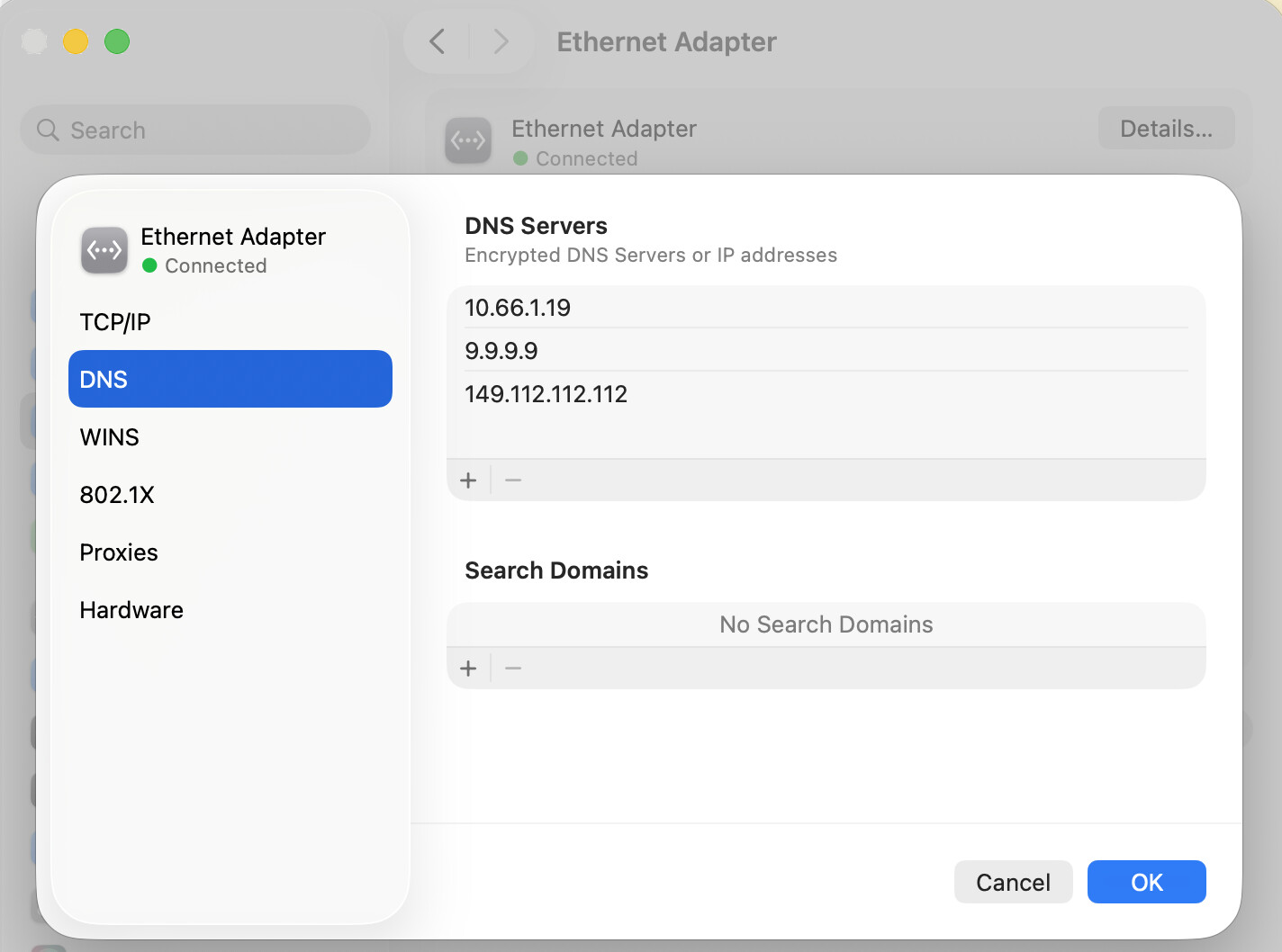
Clearly that’s different than expected. I checked a couple of settings for the laptop itself, and its browsers, but those don’t appear to be using DOH. Notably, the DNS tab of the System Settings/Network for the laptop’s active ethernet connection shows only one address, the LAN IP for my B One.

I took a quick look at the other item you linked, which definitely seemed related.

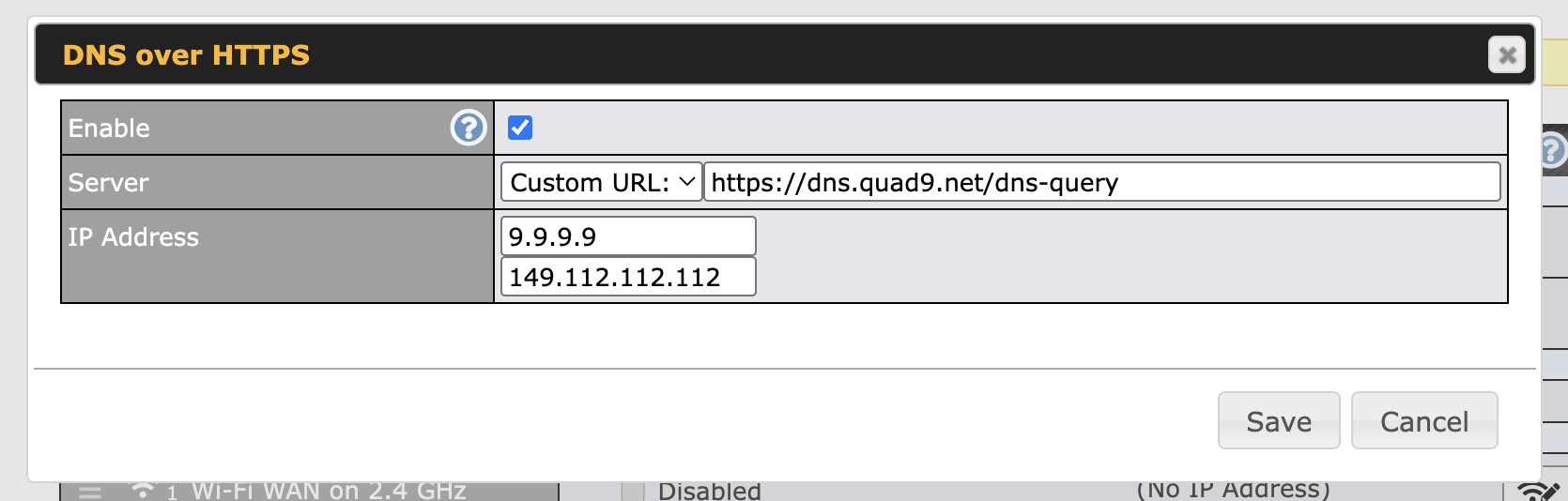
On the B One, I did have DNS over HTTPS enabled. Here is a screen shot of the settings:

When I disabled that, the troublesome laptop was immediately able to reach the internet, and of course passed the DIG test.

Next I changed the Time Server setting to NIST as recommended in the other post. Applied Changes and tested the laptop again… still good.

Then I re-enabled the DNS over HTTPS setting, which caused the laptop to fail once again. When I disabled it, the laptop worked.

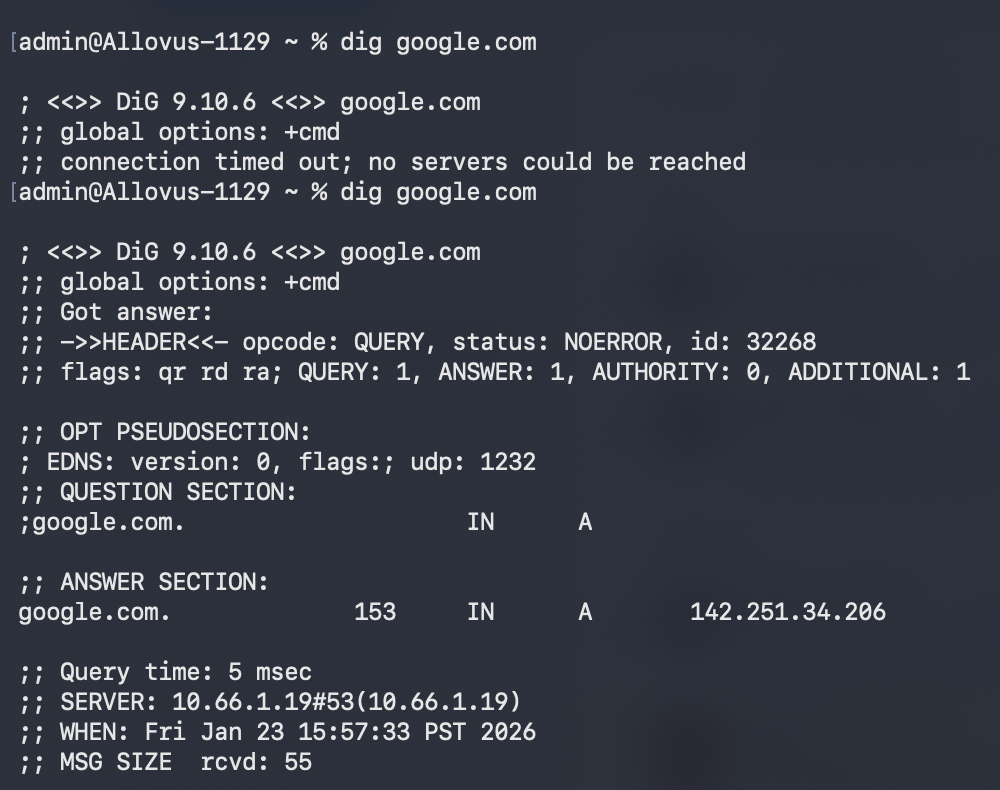
Here is a Terminal screen shot, first showing the failed state, followed by the successful state:

So, I’m not sure what to think. The key difference between my case and the other poster’s case is that ALL of his devices failed, where it’s just one for me, which suggests the time sync isn’t at the root of the problem. What would you suggest I try next, please?

FWIW, I should mention that as a matter of practice, I use Quad9 custom DNS on every single device in my environment, along with the browsers. The exception is that I’ve never fiddled with the DNS on this employer laptop. I just let it use the next device upstream.

TBH, I don’t know if that replication of Quad9 everywhere is necessary/helpful, or if I could just set that on my ISP gateway and call it good.

Thank in advance for your continued assistance.

Good sleuthing!

Question:
the successful dig command shows this as the server:
SERVER: 10.66.1.19
If that’s the LAN address of your Peplink, then that’s OK.

But otherwise it’s weird:

  1. the 10.x network is a private network range.
  2. having the DNS server on x.x.x.19 is also unusual

To me, this looks like the laptop is using a VPN.

You said

But if the laptop has a mandatory VPN set up, that could certainly be relevant here.

1 Like

Hi Mike @soylentgreen

Yes, 10.66.1.19 is the LAN address on my B One; I changed from the default (“privacy through obscurity” strategy, which I may be compromising by posting these screen shots in a public forum, ha ha).

There is an employer VPN available on the laptop, but it is only required for access a couple of their most sensitive resources, e.g. HR portal. That is to say, it is NOT required for connection to my everyday work resources, and is not engaged or a factor in this testing (to the best of my knowledge).

Thanks for your continued advice.

1 Like

Hello again, Mike @soylentgreen

Further to the previous message, I have now resolved the issue and wanted to share the details.

Firstly, it was nagging at me that the Quad9 DNS over HTTPS on B One (previous screenshot above) was tripping up the laptop, but that it didn’t have trouble reaching the internet when connected directly to the ISP gateway, which similarly has Quad9 set up for Static DNS in the gateway’s WAN settings. But is that actually “similar?”

No, they are not as it turns out. I researched the difference between DNS Over HTTPS (DoH) on routers vs. Static DNS on gateways to better understand the function of each. I also learned that there should be no problem using the two functions in concert. (Remember, please, I’m just learning about networking.)

So then I wondered if the problem was stemming from my specific DHS over HTTPS setting in the B One. You may have noted that I was using the Custom setting to input a URL and IP addresses for Quad9, rather than using Peplink’s preset for Quad9. The reason I did that was because Quad9 offers multiple flavors of its service, and I wanted to ensure that my preferred flavor was in use, given that the preset doesn’t tell you which one it is.

Thinking that I had perhaps bungled entry of the Quad9 details in the Custom setting, I changed it to the Quad9 preset, applied changes, rebooted the router, powered up the laptop, then performed the DIG for Google. It still failed.

So then I wondered about the other Peplink presets, and decided to test them one by one, using the same sequence of applying router reconfiguration, rebooting it, booting the laptop, then running DIG test.

To my surprise, the presets for Cloudflare, Google DNS, and OpenDNS all worked just find in tandem with the laptop. So that narrowed the issue down to use of the Quad9 service itself, whether the preset or the custom entry.

Knowing that none of my other devices which were connected to the B One’s interior network environment were having trouble with the Quad9 implementation on my router, I turned my attention back to the laptop.

I looked at the System Settings/Network/Ethernet Adaptor/Details…/DNS tab and noted that it displayed one DNS Server address, which was my B One’s LAN IP. I wondered if adding the two IPs for Quad9 to the list would make a difference.

So, I made those additions, then went through the whole restart cycle. Lo and behold, the DIG test passed and I was able to reach the internet. Here’s a screenshot of the final setting on the Laptop.

I have no idea why those entries was required for Quad9 but not Cloudflare, Google DNS, or OpenDNS usage on the B One. Do you think it’s a quirk of the laptop’s OS (running 26.2 Tahoe), or a bug with Peplink’s DHS over HTTPS setup?

Either way, I’m happy to have this resolved and to have learned a few things along the way. Thanks for pointing me in the right direction! It would have been a needle and haystack situation for me otherwise, and definitely tears. :wink:

I have an idea about the question posed in my previous post:

As Michael Horowitz [ @michael234 ] notes on his excellent routersecurity.org page for setting up a B One, a differentiator between Quad9 and the Cloudflare/Google/OpenDNS might be that the Quad9 preset uses the blocker variant, whereas the other three might be blocker-free. One can’t know because Peplink’s UI doesn’t display the actual variant being deployed.

And maybe the devil’s in the details of those different blocking services, causing my one laptop to misbehave.

Interesting findings, and thanks for explaining your method as well.

The final result where you have 3 DNS IP addresses listed for the laptop may not be doing what you think:

  • with multiple DNS Servers, the MacBook will try one, but if it fails, it will try the next, then the next.
  • so even if the Peplink Router DNS (10.66.1.19) is failing, it will try the other two.
  • I believe that these will be normal (non-encrypted, TCP port 53) DNS requests, not DNS over HTTPS.

So, while the MacBook is working now functionally, I think the mystery still remains as to why DNS from the Peplink is failing, but as you indicated, only when (A) set to DoH : DNS over HTTPS, and (B) using the Quad9 DoH Preset, but not for other Presets.

1 Like

Thank you for that insight, Mike @soylentgreen

Regarding your closing question (and as a new member of this forum), I’m curious to know whether Peplink staff will pick up on this post and investigate, or whether I should open a ticket or bug report. Advice?

Turning back to your third bullet, I would like to document whether the laptop is indeed failing over to port 53. I tried to perform such an analysis, but unfortunately it’s beyond my technical knowledge.

On the laptop I ran some DIG and TCPDUMP tests, but was not really able to understand what was happening in the traffic patterns. That said, it appeared to me the laptop was using port 53 regardless of whether the local DNS Server settings included or removed the two Quad9 entries (from previous screenshot).

Next I tried to watch traffic from the router side, but was unsure exactly how to go about it – there are lots of different logs and logging options. I think I should be using the Status/Active Sessions tab, filtered to the IP address of the laptop. With that as a starting point, I tried different combos of entries on the Port and Protocol/Service lines, but could not come up with results that led me to know for certain whether the laptop is always failing over to port 53, or sometimes using the router’s DNS over HTTPS setting (which presumably would be evidenced by activity on port 443?).

Apart from documenting the actual behavior, I’m also curious about the practical implication, because I don’t fully understand the network layers and behavior of packet traffic. Let’s rewind to where I ended yesterday, with a “solution” that’s (probably) not what I thought it was…

Let’s say the laptop is failing over to port 53 and sending the locally-stored Quad9 IP addresses from its DNS Server list (second and third positions). Is that somehow functionally or performatively worse than having the router provide the same Quad9 addresses for lookup via DNS over HTTPS? (Remember, too, that I also have Quad9 as Static DNS setting on ISP gateway.)

I’m curious for your response on the all of the above, and happy to perform additional tests and report back if you’re willing to hang with me on this.

Also, I want to throw one more wrinkle/clue into the mix. I initially stated that no other device on my network was having difficulty with the new B One, when DNS over HTTPS is enabled for Quad9. That was incorrect.

This morning, I turned on a Sonos smart speaker for the first time since adding the B One to my network. Like the employer’s laptop, it would not work with Quad9, but did work just fine with the Cloudflare preset. (I did not try the other presets, but assume the pattern would repeat.)

Unlike the laptop, however, the Sonos device doesn’t allow a user to add DNS entries. Presumably, it is limited to the lookup service provided by the router. If that’s true, I would then have to choose between using the Sonos speaker, or using any of the non-Quad9 presets for DNS over HTTPS… unless there’s a Quad9 bug that Peplink can resolve. Right?

Or is there a filter or setting on the B One that would allow me to exclude a device or service from DNS over HTTPS either by 1) device MAC address, 2) device IP, or service URL (e.g. sonos.com)?

Thank you!

I just skimmed this thread, but there’s issues with Quad9 and DoH, they retired http/1.1 which is the only thing Peplink supports.

The question for me would then be if the B One is failing as a DNS proxy, why are your other devices working.

When you gave the initial problem, my first thought was the DNS tab in the network settings. I’ve had similar issues with McBooks, when I leave a DNS entry in there by mistake.

My debugging would be using tcpdump on the MacBook, and packet capture on the B One (from the hidden support page). If you get the B One to capture packets, they can be interpreted by tcpdump on the Mac, it’s a surprisingly powerful tool.

2 Likes

Thanks, Barry! @Barry_Twycross1250

That would certainly be a valid explanation. Perhaps the reason my other devices work is that all of them are set up to use Quad9 for when I’m not behind my own router… in which case here at home they all might be bypassing the B One’s DoH setting. Does that seem reasonable?

Appreciate the suggestion for packet capture. I fumbled around with that up-thread, but it’s beyond my knowledge set right now. Next weekend I’ll find some time to try again. I like to learn. :slight_smile:

I started a support ticket with Peplink yesterday, but they had not offered this possible reasoning yet. I’ll float it over there and see how they respond. Apart from the Quad9 scenario, seems like it would be good for them to use this newer transport protocol.

Thanks again for weighing in. Cheers!

That could be it. I always set up my routers as the DNS proxy, and use them exclusively as the DNS server on the internal net. That way, if DNS breaks, you’ll know it, everything will stop working. That also seems more efficient, as they’re caching DNS queries.

With the hybrid approach like that, as you found, individual devices could stop working.

2 Likes

You can learn a lot by just playing with it. I’ve never specifically done network engineering, but I started learning by doing packet captures back in 1990 (with very expensive Tektronix kit which happened to be lying around at work), and correlating what I saw with the RFC (on paper). Mostly out of personal interest.

I was writing a packet interpreter, with the thought I was working towards writing MacTCP, until Apple came up with their version.

These days, Wikipedia for the protocol you’re interested is probably a more accessible source, though looking at the authoritative RFC at ietf.org is a good idea, if you want to be sure.

1 Like

Really appreciate the encouragement, Barry! @Barry_Twycross1250

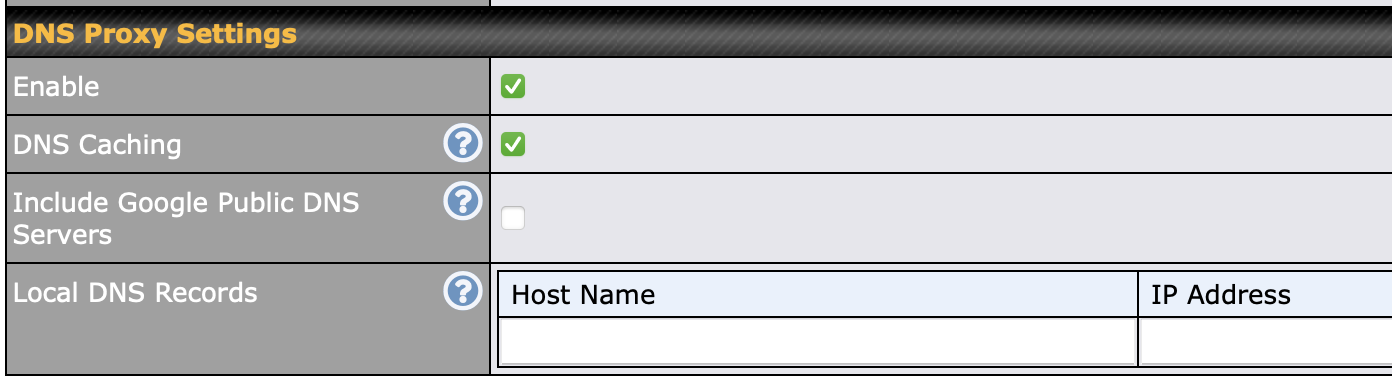
And in case it’s not clear, the DNS Proxy settings are on a different screen than DNS over HTTPS (on my Balance One, at least):

DNS Proxy Settings are on Network / LAN / Network Settings :

Whereas DNS over HTTPS is on Network / WAN /

It took me a while to figure this out when you asked your question.

I’m not sure if it makes sense that these settings are separated, but in any case I wish the Peplink UI would have more hot linking between related settings pages…

1 Like

This is an important point : IP networking and DNS is so complicated (including self-healing behavior) that you often want to have a single, simple, configuration for debugging.

The easiest way to do this is to just use DHCP, which will automatically assign the DNS servers from your router (so you don’t need to hard-code anything on the clients).

If you want to force specific clients to specific IP addresses, you can still have the clients use DHCP, but setup the Peplink router to have DHCP reservations.

This is done in a different section of the UI:
Network / LAN / Network Settings / [name of the LAN] / DHCP Server / DHCP Reservations

1 Like

Hello Mike @soylentgreen and Barry @Barry_Twycross1250

Thank you for the continued insights. These various DNS settings and functions are more complex than I had imagined; it will require me to go away and do a little studying to make better sense of your comments, then take action. Thanks for the encouragement… as the saying goes, “you don’t know what you don’t know.”

On a positive Barry’s tip on Quad9’s retirement of HTTP/1.1 accelerated my Peplink ticket to light speed. As soon as I pointed that out to the support agent, the issue was escalated and a few hours later I received an incremental firmware update which solved the issue, allowing me to use Quad9 for DNS-over-HTTPS without issue.

I should also note that Quad9 now works whether I use the Peplink preset, or do a custom entry:

https://dns.quad9.net/dns-query
9.9.9.9
149.112.112.112

Peplink subsequently confirmed that their preset uses that same flavor of Quad9’s service, but I prefer to see the info, rather than relying on the preset which does not display an actual URL in the UI.

Cheers

4 Likes