We are pleased to announce that Router Firmware 8.6.0 Beta 2 is now available.
Woohoo! Wireguard support finally. I’ll be installing it after work today, thanks team.
6 Likes
Nice!
Why is the new Balance 310 not in the list (again)? Is this an oversight?
1 Like
It’s the same fw as for the b one 5g fw-
br1p_br2p_transitp_hd1dp_hd2dp_hd1hw4_hd2hw7_b310hw5_b580xhw2-8.6.0b02-build6397
1 Like
One of my two SFC tunnels to NYC is failing to start. Ticket 26050258
1 Like
Well that went poorly, after firmware upgrade wireless clients could associate and got DHCP but couldn’t communicate. They couldn’t even ping the default gateway and the gateway couldn’t ping them. Wired clients were fine and WAN worked, but no clients connected to the built in WiFi controller on the B One could do anything IP once connected. WiFi communication WAS working because when I turned on my hotspot on my phone the backup WiFi WAN connected. One thing I noticed is 8.6.0b2 had 160MHz WiFi channels as an option, 8.5.2 only has 80 for some reason, not sure if it’s related.
1 Like
@DaveZ, it looks like the download link is missing the mentioned device model. This has been reported to the relevant team, and they will fix the download link as soon as possible.
Both B310 HW5 & B580x HW2 can you the link below for temporary :
br1p_br2p_transitp_hd1dp_hd2dp_hd1hw4_hd2hw7_b310hw5_b580xhw2-8.6.0b02-build6397
@Maciej_Rolecki Thank you for helpiing for provide the link
1 Like
@DaveZ Support team will follow-up the Ticket 26050258
Thank you for help.
Can you please help with a ticket ?
https://ticket.peplink.com/ticket/new/public
1 Like
Ticket 26050265, attached the logs I captured while it was happening, rolled back to 8.5.2 since this is my home network and playoff basketball was on tonight =) If support needs me to capture anything else I can roll it forward again next week to test.
2 Likes
Beta 1 and Beta 2 have made my wireless clients (samsung galaxy s25 ultra & s26 ultra) unstable. Get the wifi icon with the exclamation point on it. Exclamation point remains for undetermined amount of time then goes away, then comes back. Very unstable.
No settings change from what was working perfectly on 8.5.4.
Something aint right with this version/build!
Problem happens on by 5ghz and 2.4ghz.
1 Like
Will Synergized WiFi be included for the MBX in the GA?
1 Like
We have prepared a lab device for verification, and so far we have not been able to reproduce the issue.
Could you please open a ticket and share the diagnostic report with us so we can investigate further?
1 Like
Ticket #26050289
1 Like
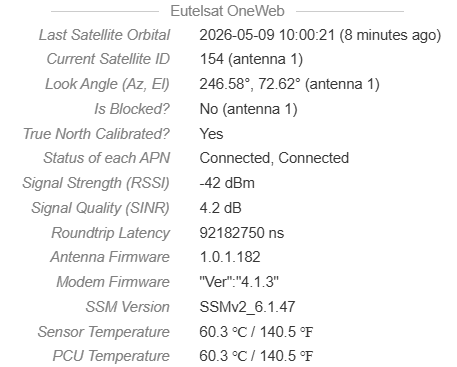
Excellent, we can see Oneweb status in Incontrol now, however, is there a way to get GPS position from Oneweb?
Also, how is the progress with Iridium, we tried to use In-Touch to access Iridium dashboard, but not working as Iridium pop-up log in page. (Thrane LT-4200S)
3 Likes
Please confirm if the MBX can be SC and control Wi-Fi on SD units. Given the hardware spec is almost similar to the PDX, it does not make sense to exclude the MBX.
Thank you.
The 8.6.0 Beta won’t install on my MAX BR1 Pro 5G. I get an error: “File size exceed allowed limit.”
I just booted up a new B One Plus, loaded a config in IC2 from a B20x. The 2.4ghz wifi wan is not working. It says “unsupported connid not a wi-fi wan connection.” i saw in the 8.6 beta “[Beta 1] [Wi-Fi AP] Fixed an issue where radios could fail to start correctly when auto channel width was used on certain channels. (Fixed in: 8.5.4s063)” so i loaded this beta and it still has the issue.
1 Like
Could you try upgrading to version 8.5.4 first, and then proceed with the upgrade to 8.6.0 Beta?
1 Like
@mystery the error “unsupported connid not a wi-fi wan connection” should not be related to the fix in firmware 8.5.4s063.
Also, I see you have created a ticket, our team will work on that and share our findings with you.
1 Like
@sitloongs I deploy 8.6 b2 to a br1 pro 5g-k , nothing could associate to wifi.
Multiple device types, iphone, dell, panasoic pc, kenwood radio.
Put 8.5.4 on device no issues, it seems wifi has a problem with this version based on my experience as well as others.
1 Like