I have a MAX BR2 Pro. I plan to install that on a sailboat. The sailboat already has 2 of the Maritime 20g antennae on its mast. I want to know if I can use both of the 20g’s together as a single 4x4 MIMO for a single one of the cellular modems in the BR2. And, if so, are there any considerations for placement?
When I asked Gemini this question, it said the 2 20g’s need to be 150cm apart from each other for optimum bandwidth, but I have not been able to find direct evidence of that claim – so it might be a hallucination. If it’s true, then I’m curious about why, since obviously the 4 antenna elements inside a 40g are not 150cm apart from each other.
(It doesn’t matter for this question, but in case you are wondering – for the other cellular modem inside the BR2, I plan to just use the stubby antennae that came with the BR2, i.e. directly attached to the router itself. I do NOT plan, for example, to use the 2 20g’s as 2 separate 2x2 MIMO connections. I get the impression that is possible, but I do not plan to do it.)
a few things to consider… long antenna cable runs degrade signals… there may be a point where the peplink inside the cabin using factory antennas performs better than a long external cable run. the boat keeling under way may impact signal. you can use the 2 20g as 2 separate connections one for each cellular modem but you need to review the peplink device and what ports you would need to connect/disable/leave open beforehand. you can probably get technical with the antennas and which lead goes to which jack it depends on how the external antennas are built, they should publish patterns. you dont want the antennas close together in general. putting a peplink up high on the mast and running ethernet back or using a dome might yield a better experience. or even mounting the antennas near / over the cockpit/stern could be better than going up the mast where the keel over angle is more dramatic? i am not an expert but just sharing there are multiple things to consider.
Those considerations make sense to me. Thanks for your thoughts. I was aware of the signal loss due to the cable length, and indeed that is one reason why I don’t plan to have 2 sets of antennae on the mast – in some cases, line-of-sight might dominate; and in other cases, pure signal strength might dominate. In theory. With this configuration, I’ll be able to test which configuration has a better outcome: Anywhere, including in the middle of nowhere (e.g. northern Inside Passage), I could switch SIM cards, or (equivalently) swap which ports on the router use which antennae. It might turn out that the stubby antennae work best in all cases. I’ll find out.
I considered using a dome with the modem up on the mast (to reduce antenna cable length), but for now I’ve decided I want to keep the router inside the cabin. If I mount the router up on the mast, I’d need a remote SIM card extender, because I wouldn’t climb the mast to swap out SIM cards. And, for now, I want to keep it simple (even if at the cost of some signal loss).
This is a catamaran so it doesn’t heel very much. I should have mentioned that before – polarization probably won’t change much as a function of apparent wind direction.
You anticipated exactly one of the questions I have, and that I’m hoping a Peplink authority figure will answer: which antenna cables should I attach to which BR2 ports? I saw analogous discussions in this forum about different Peplink devices and antennae but not for the BR2 specifically.
Update since I first posted: I (think I) now understand better why the 2 2x2 antennae would benefit from being farther apart; MIMO is (among other things) about exploiting spatial multi-path, not (just) beam-forming or polarity diversity. And therefore 2 of 2x2 MIMO antenna spaced apart can theoretically have better performance than a single compact 4x4 MIMO antenna. That explains the mystery I posed in my first post; it’s not that putting the 2 2X2 antenna close makes them malfunction; it’s that doing so would miss an opportunity for using multiple paths to get a better channel matrix (i.e. to compensate for fading, scattering, diffraction and reflection). Turns out, the 2 antenna that came with my mast are indeed mounted about 5 feet apart, so it seems like I’ll get that benefit. It does seem, however, that such benefits are more important in urban areas with lots of obstacles and complex terrain (i.e. buildings), whereas I mostly care about getting good signal in the middle of nowhere, where the problem will mostly be distance and obstacles will be mountains whose size and spacing will be large. But trees will also be a factor sometimes – in which case spacing might matter more.
everyone i know myself included have added starlink. most removed their cellular capabilities. i kept mine but use starlink 99% of the time. only exception is heavy rain (i dont have a high power starlink ) .
That’s interesting. We have seen that also but the adverse reaction to Musk and his antics have dampened the “Starlink enthusiasm” somewhat from what we see from our vantage point (and, indeed, have caused some of our clients to cancel Starlink services.)
Starlink has not worked sufficiently for us for video calls in a professional context. My wife and I both tend to be on video calls for work throughout the day. We get multi-second drop-outs multiple times per hour. That doesn’t ruin browsing, watching movies, or even casual intermittent Zoom calls, but it is not acceptable for heavy professional use.
So, we tend to use cellular when it’s available, and resort to Starlink only when cellular is not available. Like up north on the Inside Passage. And, eventually, offshore passages – but we won’t be working during those.
The Max BR2 Pro allows us to bond, but in my testing so far, I have not seen major benefits – certainly not enough to pay for a bonding service.
I still have not found any answers for which Maritime 20G antennas to connect to which ports on the MAX BR2 Pro.
I have found such answers for the BR1, and there the answer seems to depend on specific SKUs of BR1 – implying that there is indeed a right and wrong way to do this: Max br1 pro 5G and maritime 20g antenna setup
I also found several documents that seem related, but still do not give me enough info to answer this specific question:
I’m new to this forum. After I posted the first message, I later found the “Pepwave Max” forum. I’m wondering whether I’ll get more relevant visibility by posting there. Is there a way to migrate or cross-post that follows ettiquette?
Each Maritime 20G provides 2×2 MIMO. When both units are connected to the same cellular modem on the MAX BR2 Pro, they can be used together as a 4×4 MIMO antenna setup for that modem.
Connect as follows (example: Cellular Modem 1):
Maritime 20G #1
LTE/5G lead 1 → Cellular 1A
LTE/5G lead 2 → Cellular 1B
Maritime 20G #2
LTE/5G lead 1 → Cellular 1C
LTE/5G lead 2 → Cellular 1D
Notes:
Keep all four leads on the same modem (don’t split across Modem 1 and 2).
Connect one GPS lead to the BR2 GPS port; the second GPS lead can be left unused.
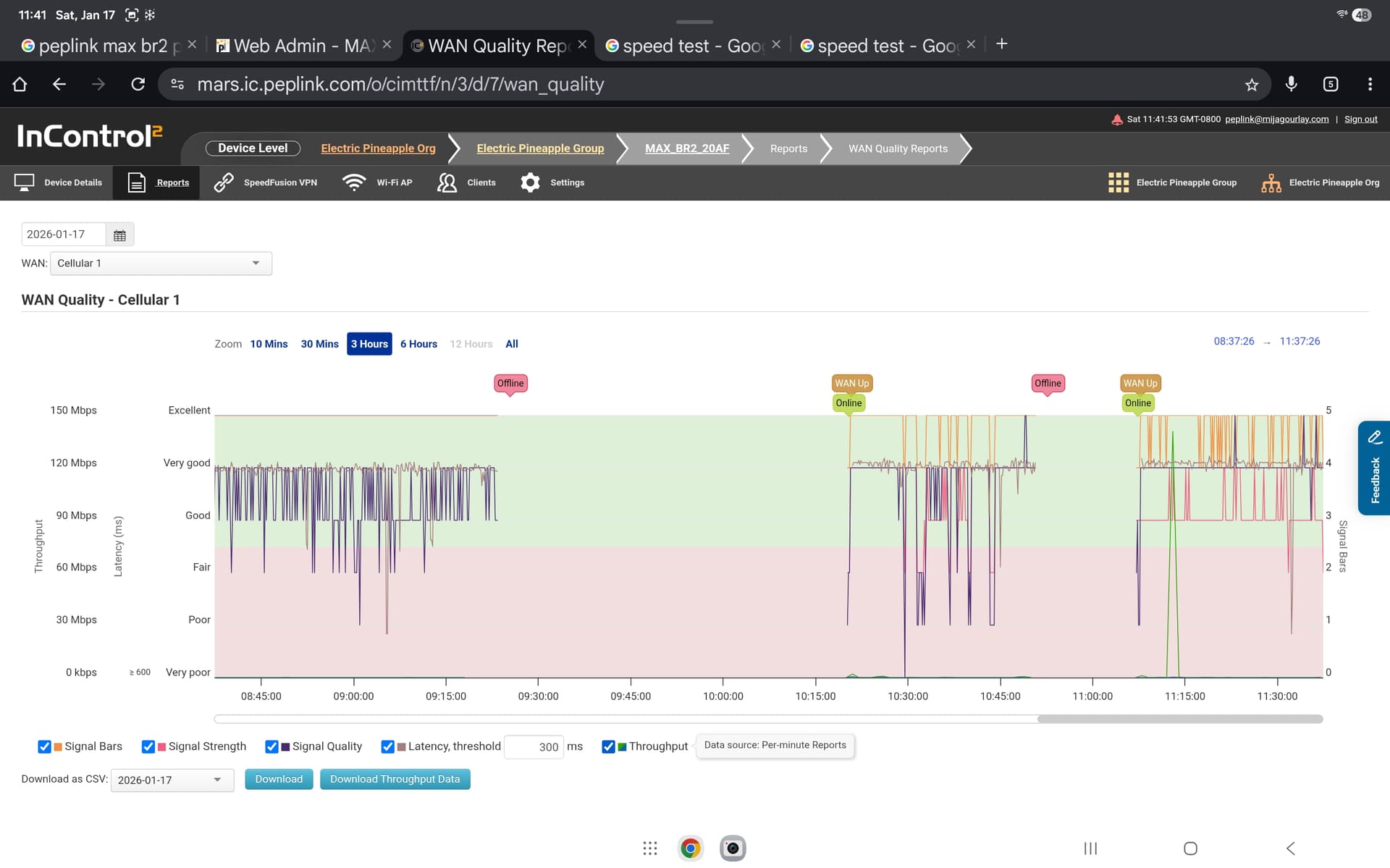
The far left section is the BR2 operating in my office. Ignore that. It’s unrelated to this test.
The middle section is the BR2 operating at the boat yard next to the mast, using the stubby paddle antennae. It is a baseline.
The right section is the BR2 operating with the device in the same location as above, but connected to the antennae (2 of 20G’s) on the mast. Note that for this test, the mast was horizontal, near the ground, about 3 or 4 feet above the ground. (It’s being prepared for stepping.)
I also ran speed tests in both configurations. The results were comparable; using the 20G’s I got very slightly faster data rates for both download (104 vs 105 Mbps) and upload (21 vs 25 Mbps).
I was a little surprised that the cable loss didn’t affect signal strength as much as I expected; given that the 20G’s were at about the same location (including height – so they had no visibility advantage compared to the stubby paddle antennae) I would have expected the stubby paddles to “win”.
Great point. The mast will be stepped in several days. I’ll try again after that.
Also, I meant to mention: I measured the distance between the two 20G’s: it’s a little over 7 feet, so more than the recommended minimum of 150cm (~5 feet) that I read in this document: