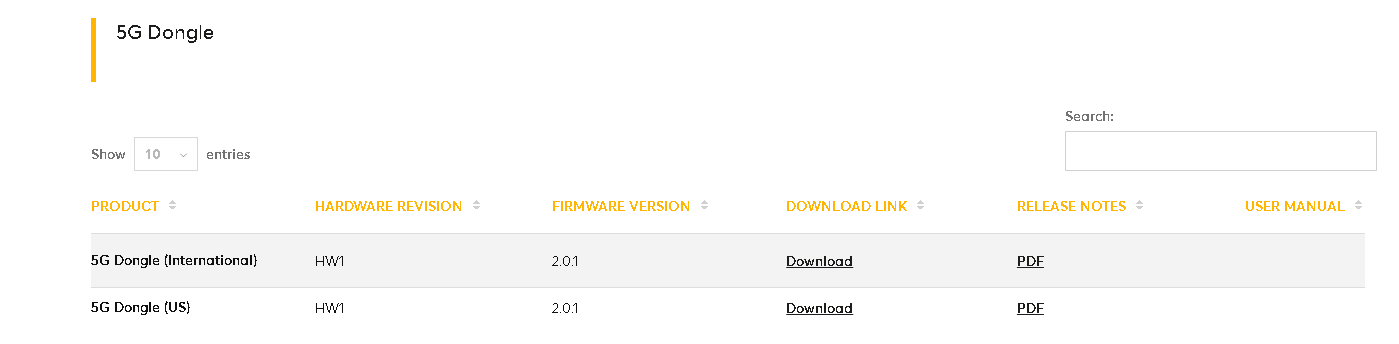
We are pleased to announce that 5G Dongle Firmware 2.0.1 is now generally available for production environments.
You can download the firmware from the Firmware Download Page or upgrade directly via InControl Firmware Management.
We are pleased to announce that 5G Dongle Firmware 2.0.1 is now generally available for production environments.
You can download the firmware from the Firmware Download Page or upgrade directly via InControl Firmware Management.
Hey @Lai , which build is this? There were two 2.0.1 firmwares floating around over the past few days.
Hello. I can’t find this product type on Peplink website. Can you give me link?
Hi…
5G Dongle (International)
https://download.peplink.com/firmware/dngl_adt/fw-dngl-5gz-2.0.1-build1016.bin
5G Dongle (US)
https://download.peplink.com/firmware/dngl_adt/fw-dngl-5gy-2.0.1-build1016.bin
It’s not on the current price list furnished to us either. Many times products are available to “preferred” partners well before others even know of their existence. This may be one of those situations.
This is an upcomming model/product, it was sold to partners who attended the Peplink summit this week in Orlando as a VIP preview.
Target price is $399 and hoping to launch around the end of the month, pending successful testing of the units that went out.
How does this compare to the Max Adapter 5G? It looks the same.
Compared to the Max adapter, the new Dongle is a small pocket sized router that you can log into and manage locally (or RWA from IC2). This also means you no longer need the Peplink Connection manager, as it will turn up as a network adapter/wired network connection when connected to a computer.
Looking at it, it’s confusing, they look exactly the same but have different names.
You have
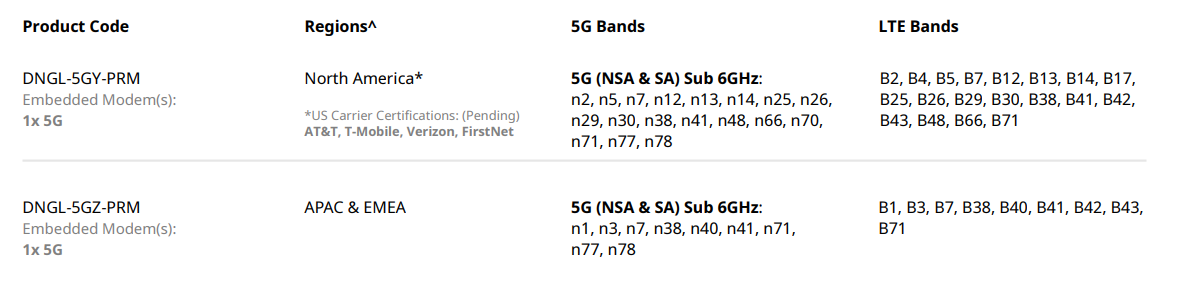
Also based on the specs, why the newer one has lower speeds?
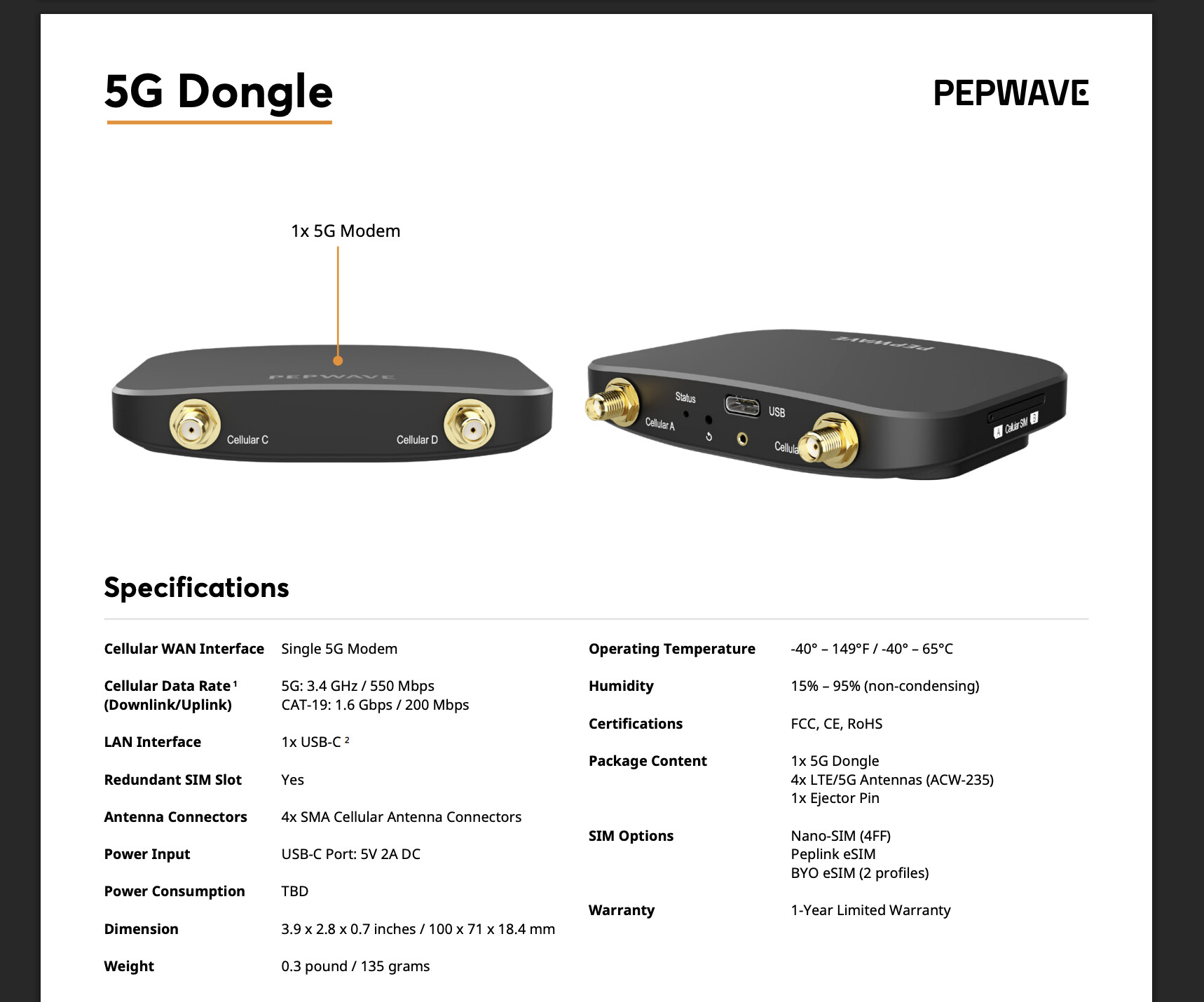
From what I remember Max Adapter CAT20/5G has Qualcomm X55 modem. What about the new one, what modem does it have? Also would be great if they would list the power consumption and the material it’s made of (plastic or metal). I also saw that in the resource sheet it says that it supports Mac, is it correct? Did anyone tested?
They all look identical and I definitely see how that is confusing. All you need to do is forget the MAX Adapter (at least the 5G version).
We’ve changed the name because the 5G Dongle is quite different:
To some of your other questions, this is not released yet, so the datasheet may have some gaps or errors but we are updating it this week.
Feature Request.
Does the module that is in the 5G Dongle have the ability to support the “Site Survey” feature? I don’t see it in the tools in the 2.0.1 firmware. That would be very cool if it supported that.
Great, thank you for letting us know. I was planning to buy a 5G dongle/adapter to extend capability of my Peplink MAX BR2 Pro via the USB port and this comes handy.
Can you give us an estimate when it would be available for purchase? This month? Next month? Next year?
Are there any updates on when this will be available for purchase? Or any new tech specs for the new 5G Dongle?
Hi everyone,
I recently had the chance to test the latest Dongle and I’ve got a few thoughts I’d like to share.
First off, a massive thank you to the Peplink Team for improving the management and browser GUI. It’s much simpler and faster to configure, and it feels just like using any other Peplink product.
I also highly appreciate it that they also run with Mac products!
However, there’s a bit of a catch for future owners. The new dongle doesn’t come with a USB-C to USB-C cable or a USB-C to USB 3.0 adapter like the MAX Adapter 5G did. These aren’t listed in the datasheet, but I was hoping they’d be included since I’m used to the old MAX Adapter. You can buy them separately if you need them.
There are a few areas where I think improvements could be made:
A small tip to all SF Connect app users: you can connect the Dongle to your smartphone and bond it with an embedded modem improving both speed and security of your internet traffic.
Thanks for sharing your experience with it.
It seems like most of your comments are software and firmware related. Is there anything else with the hardware we should be ware of?
What has been your experience, and anyone else’s, with Peplink addressing these concerns?
Hi @N12,
I think hardware is well thought out: USB-C port and SMA connectors make the Dongle an amazing solution that beats any other 5G dongles I’ve tested.
For firmware and software, the Peplink team fixes most of the issues quite fast, sometimes overnight if necessary.
P.S. I’ve tested the dongle with my iPhone and it connects within several seconds and establishes a cellular connection in ca. 1 minute. Much faster than my laptop - the issue might be related to the user’s hardware, not the dongle itself. I’ll perform more tests and share the results.
Does the new 5G Dongle have internal antennas that are used if the SMAs are not connected? From a business travel perspective, having to take the antennas off to throw it in a laptop bag and then re-connect them every time you go to use it will be a hassle and prone to damaging the antennas or connectors over time. Thanks.
If you want to avoid external antennas and save some money, consider the TCL LINKPORT IK511. I’m using that right now because the new Peplink 5G dongle isn’t available yet.
TCL LINKPORT IK511 only work with T-Mobile