WiFi roaming and hot failover not working as expected

Hey,

I am using the MAX BR1 Mini 5G as a mobile indoor router. I want the primary connection to be WiFi, and have cellular as a backup. The device kind-of works, however no matter what settings I try, I do not get good results. The primary goal is to never lose connection, the secondary one is to have a low-latency connection.

The facilities where the routers are deployed have good WiFi coverage (and varying degree of 802.11r support).

With or w/o the “Roaming” setting of the 2.4GHz and 5GHz WiFi WANs enabled, when I select the “Low Latency” outbound policy, I have connection losses of >20s when the uplink changes.

When I enable the “Roaming” settings, then the situation improves a bit and most connection losses are around 5s, but the latency of the connection is degraded. Every couple of seconds, there are pings of >250ms. This is probably due to the WiFi scanning, but it is a very high cost considering that failover still doesn’t work.

I am really surprised by this behavior, as even off-the-shelve devices with just a single WiFi module have lower-latency and more stable roaming than this router with two active connections, so I suspect that I am miss-configuring the device. How can it be configured that roaming works better, and that the failover between the 5GHz to 2.4GHz connections works faster when one of them is switching AP?

Since I have a PrimeCare subscription, I also tried out SpeedFusion Connect as this seems to offer hot failover. This again improves the situation slightly and the connection drops now only last 1-2s, but at the cost of higher latency, and some huge latency spikes. Once again, I suspect that I am miss-configuring the speedfusion settings. How can I actually get hot failover with Speedfusion?

Since the device sometimes exhibits unstable connections over WiFi even when stationary (packet loss, high jitter) I am wondering if this is even the right model, or if other Peplink devices are better suited for the “indoor WiFi roaming w/ hot failover and cellular backup” needs that I have.

I would be grateful if anyone could point me into the right direction of configuring the peplinks/speedfusion correctly. I’m happy to share any settings or do more experiment with the device.

Best,
TB
Can you share screenshots of your wifi roaming settings please?
What is the Roaming Signal Level Threshold set to?

What kind of environment is this? what is the traffic you want to failover? Video? TCP? UDP? Where is the traffic going to and from? Local server? Internet?

Hey,

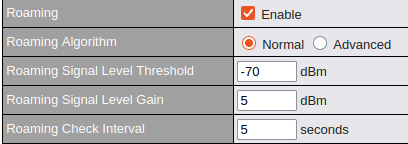
I tried many roaming thresholds, and actually change them slightly for each each location where we deploy because the roaming is so bad. Attached is an example of the roaming settings for the 5GHz WAN. I stay pretty close to the default values, and keep the “Roaming Check Interval” as low as possible (5s).

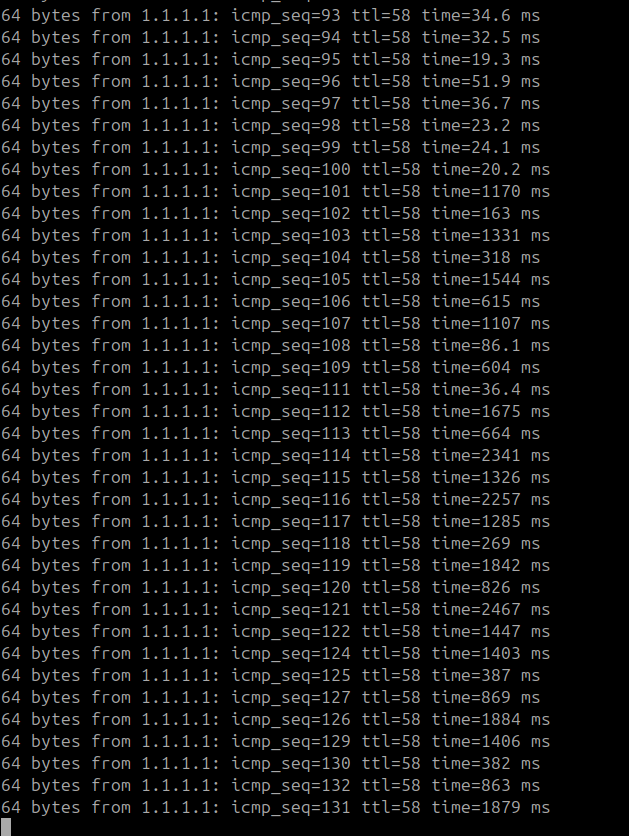
Note that when I use “Advanced → Intensive Scan” then the device practically becomes useless. You can probably guess when I turned “Intensive Scan” on:


(This is with SpeedFusion Connect enabled, and connected to 2.4GHz and 5GHz WiFi, and Cellular as “Priority 2”. Ping to 1.1.1.1 from my laptop in the same WiFi network is <2ms. ) .

The environments are any kind of office buildings. They typically have very good WiFi coverage (compared to shopping centers etc.), but might have mediocre cellular coverage.

Ideally, I want all the traffic to failover, but the most important one is video streaming which is UDP-based (RTP). There are some TCP connections that should also survive the failover, but we can implement some robustness in these once we actually get the peplink to provide a stable connection in general. We do not use a lot of traffic, < 5Mbps outgoing and <1 Mbps incoming. Sometimes I’m running iperf tests to check the network at the location and never hit any bandwidth limitation relevant for our application.

The traffic is bidirectional. It is outgoing video and some data, and incoming data. Primarily only UDP traffic. It goes over the internet to our office. All the locations are in the same city. We also chose a SpeedFusion connect exit node located in the same city.

(After finishing this post, the latency of that device still isn’t back to “normal” even though I disabled the “Intensive Scan”. It takes forever for these settings to apply, which makes trial-and-error in the field even harder. It even degraded the 2.4GHz connection so bad that it failed the health check:

Failed to receive DNS response from the DNS servers for “Wi-Fi WAN on 2.4 GHz”. But public DNS server lookup test via the WAN passed. So please check the DNS server settings. ).