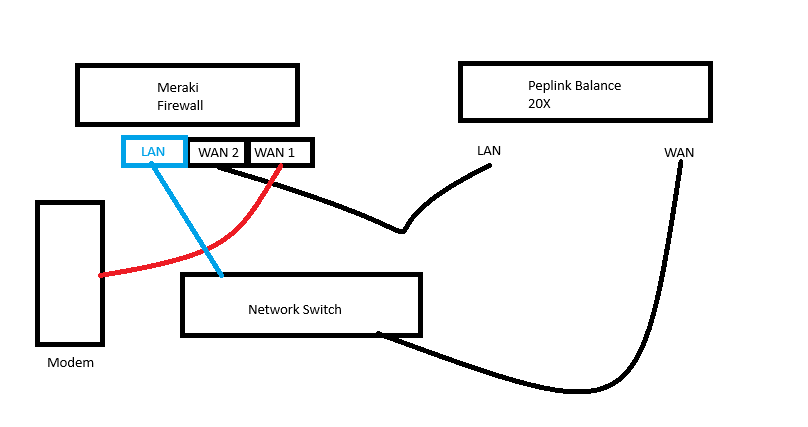
I have a setup where I have two connections on most of my Peplinks - a cellular connection and a “WAN” connection.
Frequently these have been setup with the WAN connection being an uplink from a switch (behind the firewall, a meraki).
We ideally want to utilize the WAN as our primary for all management traffic so it’s set as our primary.
The issue we run into is when the WAN fails -
We’ll initially fail over to the cellular
Following the fail over, because the cellular is now providing connection, the WAN looks to the peplink to be good when in actuality - it’s not, the cellular is providing the uplink. We fail back and then immediately fail back to the cellular.
I realize this is the “wrong” way to have this setup, ideally the WAN is coming from the modem however we’re working with what we have today.
Ideally, I’d have a good way to determine failover that doesn’t cause the failover “loop” - is there something I can do differently here (other than physically changing the setup)
As a secondary option, is there anyway I can make the cellular the primary but somehow still force all management traffic through the WAN?
Is that a loop you have there? When WAN 1 is “unavailable”, you route your traffic from your Pep (on the WAN port) through the switch to the firewall, and further trough the only remaining available WAN interface being WAN2 and thus back to the Pep? Very weird construction…
I would use the Meraki Firewall for LAN segmentation, intrusion detection and so on, whilst having the Pep handle the balance between various WAN interfaces and offering them as only one uplink to the firewall.
If you want to keep this setup and define priorities, I would recommend to have all your WAN interfaces on the Pep enabled in priority 1 and play around with outbound policies. Then you can for example route all management traffic over the WAN and only the WAN. For other traffic, you can play with either priority algorithms as outbound policy, or some balancing, but beware of what you do: avoid ending up in loops.
Agreed on the weirdness - it was setup incorrectly at a number of locations and I’m trying to work with what I can do remotely for now.
Sequence of the issue is:
Primary (Cable) goes down,
Pep initially sees primary as down
Meraki fails over to secondary (Peplink)
Pep sees primary as back (cellular is providing a good link to the switch it’s setup on)
Pep fails back to primary (modem is still down but sees a good connection because Pep is providing)
Begin loop of fail over / fail back.
Potential solutions I considered were using a ping to the gateway of the cable connection as my primary indicator for up/down (vs. an internet site) but this is error prone if the primary changes.
I think the policy to force network traffic over the WAN and making cellular the priority is the best bet where we are. I didn’t see a good way to do this other than trying to route based on *.peplink.com however
If you can only make remote/configuration changes, I would first check the Meraki config. There you might be able to block traffic from the WAN IP of the Pep going to the WAN2 of the Meraki and back to the Pep again, so making sure the WAN Health Status PING packets from the Pep (SRC IP = WAN of Pep) are no longer answered by the Pep itself.