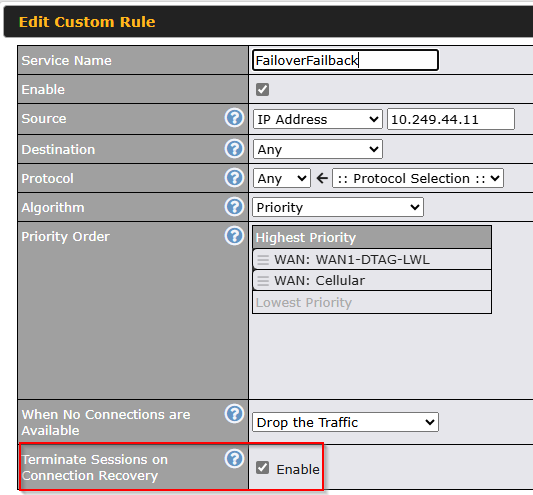
If WAN1 fails, the sessions correctly move over to WAN2.
When WAN1 comes back online, the existing sessions remain on WAN2 — only new sessions are established on WAN1.
This has been the case for me across every firmware version I’ve tested. Each time, I end up receiving a special build from support, since apparently many other users either don’t use this feature or don’t notice the problem.
How about you? Do you actually not need this feature, or is it working differently in your setups?
For me, it’s a real issue, since WAN2 is a backup line with high per-volume costs.
Just a quick suggestion, have you tried this via IC2 outbound policies? Maybe its related to the webadmin version. Might just be a quick work around. I have my self not seen this before.
Do you have this issue when using a specific application or protocol? Or is it on general internet usage? And multiple applications or protocols behave like this?
And have you tested this if you create 2 different rules with another OBP algorithm and have them failover through the next rule? Does it then disconnect and uses the first rule?
Let me know. I’m interested to see if the above helps.
If you just want a hard failover/failback with destructive sessions, setting the interfaces at different priorities will achieve this, you don’t have to use an outbound policy for this specific case.
We have seen this problem also, several times. Breaking WAN2 also to achive session movement back to WAN1. Problem with that, it is a manual human action.
Combined with the problem there is no option to disconnect a specific session or all sessions from a specific source or destination. Missing tools/options there.
@Andrew_Fidel Sure, I can work “around” the bug and manually disable WAN2, but this is not a solution. There is a possibility to force a “failback”, but it is not working. So, If I do not SEE that there was a short interruption at night, the sessions are staying on the expense backup-WAN for weeks…