I’m using a Peplink MAX Transit Duo Pro with SpeedFusion Connect to livestream storm chases from a moving vehicle.
My setup consists of three WAN connections:
-
Starlink Mini (Ethernet WAN)
-
Cellular 1 (RoamLink physical SIM)
-
Cellular 2 (RoamLink FusionSIM)
-
All three WANs set to Priority 1
-
Dynamic Weighted Bonding enabled
-
Adaptive FEC enabled
-
WAN Smoothing disabled
I’m transmitting approximately 6 Mbps of 1080p30 video over SRT from OBS on my field laptop to a MediaMTX server at home, with 10,000 ms of SRT latency.
The problem:
When all three connections have sufficient upload bandwidth, the stream generally performs well. However, while driving through different areas and switching between cellular towers, the available upload bandwidth on one or both cellular connections can vary dramatically.
The issue isn’t necessarily poor signal strength. The cellular connections can remain connected with usable signal while their available upload capacity becomes insufficient to handle the amount of stream traffic SpeedFusion is assigning to them.
I’ve observed cellular latency reaching 5,000–8,000 ms while SpeedFusion seems to continue sending substantial upload traffic through those connections. During one rural test, my phone’s upload speed was only slightly above 1 Mbps, suggesting severely limited cellular upload capacity in that area.
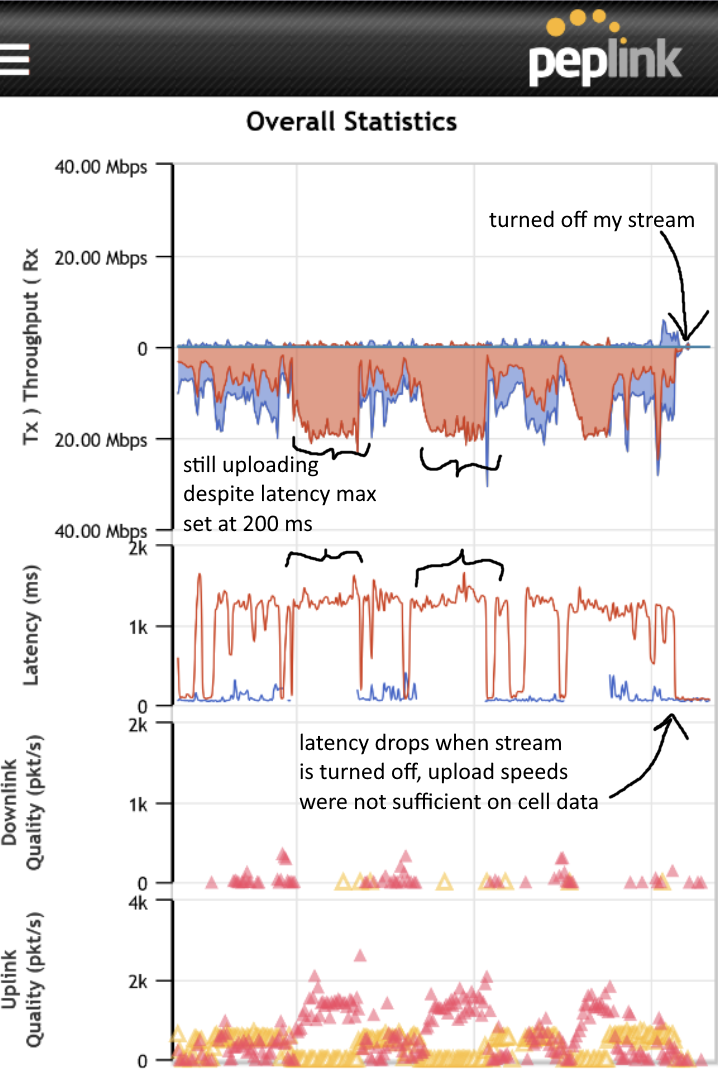
My concern is that Dynamic Weighted Bonding isn’t reducing traffic quickly or aggressively enough when a cellular WAN’s available upload bandwidth falls below the amount of traffic being assigned to it. This appears to cause severe latency, packet loss, visual corruption, and missing video frames.
Starlink alone has generally been more reliable, although I’ve experienced occasional frame skipping with it as well.
What I’ve already tried:
-
Dynamic Weighted Bonding
-
Congestion Latency Level adjustments
-
Cut-off Latency thresholds of 1,000 ms, 500 ms, and 200 ms
-
Adaptive FEC
-
Increasing SRT latency to 10 seconds
-
Increasing MediaMTX receive and outgoing queue buffers
None of these has consistently prevented the problem.
What I’m trying to accomplish:
I want SpeedFusion to use all three WANs when they have sufficient upload capacity, but quickly stop assigning significant traffic to a cellular connection when its available upload bandwidth collapses, even if the connection remains online with adequate signal strength.
I don’t want to put cellular on Priority 2 because I need simultaneous bonding when the connections are usable.
Stream continuity is much more important to me than low latency. I’m willing to accept additional delay if it results in reliable video delivery.
My questions:
-
Why might Dynamic Weighted Bonding continue assigning substantial upload traffic to a WAN whose available upload bandwidth is insufficient, even when latency rises to several seconds?
-
Is there a way for SpeedFusion to detect insufficient upload capacity and automatically reduce or suspend traffic on that WAN without disabling bonding?
-
Is there a way to make my Starlink connection handle the majority of the upload while relying on cellular data to fill in the gaps?
I’d particularly appreciate hearing from anyone using Peplink for mobile livestreaming, broadcast applications, or other sustained real-time uploads.