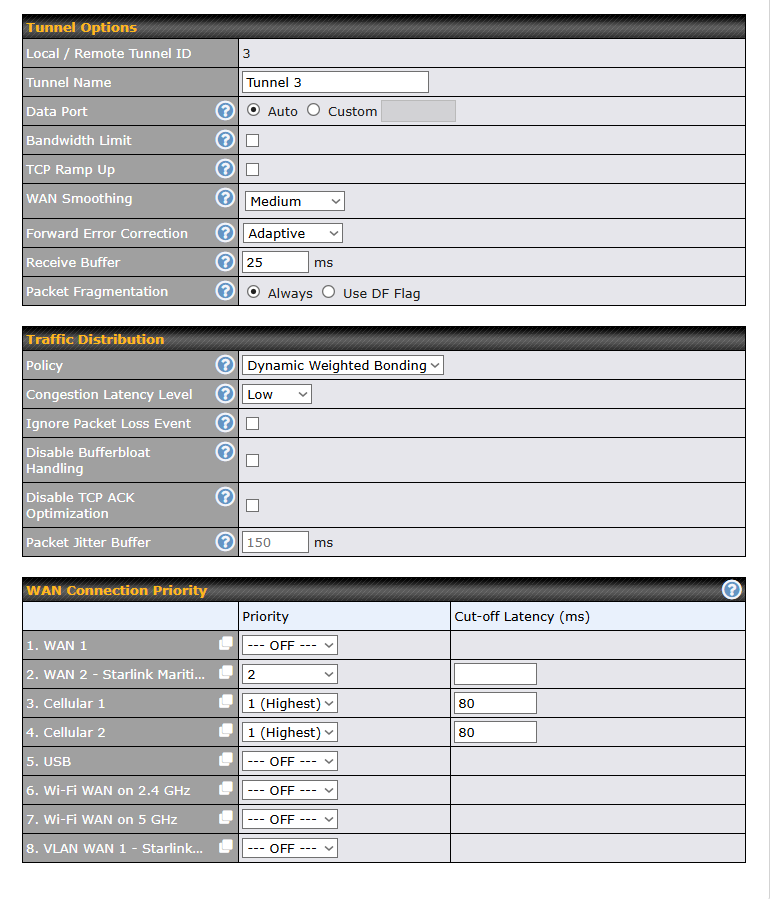
Diving through the forums we find a lot of useful information regarding Speedfusion for Hot-Failover using back-up cellular systems. We are however in a somewhat reversed situation, where we find we are getting difficulties creating a truly stable network.
We are using a MAX BR2 Pro on a vessel. We use both cellular modems as our prime connection, and have Starlinks as a backup system. Cellular data is quite a bit cheaper then the Starlink in our case. So ideally we use this as long as possible. Previously the crew would change the priorities of the systems (Cellular prio1 / Starlink prio2) by hand when working in areas with spotty / intermitted cellular connections. It’s difficult to ‘gauge’ when the cellular is good enough again to switch back, leading to a lot of ‘overuse’ of more expensive Starlink data when truly good cellular was available.
For this reason, we are now trialing SFC, hoping it can be a good source of switching for us.
We have the following setup:
All WANs on Prio1 (cellular1/2 and Starlink)
We have cellular setup to check for at least 3 signal bars, and healthcheck is set on Smartcheck
.
Outbound Policies are set up to enforce traffic over the SpeedFusion Connect tunnel.
We want to use cellular as long as it is a good and usable signal, hence bonding and dual models. However we want hot-failover especially for the personnel on board so they experience ‘seamless’ connection so they do not have to switch by hand.
So far this is working quite well, however we still get reports from the vessel that there are moments when the connection is quite poor. We suspect the cellular signal is not being rejected fast enough.
Does anyone have any experience with such a setup who could shine some light on good settings / health checks for cellular systems in such a scenario. We do not mind switching away before the signal truly degrades (and thus losing a bit of ‘cheaper’ data) as automatically switching back will save us enough of more expensive Starlink Data that this will end up being cost-effective.
Looking forward to any tips / tricks / best-practices people can and are willing to share with us!
With the configuration shown in your screenshot, if (say) Cellular 1 gets congested and exceeds 80 ms latency, it will get suspended, dumping all the load on Cellular 2. Then Cellular 2 will become congested, get suspended, and only then will Starlink will be used. The time it takes for that sequence to occur may be causing the noticeable interruption.
Ideally what you’d want is a feature that additively enables Starlink when Cellular 1 and/or Cellular 2 gets congested, meaning it would leaves both Cellular 1 and Cellular 2 active alongside Starlink, using dynamic weighted bonding to distribute traffic between all 3. But that feature doesn’t exist.
The improvements I can suggest for now are:
Turn off WAN Smoothing (it sounds good on paper, but after several years experience with using dual cellular with dynamic weighted bonding, we have found we don’t need it, which saves a lot of overhead and therefore will reduce the likelihood of cellular congestion and network disruptions)
Turn off Forward Error Correction (same comment as above)
Enable TCP Ramp Up (suggested to me by Travis Durick of Peplink)
Enable SpeedFusion Boost when it’s released with firmware 8.6
Probably users complain that the connection is becoming very slow when the signal is still above 3 signal bars but both links get congested. The further away you travel, the more the same masts will be used by the users around. The set cut-off latencies on both Cellular connections in the same priority group won’t help either: when both Cellular 1 and Cellular 2 get congested and latencies rise, they will stay the n° 1 priority interface and Starlink won’t step in. Starlink will only step in once both Cellular connections are completely gone (or at least seen as gone depending on the heath status monitoring you configured, so both below 3 signal bars probably).
Better is to have both Cellular connections and the Starlink on the same priority level, but set the Starlink to a ridiculously low cut-off latency, e.g. 10 ms. This way, the Starlink won’t be used as long as the Cellular connections stay below their configured cut-off latency. Only when both cellular connections exceed their cut-off latencies (together with the Starlink, which cut-off latency is always exceeded), these cut-off latencies will become ignored and all available connections in this priority group will be used, meaning the Starlink steps in.
WAN Smoothing is indeed overkill and only makes your cellular links getting congested faster. Use it only for a small selection of important data, and even then, not when both links will be a cellular connection with the same provider, probably on the same mast when away from shore. It’s only relevant when using two different providers, and for a limited set of sessions.
FEC is a very good solution, especially for TCP upload traffic over Starlink.
I would recommend to set up some subtunnels, at least one with FEC enabled and one without FEC, eventually also one with WAN Smoothing enabled, and split out your traffic over these subtunnels with outbound policies. Important (upload) traffic better uses a subtunnel with WS or FEC enabled, general traffic can use one without. Make the first subtunnel the one without these features enabled.
And if you set up your own Fusionhub, you can even play with the Link Failure Detection Time and speed up handovers.