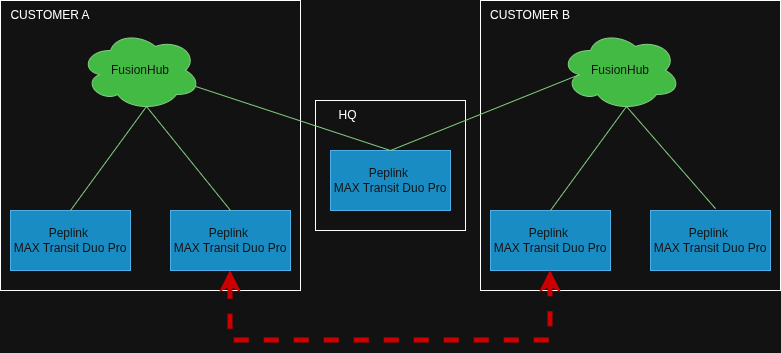
We are trying to configure multiple networks (one for each customer) and have a single Peplink router at HQ that can connect with all those networks.
Our current challenge in this is that when we connect our HQ router to multiple customer networks, those customer networks become interconnected as well.
Each customer has multiple Peplink routers with SpeedFusion tunnels to their own FusionHub.
Our HQ router has SpeedFusion tunnels to all FusionHubs.
The red line connection is what happens and what we want to prevent.
As a result, not only can HQ connect to all devices of Customer A and B (as intended), a device from Customer A can now connect to a device from Customer B (what we want to prevent).
In an attempt to have the HQ router block connections between Customer networks, we tried setting an outbound firewall policy on the HQ router that only allows traffic from and to the subnet of the HQ router, but that did not block any traffic between the customer networks.
What exactly is the end goal or problem you are trying to solve here?
By default the FusionHub from Customer A and B will advertise any routes they know about to your HQ FusionHub, that in turn would pass routes that it learns from Customer B to Customer A and so on.
Configuring route / peer isolation on the HQ hub should drop the route advertisments from OSPF between your HQ and the Customers.
However that does not stop traffic flowing if the route could be learned by some other means, so firewall rules should be configured to isolate the customer networks - that may be easier said than done if these customers all manage their own address spaces without any coordination.
Using multiple VRFs on the HQ FusionHub is probably the correct way forward here, you would end up with a routing table per customer, which would solve the isolation problem without complex or unweildy firewall rules on the HQ FusionHub.
Have a look at this post and see if it would do what you want:
My end goal is that we can support our customers from a single Peplink router, without connecting their networks together.
Note that we still control the customer networks (it’s not their office network or something) so we already have a pattern in place that should give each customer clearly distinguishable IP ranges.
Turns out as well that I was really close with my firewall solution, it’s just that I configured outbound rules instead of internal rules. With these 2 internal rules, I can login to a device of Customer A and Customer B simultaneously, but cannot ping between the 2 devices:
Allow from Any to Alow from to Any Default: Deny
The VRF solution looks great as well, since that also reduces the need for multiple FusionHubs. What I don’t understand (and I don’t think is explained in your linked post) is what happens if you add a router to the setup that is connected to all customer VRFs. Would that not also provide a route between customers through that router, the same way it does with multiple FusionHubs?
If you’re in control of the addressing across all the customer sites then a single VRF and firewall rules will probably be fine.
If you did hang another device off the side of the FH I’m not actually sure which VRF that joins into (default perhaps?) but if it did have routes into all of the customers then yes you’d need to do filtering on that device.
One tip for the firewall would be as you have the default set to deny I would personally add a custom rule as the last in the list that also does the same and enable event logging - this way you can see if anything is hitting that rule.