Hello @sitloongs ,
Is ON or OFF by default?
Thanks 
By default, all connection tests are disabled. They are optional features that users can enable to verify their network connectivity based on their specific use case. Please note that each enabled connection test generates additional network traffic while the tests are being performed.
1 Like
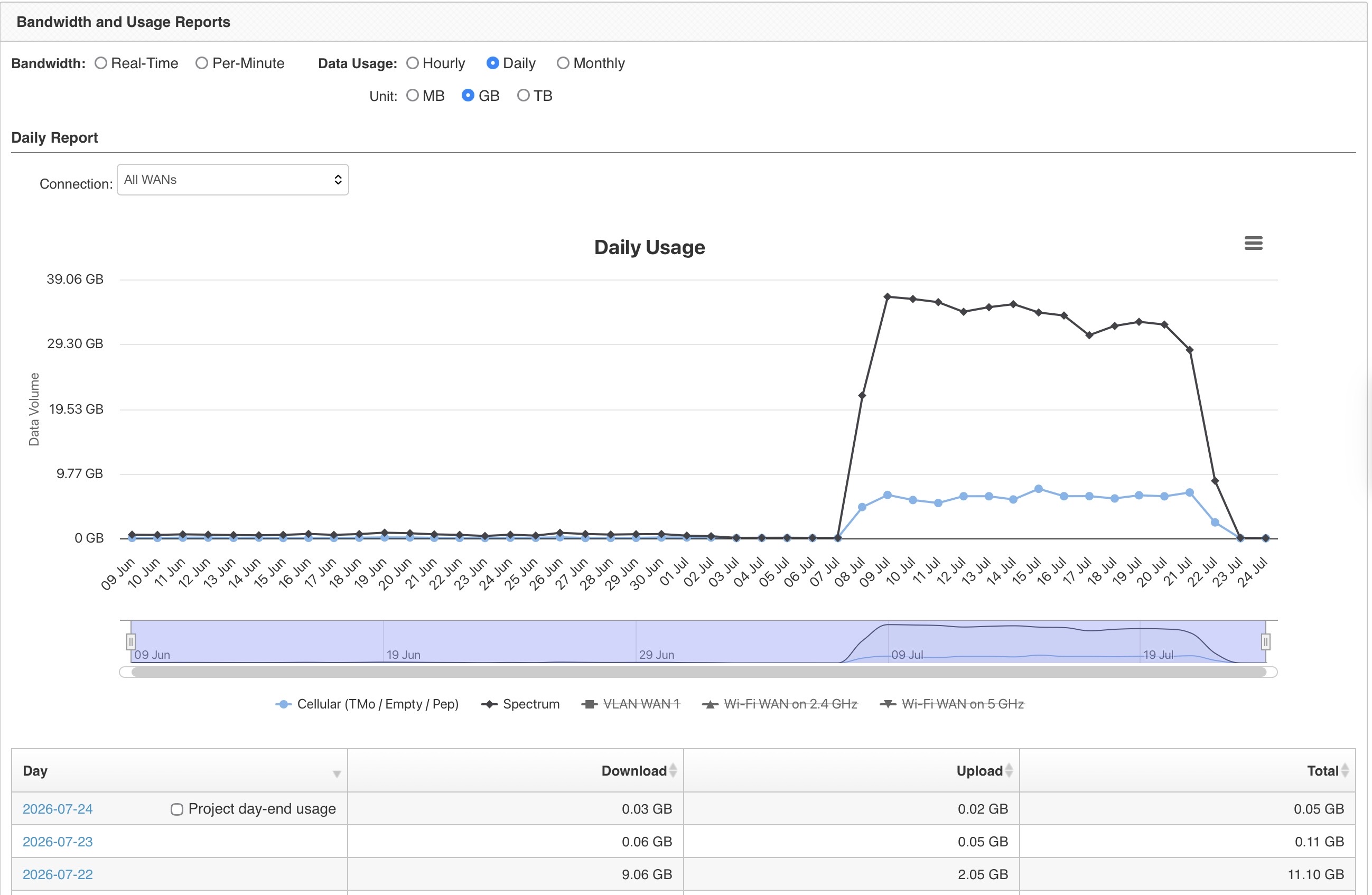
@sitloongs for my 2 cents, I understood that it was going to use some data to run these test, but I think it is data consumption is excessive to say the least. I estimate that it will use at least 50GB a month with the default settings to test every hour. This is a high cost across multiple devices and consumes over 50% of a typical business cellular data plan. It unfortunately makes the feature useless for us other than for periodic debug testing or with unlimited data connections.
It burned a 100GB data plan at a remote location in 1.5 weeks. That being said, I should have paid attention.
@mldowling , the “activate” link on the group device listing page in IC2 I think activates it without further action, but I’ll double check on that. I know when I saw it i clicked that on every single device that had it… hehe
@ChristopherSpitler @mldowling I’m sort of glad that it wasn’t just me that made the mistake. I’d kept a really close eye on the previous RCs and had taken my eye off the ball. If this goes to full release without changes I suspect that there will be many many unhappy customers that burn through data plans by enabling the default settings of checking every hour.
We will discuss this with the Engineering team to see whether we can provide a clearer warning message regarding the expected data usage.
Just for your information, when testing speeds of around 500 Mbps, a single SpeedTest may consume approximately 1 GB of data, depending on the achieved throughput and test duration.
Therefore, when enabling the connection test, it is important to consider the associated data usage, especially for WAN connections with limited or expensive data plans.
Below is an example of the data usage for a single SpeedTest at speeds of approximately 500 Mbps:
Speedtest by Ookla
Server: TIME MY - Kuala Lumpur (id = 50737)
ISP: TIME Fibre Optic
Latency: 1.96 ms (0.02 ms jitter)
Download: 521.15 Mbps (data used: 681.6 MB )
Upload: 496.70 Mbps (data used: 255.5 MB )
Packet Loss: 0.0%
Server: TIME MY - Shah Alam (id = 12108)
ISP: TIME Fibre Optic
Latency: 2.22 ms (0.06 ms jitter)
Download: 517.74 Mbps (data used: 650.5 MB )
Upload: 498.89 Mbps (data used: 225.3 MB )
Packet Loss: 0.0%
As shown in the example above, a single SpeedTest may consume approximately 1 GB of data (combined download and upload), depending on the achieved speed and test duration.
5 Likes
Thank you @sitloongs
That is very useful data and definitely reinforces my view that it should come with an appropriate warning.
1 Like
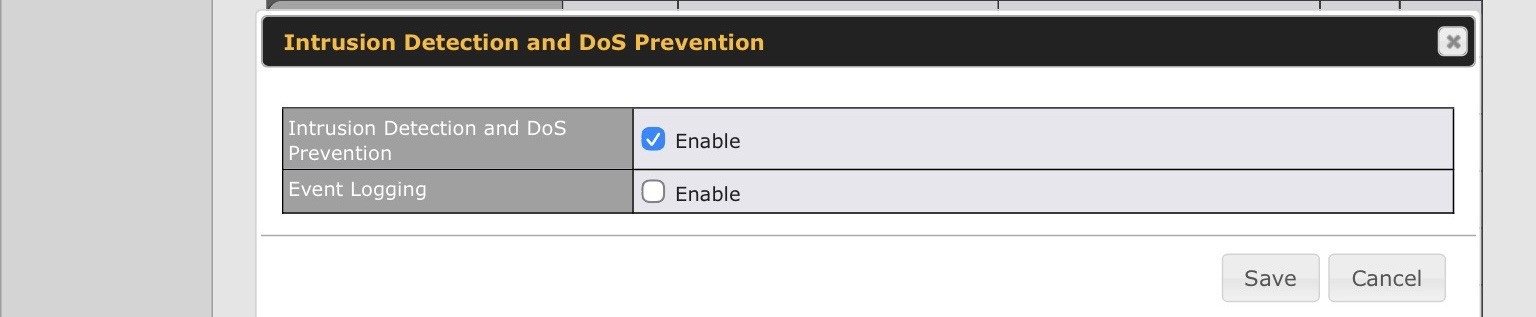
@sitloongs: I can not manually enable Event Logging for „Intrusion Detection and DoS Prevention“ as my firewall rules are managed by IC2, as IC2 lacks a specific checkbox for the “Event Logging” toggle within the IDS/DoS section. See ticket no. 26041060.
I cannot understand support team‘s recommendation to raise a feature request for this issue. 
Suggestion: Either please allow us to manually configure this via router‘s Web-IF until Peplink will add the specific checkbox to IC2 or set it to enabled by default. I lost so much time as I had issues with IDS/DOS blocking diagnostic as I could not get any logs.

1 Like
Allow me to add a topic that is very annoying (since several GA versions not fixed):
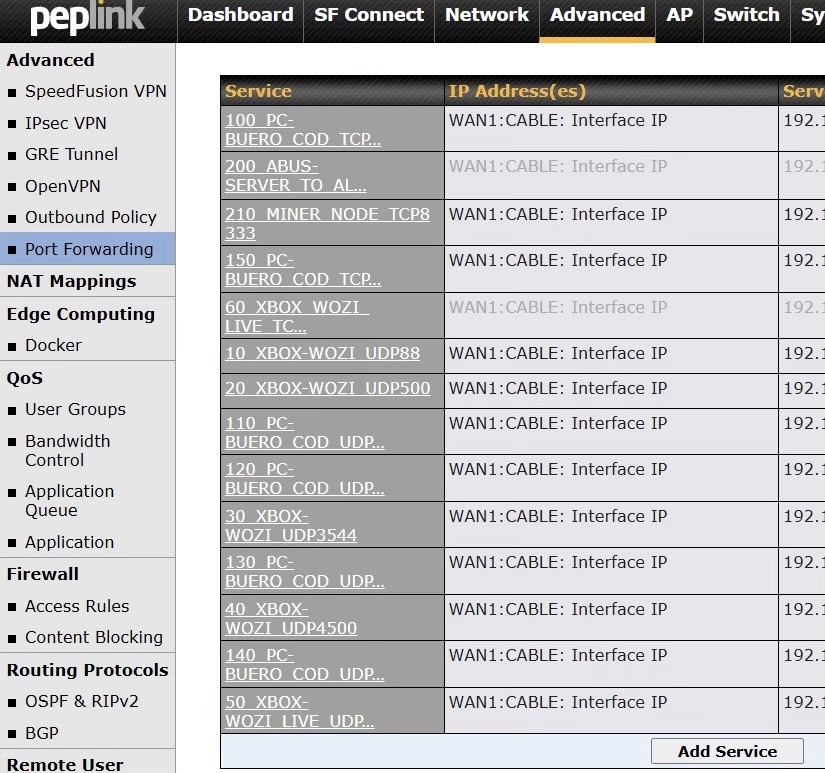
The Port Forwarding Web-UI is not sorted or column-sortable, which is annoying if you want to maintain it.
Can you please ask your devolopers whether they might want to consider adding at least an “ORDER BY SERVICE” column in their database query, so we can use names that lead to a sorted port forwarding rules list?
Also raised in ticket no. 26041060.
PS: When will the configuration of Port Forwarding be available in IC2?
Another difference I found in the current beta firmware between the WEB-UI of our new B One and our Balance Two:
The B One does not show the WINS Server Settings option, but the Balance Two does under LAN → Network Settings.
2 Likes
I will take a look and update you via the tickets.
2 Likes
@ChristopherSpitler @dnavany @mldowling
Team, thanks for sharing this, the usage is excessive to say the least. We will look into this.
2 Likes
Thanks @Rafferty
Unless the data consumption can be hugely reduced, I suggest that the default when enabling is a weekly or at most daily test to minimize accidental data consumption.
Here is a before and after from a device at a remote location for monitoring and occasional emergency use. The location was not is use during this period.
1 Like
@dnavany ,
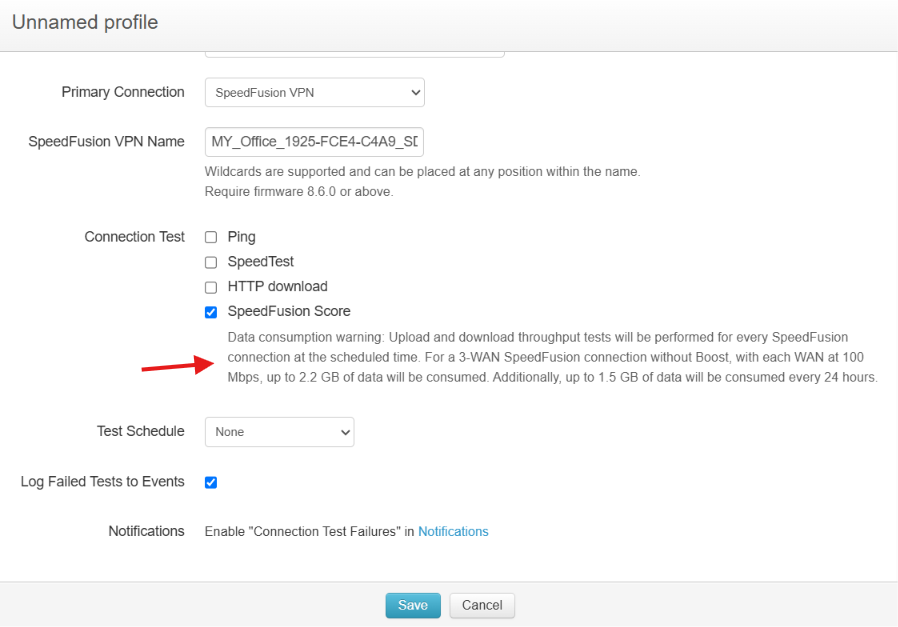
The default profile no longer includes the SpeedFusion Connect (SFC) tunnel. Engineering has also implemented an estimated tunnel usage calculation that is applied when the “SpeedFusion Score” option is enabled.
For now, users need to add each SpeedFusion Connect (SFC) tunnel manually. While this requires a bit more effort during the initial configuration, it helps ensure users are aware of the estimated data usage associated with each tunnel and can make an informed decision before enabling it.
We appreciate your help and feedback on this.
3 Likes
Thank you!
@sitloongs: Can you maybe also have a look on ticket # 26050058 as the Web-Blocking feature seems to ignore Exempted Subnets from 8.6.0. RC4.
One additional observation during RC5 testing:
We are currently investigating a possible outbound policy issue together with @Frontier_Netherlands (Support ticket #26060946).
So far, we have observed that outbound policies using direct IP networks behave differently from policies using grouped objects.
At this point we cannot conclude whether this is a configuration issue or a firmware regression, but grouped objects are currently one area under investigation.
We will report back once the investigation has been completed.
1 Like
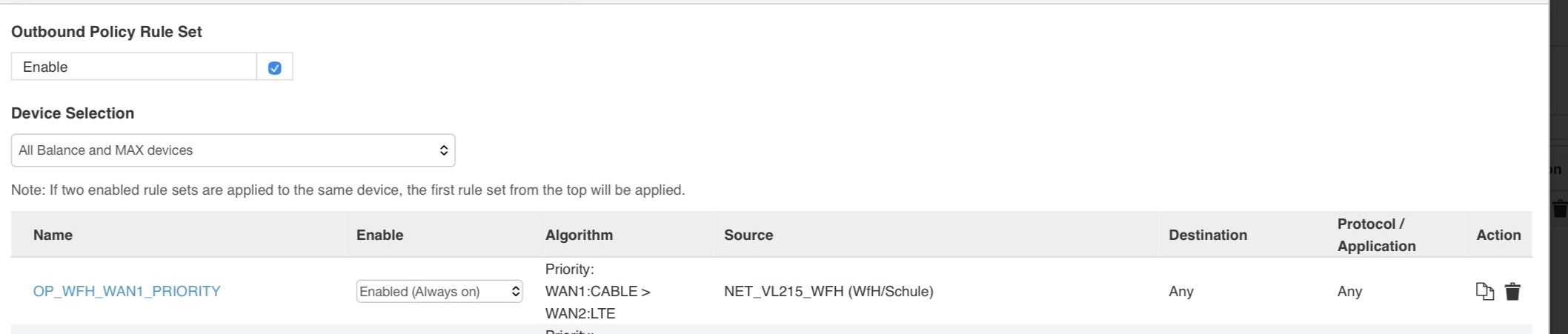
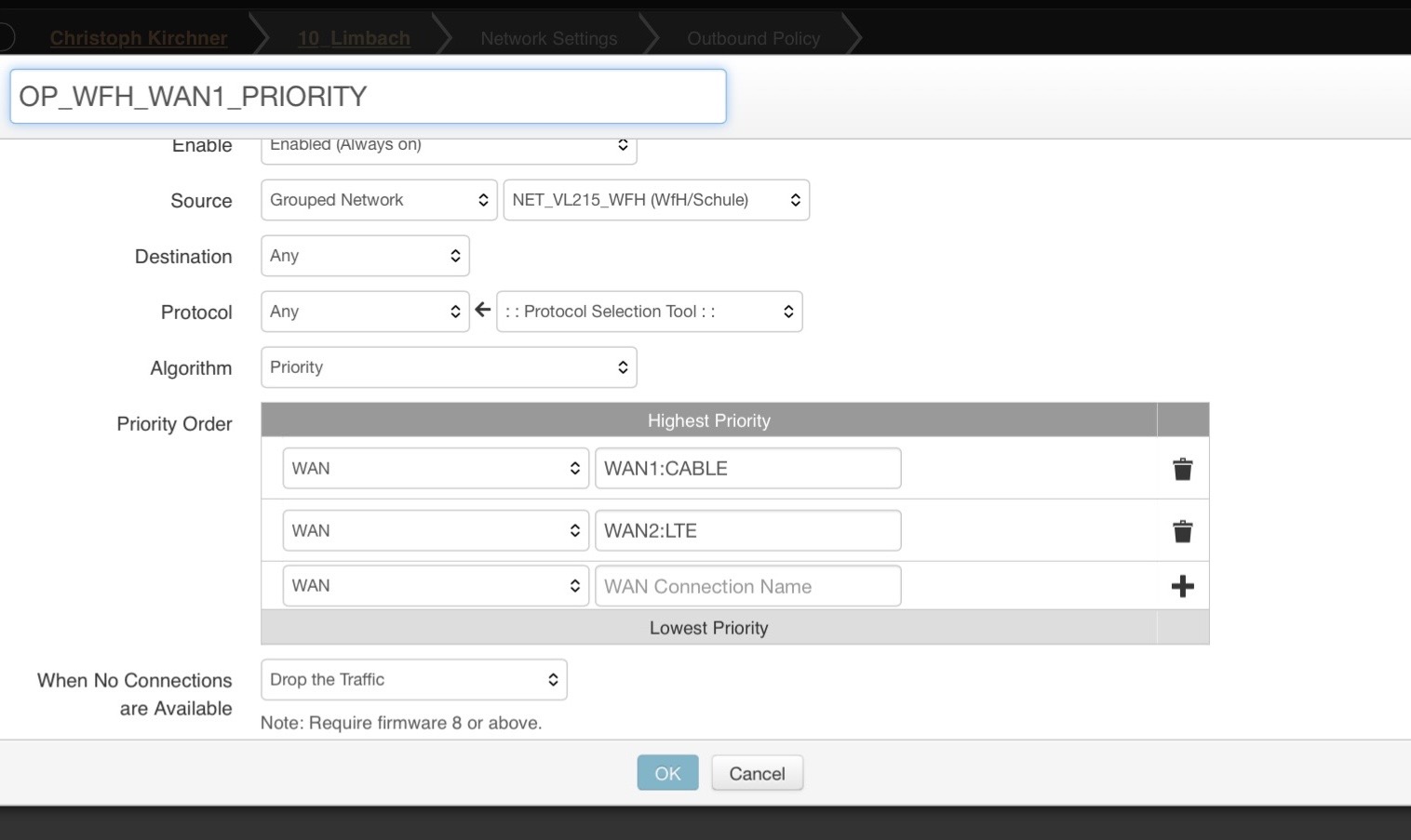
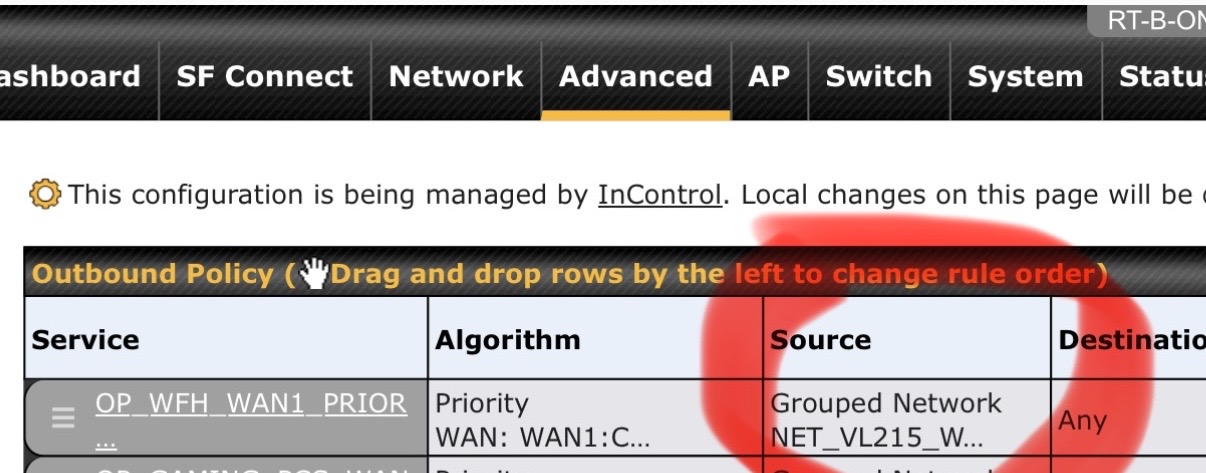
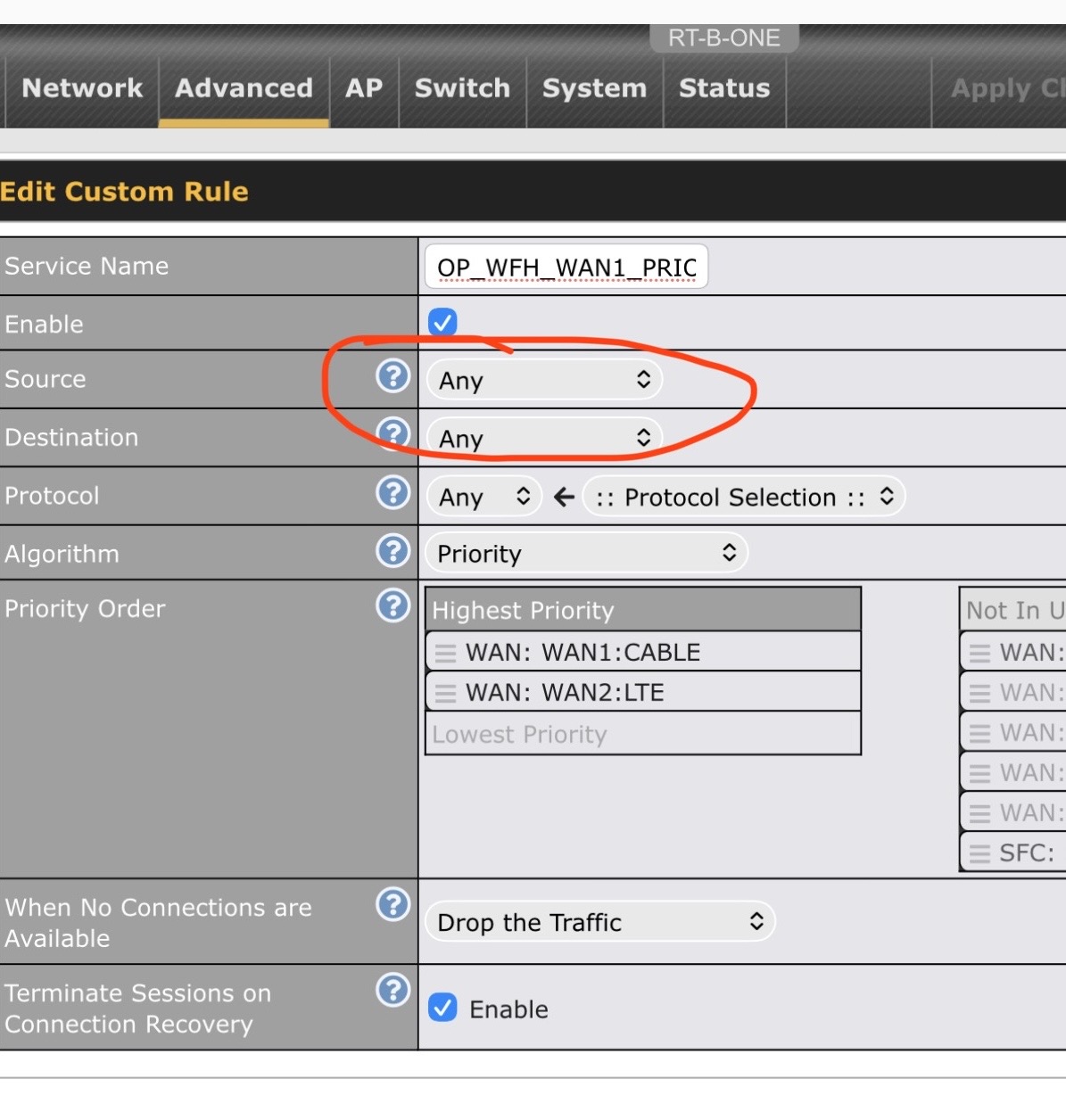
While testing the current 8.6.0 RC5 beta firmware, I noticed a small UI inconsistency in the Outbound Policy configuration.
In the Outbound Policy table, the source is displayed correctly as the configured Grouped Network (NET_VL215_WFH).
However, when opening the same rule for editing, the Source field is shown as “Any”, although the rule itself has not been changed.
The corresponding screenshots are attached below.
Can anyone else running RC5 confirm this behaviour?
At the moment this appears to be a display/UI issue only, as the rule itself still seems to work correctly.
1 Like
Hi @ckirch
I’ve checked our 2 devices running RC5 and don’t see the issue that you are seeing. They are a BR2 Pro and a BR1 Pro 5G. I’m using an iPad and Safari browser. I have a B One 5G but its in a very remote location so I’m reluctant to upgrade to RC in case something goes wrong.
Thank you @dnavany !
My router is a B One.
1 Like