We are pleased to announce that Router Firmware 8.6.0 Beta 3 is now available.
The features and fixes keep coming!
Could you please provide documentation on where to find cell recovery on support.cgi for LTEA-US modules? I am having troubles finding it.
1 Like
Hi Zak,
The feature is under support.cgi. When you click the cellular module firmware update check, if the module falls under the problem condition, the system will notify you with the corresponding status condition.
In support.cgi page, look for the “Cellular Module Firmware Upgrade” and click "check for update‘’

At the “Firmware Version” section , it will display the condition. Just proceed the update and it will recover the issue.

1 Like
Hi Sitloong, is there a reason the BR1 Mini, specifically the MAX-BR1-MINI-LTEA-US-T-PRM won’t be covered in the FIPS update? There are concerns that replacing an existing fleet of devices isn’t going to be an option for most clients when there isn’t a good reason the existing ones couldn’t be supported.
3 Likes
CPU 100% usage - Adding this as a feedback report
Have not seen any reports of this yet - major CPU pegging on B One 5G, 100% at various times, without any real load.(rendering the router unusable for client devices) - can not identify any triggers. [Never experienced any CPU usage higher than 50% with previous 8.5.x firmware versions].
Fairly benign setup:
TMHI - WAN1
Starlink - WAN 2
Verizon - WWAN 5GHz
Cellular - unused
VWAN - configured, unused
Clients - ~50 wired/wireless though external AP’s
1 Like
What does this addition mean in reality for administration options? Did not see any config differences in the web interface - (did not look into support.cgi screen - due to the aforementioned CPU load issues). Would be incredible if we could control/override PCC vs SCC bands.
[Beta 3] [Cellular & 5GK / 5GN] Added support for
controlling 5G SA Carrier Aggregation on supported
cellular modules.
I installed the firmware on my MAX BR1 PRO 5G, but it won’t boot to it. It boots to the previous beta (b2 build 6397), even if I select build b3 6410 from the reboot menu. Nothing in the log indicating a problem. Just says booted to 6397. Any ideas.
1 Like
@Lee_Zim , The option is available here
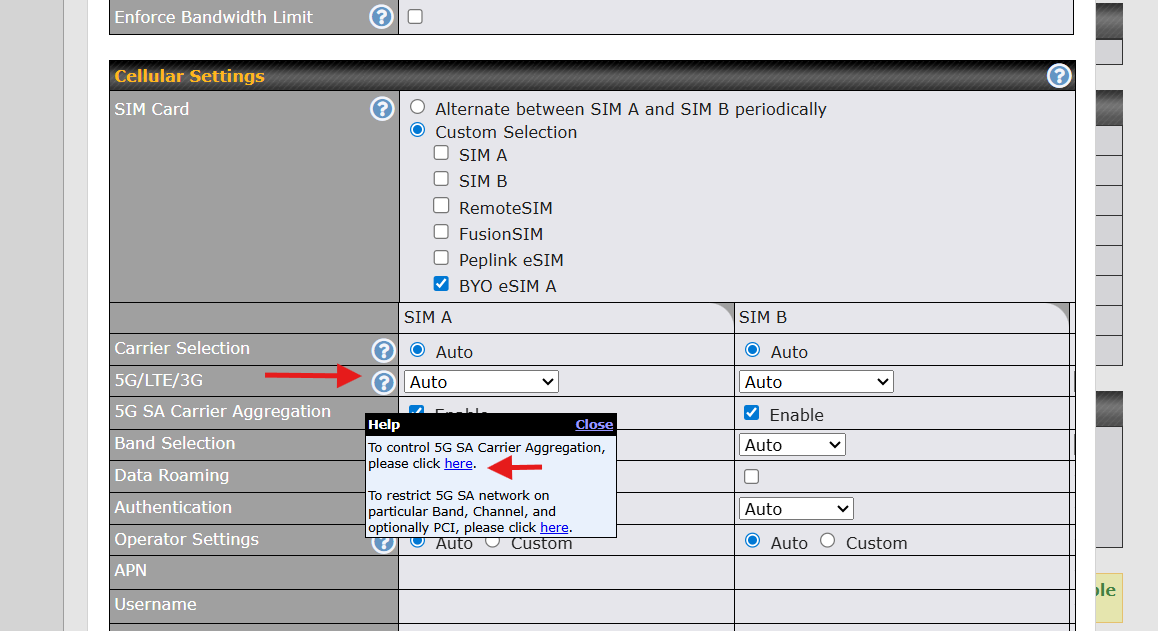
1 Like
Can you please check and make sure IC2 firmware management is not enabled ? I some case , IC2 may reverted the firmware. If this is not the case, please create a ticket for support team to check.
1 Like
IC2 wasn’t the solution. But I went back to the last general release (8.5.4) then I was able to install and boot to beta 3. So it’s probably not worth making a ticket.
Hello @sitloongs - thanks for the follow-up, I now see that option. Alas, I was expecting more that just a check-box feature.
Hi all,
I have a Balance 310 (new 2.5G/10G ports version) at home, a hosted FusionHub solo in a datacentre and a B One 5G for temporary out and about connectivity.
I have upgraded all to 8.6.0 beta firmware and all is working well, except when I try to use remote user access VPN on the FusionHub solo set to WireGuard. The connection establishes but passes absolutely no traffic whatsoever. I’ve had to go back to using OpenVPN for now - is this a known issue?
Many thanks
1 Like
Hello @Jill_Hughes1,
We are supporting a client through a Peplink ticket, open for a very similar issue: Peplink Ticket 26060252.
We have had some BR1 Pro 5G units experience issues installing beta releases. Our current workaround has been to roll back to 8.5.4 GA and then to 8.6.0 RC2.
The Peplink team needs more examples of the issue to understand the impact better and isolate the cause so that they can engineer a solution into future firmware releases.
Please open a new Peplink Support Ticket (Help & Support Hub | Peplink). Document everything you can in the ticket, including screen captures, configuration notes on the DHCP setup(s), firmware version(s) and the Diagnostic File(s) from the router(s) status page, and add it all to the ticket. Once you have created the new ticket, please note the ticket number here in this forum thread.
Have a good week,
Marcus 