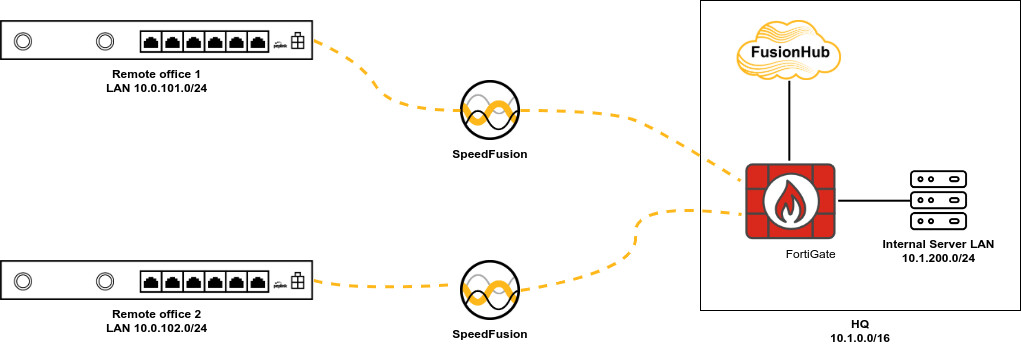
In the simplified situation below, I have two branch offices connected to the HQ using Speedfusion tunnels. The real situation is of course far more complicated, with more remote offices, and where the central FortiGate firewall cluster handles all traffic between all VLANs together with more in-depth security features and filters. Speedfusion tunnels are set up to connect remote offices due to all advanced Speedfusion features like bounding, FEC, WAN Smoothing,…
How can I make sure clients in remote office 1 can also reach services in remote office 2 (and vice versa) but only when passing and being filtered through the FortiGate firewall? It would require the possibility to create an outbound policy rule in the FusionHub where traffic can be routed depending on the incoming network interface and not only the source IP address.
The other solution would be to have a separate FusionHub for every remote office, which can be a lot…
Any other suggestions or possibilities?
1 Like
Hi, @PeterDedecker
maybe I am have a crazy idea…
humm… Can we use the FG Firewalll to route traffic between x.x.101.x to x.x.102.x?
so…
- FSH will be used as IP forward… disable NAT at the WAN/LAN interface.
- FG have route to both remote offices… point to the tcp/ip address of FSH
- disable " SpeedFusion VPN Peers Access Internal Network "
- built VRF_side_a and VRF_side_b … each one for each remote office (test this)
- FSH have static route to each network office… pointing to the tcp/ip address of the FG connected at the FSH
- FG need to have route/firewall/rules to allow/deny L4/L7 communication between two offices.
What you think, about?
2 Likes
Thanks, Marcelo, for the inspiration. I looked further into VRF as an interesting workaround for this, but I do need OSPF (or BGP) to manage dynamic routes to the large and growing number of remote ends, which is not feasible this way, I’m afraid.
Although, there might be a solution by adding a virtual LAN interface on the SFH and use the “Route SpeedFusion VPN traffic to LAN”, where the FortiGate will again be my default gateway, filtering traffic and sending it to the next hop being the WAN or LAN interface of the SFH.
1 Like
Use OSPF in the speedfusion links to just manage loopback address routes, without the actual office LAN IPs shared in OSPF. Then use BGP from the remote office peplinks directly to the fortigate for the actual office IP ranges
2 Likes
Hi Peter, we have the same deployment. The way in you can manage the inter-branches policies and inspection using fortigate is routing the traffic with the LAN port of your FusionHub, and then activate the “Route SpeedFusion VPN traffic to LAN” then you will handle the traffico in a FusionHub->FusionHub policy on FGT

2 Likes
This is the way @PeterDedecker
3 Likes
Thanks, guys! It took me some time to find that option in the LAN network settings instead of the Speedfusion settings 
1 Like
Unfortunately, this is not working now. I see the remote networks available as Remote Routes on each node, but PINGs don’t get through and I don’t see them coming out of the LAN interface of the Fusionhub when I remote pcap on that one. (also not on the WAN of the Fusionhub). It seems the Fusionhub is not sending them any further.
When the “Route speedfusion traffic to LAN” option is disabled, pinging works again. I should not think of an issue with the FTG, as I don’t see those packets coming out of the fusionhub LAN when doing a PCAP.µ
Using 8.6.0 RC5 firmware.
Sorry, it seems the packets are correctly arriving at the FTG, but I just don’t see them in the packet capture on the fusionhub itself. There must be some kind of bug in that packet capture itself.
But it’s working fine now, thanks!