Hi, I’m new to this community and a new Peplink router owner. I am setting up a base (one WAN1) B One router for home network. I have a basic home setup - ISP modem connected to the B One. In the Dashboard tab, under WAN, then - Wan connection settings, the WAN1 is showing a public IP. Is that supposed to be a public IP or private? I want to ensure the router/network is not directly front facing to the internet and is in fact using NAT to hide the LAN devices connected to the router. (I got mixed answers to this question, so I’m here to get a definitive answer, hopefully)
I do have NAT on (default), and IP forwarding off (default). 2. A traceroute shows the first hop as the router (192.168.xx), and the second hop as a public IP (the ISP’s). 3. Devices connected to the router show private IP addresses (192.168.x.x) and can access the internet.
Is the instance of the public IP in the Dashboard tab, under WAN, then - Wan connection settings just showing me what the public IP address is, and the router is in fact using NAT; or does that instance of public IP in that WAN connection setting mean I’m front facing directly to the internet and LAN internal devices are not hidden?
Yes… The device have a public ip address at the wan, provided by your ISP (Internet Service Provider) and Yes… your device is using NAT… between LAN and WAN.
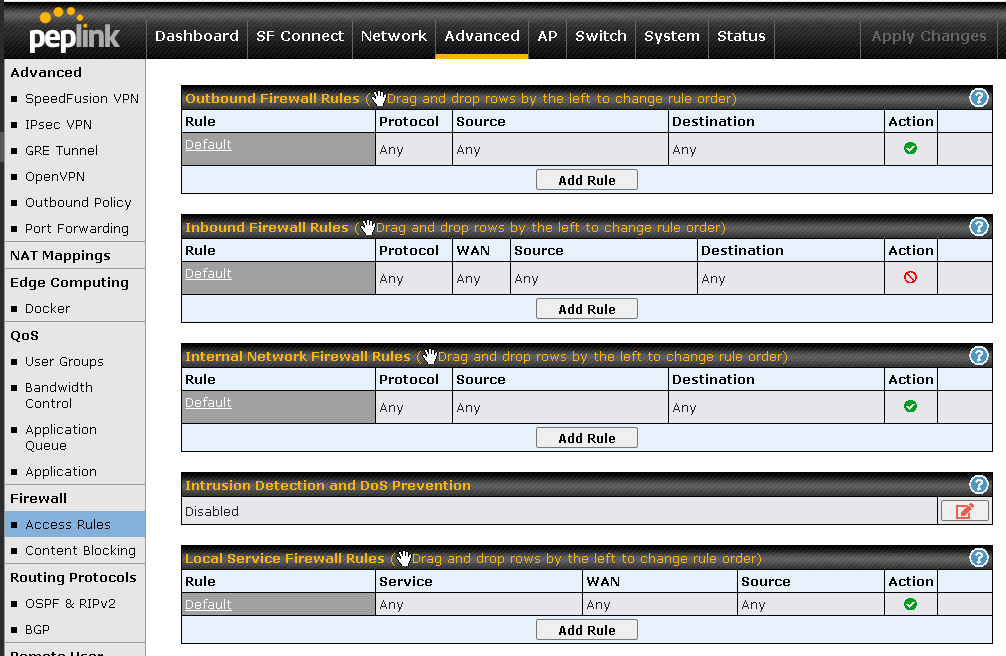
To be sure… about your firewall… look at below… a simple rule to deny all incoming, not knowing, packets from the Internet.
Thank you! So to be sure, even with that public ISP showing up in WAN connection settings, NAT is still being used? I was told by someone that it should be a private IP, but everything else (1 - 3 in my opening post) showed it using NAT. Thank you for clarifying and verifying.
So the inbound rule is a good thing to have to deny all?
Would it still be generally secure for home router if using WPA3, secure WiFi password, secure admin password, and NAT left on? Or is it generally more secure with this inbound rule to deny all?
Yes… WPA3 it is more secure than WPA2 for WiFi usage.
Sure… Strong password for your admin access is always a good idea.
You need NAT to all conections from LAN, going to WAN.
Having public ip address at WAN, it is good, for a game porpouse and maybe will be use by another IoT device in the future. Camera, maybe?
Yes… Keep inbound rule at deny all… This way you will block connections from unknown.
Thank you again! One more question, please. for the gaming console, when i connected it to the router, it shows as NAT type open, even though NAT is on, as discussed above. Connected to prior router, the game console showed NAT as moderate. Is this OK? What would be the difference?
Xbox NAT Open means your console has unrestricted access to connect with other players and servers, resulting in the best online experience with no chat issues, fast matchmaking, and the ability to host games. It ensures your router’s firewall is properly configured for Xbox network traffic.
What “Open NAT” Provides:
Best Connectivity: You can connect with anyone, regardless of their NAT type.
Optimal Chat/Voice: Smooth, uninterrupted party chat.
Host Games: Ability to host multiplayer matches successfully.
Performance: Reduced lag and faster matchmaking.
Why it Matters (Compared to Moderate/Strict):
Open: Connect to all.
Moderate: Limited to matching with Open/Moderate users.
Strict: Only matches with Open users; severe party/multiplayer issues.
I
f your NAT is not open, you may face issues joining games or hearing friends. It is typically fixed by enabling UPnP on your router or setting up port forwarding.
Thank you. So to be clear, the xbox is still using network address translation (as it does get a private IP), but showing “Open NAT” for some reason on the peplink, even though it worked fine on the old router showing “Moderate”?
whoever is telling you this is wrong. If your LAN devices have a private LAN IP address and your router has a public address on the WAN port, then the router is indeed doing NAT.
I just heard that open is not as secure as moderate, and not sure why it changed with peplink router to open.
“Secure” (or not) is messy sometimes. It all depends on whether you allow untrusted or potentially hostile devices on the LAN side of NAT. If you do then allowing them to bypass the firewall with UPnP is bad (a.k.a. an “open” network according to your XBox). But if you trust all your LAN devices then UPnP is a feature, not a security problem.