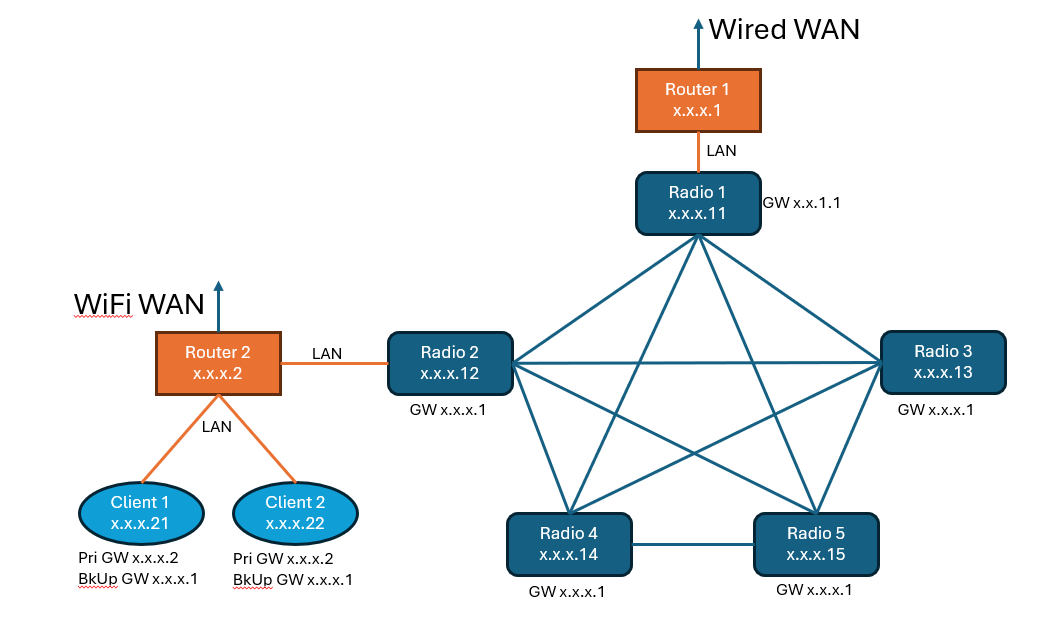
I have a radio mesh LAN with a Max BR 2 Pro at one radio node to provide a wired WAN gateway connection to a data center. Another of the radio nodes also has a Max BR 2 Pro that provides a WiFi WAN connection as an alternate gateway for devices hosted at that node.
The node with the WiFi WAN is currently configured to use the 2 gateways, if either connection is down the router automatically routes traffic through the active connection. However, if both the WiFi WAN and mesh radio LAN connections are active, the default route for traffic to the data center is over the mesh radio LAN to the router with the wired WAN gateway.
How do I configure the router to use the WiFi WAN as default? Setting an Outbound Policy (assuming I’ve done it correctly) does not seem to effect this behavior.
Connecting the mesh radio network to the WAN port is not an option as the node needs to send and receive multicast data to/from the other mesh radio nodes.
                     Data Center
                         ▲
                         │
                   Routed network
                         │
                    Wired WAN
                         │
                  ┌────────────┐
                  │ BR2 Pro #1 │
                  └─────┬──────┘
                        │ LAN
                        │
                   Radio Mesh LAN
                        │
                    Radio Node
                        │ LAN
                  ┌─────┴──────┐
                  │ BR2 Pro #2 │
                  └─────┬──────┘
                        │
                Wi-Fi WAN ───────► Alternate path
- The above is the setup ?
- How BR2 Pro #2 learns the route to the Data Center via the mesh LAN—for example, a static route, OSPF, or another router on the mesh ?
1 Like
Hopefully this helps explain my problem better.
When radio 2 is connected to the mesh network, all traffic from clients 1 & 2 go through router 1 to the WAN. I would like their WAN traffic to go through router 2’s WiFi connection.
What method are you currently using to direct clients to the alternative gateway?
Are the two BR2s in HA/VRRP mode, or are you relying on something on the client side to handle that failover?
You mention that the radio network needs to exchange L2 traffic / multicast, is that only within the radio mesh, or do you mean the clients hanging off each side of the mesh need to send that traffic amongst themselves?
Might be interesting to know what the radios are you are using for the Mesh, does that product have any way of directing traffic?
What you are asking for would normally be solved very simply if the network had some L3 boundaries between the various nodes as it would be trivial to weight the routes insdie of OSPF to make one path more attractive based on distance.
1 Like
I have not set up any routing protocols in the router just yet.
VRRP won’t work because, as I understand it, Peplink only supports an Active-Passive configuration not the Active-Active one that I need here.
Using OSPF would seem to require me to create a couple of VLANs that I’m not sure how it will effect my radio LAN operation. I will have to look into that. I would appreciate any suggestions you might have.
Turns out my solution, at this point, is to use the Windows gateway fail over and keep the router out of it (for the most part).