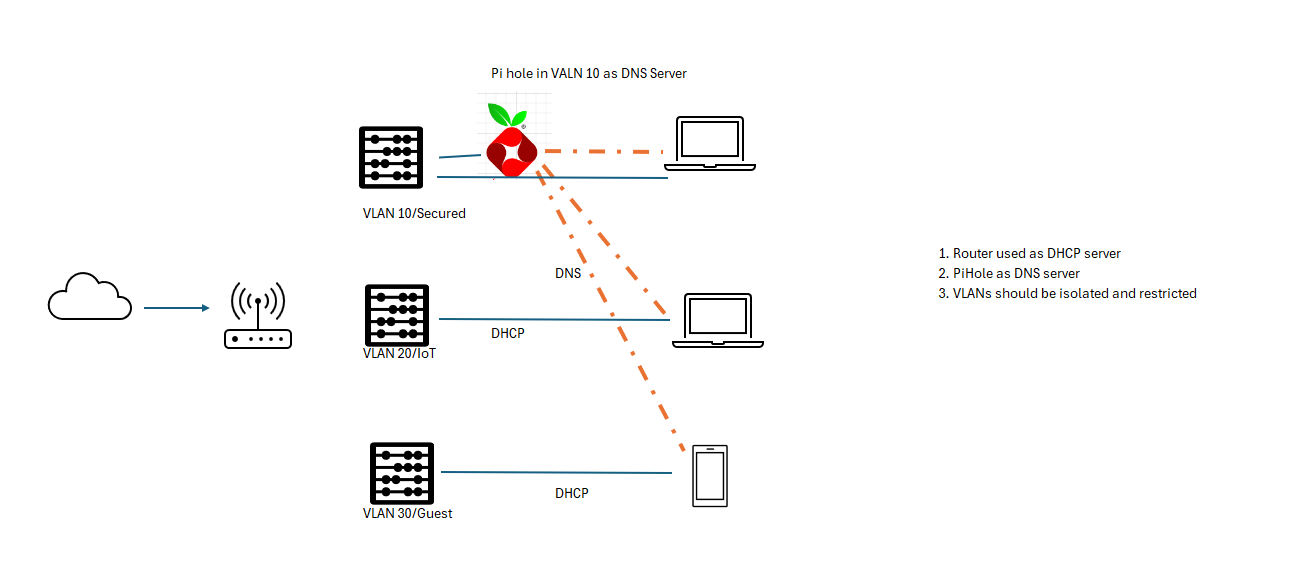
1: Okay
2: Using NSLOOKUP/DIG, it is resolving names/domains?
3: By default… It is allowed from any / to any.
4: okay
5: Internal Network Firewall Rules? blocking?!?!
6: okay… inbound firewall rules.
7: please… change your rules to allow… Maybe you are doing a wrong setup.
8: okay
First question is are you having DNS issues, or transit issues. A ping to a numeric IP will tell you if you have transit or not. (ping 8.8.8.8 is a handy one.)
if it is a DNS issue, I’d be thinking of doing packet captures to see if the packets are getting to the pi hole, and back, or getting lost somewhere else.
I’m also wondering why you need the pi hole, the B1 DNS capabilities are pretty good.
on Network/WAN/WAN Connection Settings, set DNS Servers to the IP of your PiHole.
On Network/LAN/Network Settings/DNS Proxy Settings:
Enable: yes
DNS Caching: yes
Include Google Public DNS Servers: ??? If you want DNS to keep working if your PiHole crashes, then turn this on. Otherwise, keep it off.
Disable inter-VLAN routing
This is a much simpler approach:
the Peplink becomes the DNS Proxy, intercepting and referring all DNS request to the PiHole
no firewall rules are needed.
However, this means that all VLANs (including your Main one) use the PiHole. If you wanted to have different DNS for different VLANs, this wouldn’t work.
Hi, @Kumar_Sam
Please…
Can you draw your topology?
and describe what a kind of data traaffic you will need between vlans?
This way… We (Forum) can check what kind of rules you will need.