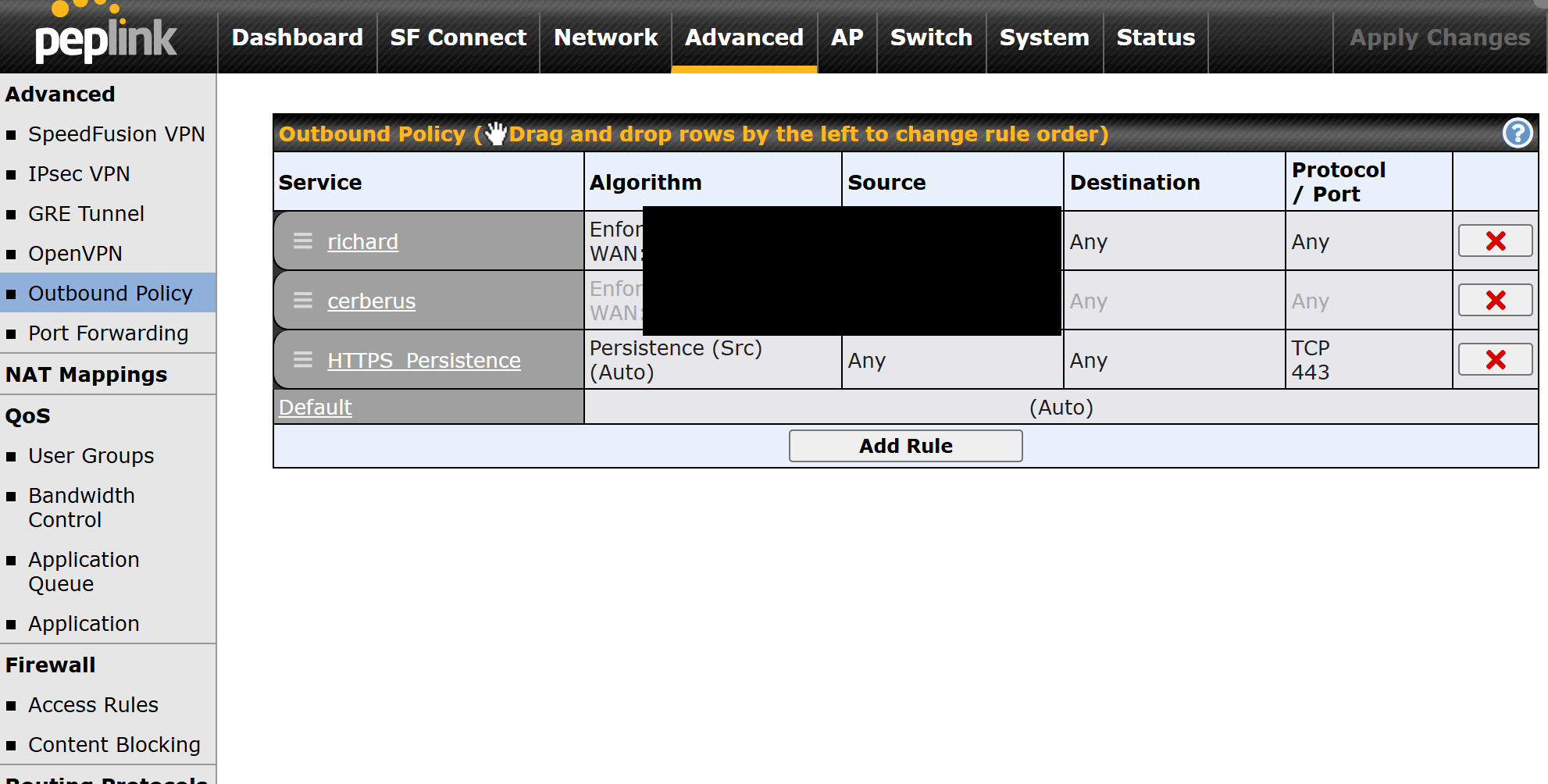
I am currently setting up a Peplink router and I cannot find the Outbound Policy menu anywhere in the admin panel.
I have checked under Network and looked through all submenus like LAN, WAN, QoS, Firewall, etc., but there is no section called Outbound Policy or Outbound Policies.
A few details about my setup:
I am logged in as admin
I am accessing the router directly via its local IP, not via InControl
SpeedFusion is not licensed yet, but as far as I understand Outbound Policy should not require any license
Firmware is relatively recent
My questions:
Is Outbound Policy available on all Peplink models?
Can it be hidden depending on firmware or UI mode?
Is there any setting that enables or disables visibility of Outbound Policy?
Could this be related to using a simplified interface or a specific operating mode?
The reason I am looking for it is to disable load balancing for video calls and force WebRTC traffic to a single WAN with fallback only.
If anyone has seen this before or knows exactly where it should appear in the menu structure, I would really appreciate some guidance.
If you can’t find it there, maybe update the firmware (or load off of the alt boot), factory reset and then maybe a support ticket.
You never said what device you had but I checked on devices from 3 different series of devices, one of which is the cheapest router they sell, I can’t imagine it’s a missing feature on anything except maybe USB modems
Thanks a lot for your reply. I’m really sorry! I found the Outbound Policy under Advanced on the B One 5G, so that part is resolved now.
The remaining issue is not that the menu is missing, but rather what types of matching the B One supports inside Outbound Policy.
On my B One 5G (current firmware), Outbound Policies appear to be limited to:
• Source matching (MAC / IP)
• Destination = IP Network
• Protocol / Port
• Priority / Weighted Balance
What I don’t see on this model are options for:
• Application-based matching
– WebRTC
– Video Conferencing
– Zoom / Teams / Meet categories
• Traffic class detection beyond:
– DNS-based domain resolution
– SNI (for TLS, limited)
• Media-stream awareness (STUN / TURN / SRTP as an “application”)
So while Outbound Policy itself is present, application-based routing doesn’t seem to be available on the B One, unlike on Balance or MAX models.
Because of that, forcing
“WebRTC → WAN A, everything else → WAN B”
is not possible directly on an application level on this device.
The practical workaround that works well in my case is client-based routing:
routing my work laptop (MAC-based rule) over cellular, while the default rule prefers VDSL for everything else. That achieves the intended result for video calls, just without application level matching.
Really appreciate you taking the time to verify this on multiple devices — your reply helped me narrow the issue down to model capabilities rather than a missing menu or misconfiguration.
There is one related second issue I’m currently trying to clarify, and I’d really appreciate input from anyone who has done this specifically on a B One 5G.
SpeedFusion / PepVPN peers and profile creation
My intended setup is very simple:
• One single SpeedFusion / PepVPN tunnel
• From the B One 5G
• To one remote endpoint only
(e.g. my own Hetzner VPS running FusionHub or another Peplink virtual appliance)
So the use case is strictly: B One 5G ↔ one remote SpeedFusion endpoint
No multiple branches, no hub-and-spoke, no additional peers.
According to the tech specs, the B One 5G ships with 2 SpeedFusion VPN peers enabled by default, which should theoretically be sufficient for this.
However, on my device:
• InControl is disabled
• SpeedFusion Connect is disabled
• Logged in locally as admin
• Under Advanced → SpeedFusion VPN, I only see the Local ID field
• There is no option to create a SpeedFusion / PepVPN profile, no bonding, no smoothing, no WAN priority settings
So my open questions are:
With the default 2 SpeedFusion VPN peers, should it already be possible to create at least one local SpeedFusion / PepVPN profile on a B One 5G?
If not, is there an additional license required just to unlock local profile creation, even when only connecting to a single remote endpoint?
Specifically: is the “Up to 10 PepVPN / SpeedFusion Peers License Key (PVN-LC-10)” required in this scenario, even though only one peer would actually be used?
I’ve opened a ticket with Peplink support to get an authoritative answer, but I’d be very interested to hear from anyone here who has already set this up on a B One.
If you don’t have an active PrimeCare, you don’t get those features. If it’s not active, you can click the refresh button to activate it. (Which is better than when you used to have to add it to InControl to get it to realize this.)
If it doesn’t activate when you click the refresh button, you should get a year of plain PrimeCare (not +) for free, you’ll need to contact your reseller. My B One 5G shipped from the 5GStore, and they didn’t activate the PrimeCare.
When I rang up, they guy there said they bundle them up and do them at the end of the month (or something like that), but could turn on PrimeCare for mine, while I was on the phone.
Also, my B One 5G is happily running with one SpeedFusion tunnel (either level 2 or level 3).
My B One (not 5G) is happily running with 2 tunnels, I assume the 5G would as well.
The data sheet says you get 2 tunnels for free, and 5 with PrimeCare (free for a year).
Also the PrimeCare+ subscription on the 5G is the “B” version, which is twice as expensive as the “A” version, which the B One (not 5G) takes, which is quite a bargain for the 4 year. PrimeCare-B isn’t quite such a bargain.
I have a Balance 210, a Br1 Pro 5g=G and a B One 5G all connecting to my current location (B One synergy controller with a Balance 305 synergized) with no additional licenses other than PrimeCare on the B One’s and the Br1 Pro and no issues with setting up speedfusion.
It is slightly different in layout for the setup from the older device to the newer ones but pretty strait forward.
You get a license for FusionHub Solo for free with your account. You will need to keep your B One 5G on PrimeCare or Primecare + but that should do what you need at your preferred datacenter. You access the license through your incontrol account. Should be able to find a good guide somewhere here on the forum for setup.
As for setup itself:
-On the SpeedFusion VPN page, under “SpeedFusion VPN Local ID” set a local ID for your local device on both ends.
-On both ends make a new profile
-Name it whatever you want
-Enter the ID of the other ends 'Local ID" field in the “remote ID” field. You can ignore the pre-shared key field, not used anymore.
In the “Remote IP Address / Host Names (Optional)” field, you must enter a static ip address of one of the connections of the remote route or FusionHub device on ONE end, not both. That said, if you have static IP’s for all connections on both ends, enter them all for both, otherwise you are relying on the one connection for establishing the connection each time
All other settings can be adjusted once you have it up, set to preffererences
click save
and that should do it.
FYI, doesn’t currently effect your setup but the FusionHub license that comes with PrimeCare means that you aren’t tying up a license on the FusionHub. IE, if I connect my 305 to a FusionHub Solo, that ties up it’s one license. But if I then connect to the same FusionHub with my B One 5G on Primecare, it’s +1 license means 2 work just fine (as long as I keep paying for PrimeCare.
Chances are you won’t need to pay for any types of licenses unless your setup gets a fair bit more complicated.
Hey guys! Thank you for all the information. I have progressed a bit. I have setup a speedfusion VPN on a hetzner server. I am using smoothing on that profile. But I want to setup a second peer / profile for bonding, because in certain cases I want to use smoothing and in other cases I want to use bonding. But how can I setup a second peer? I want to use the second peer with the same hetzner instance.
I’m using right now a free Solo license (see this here: General FAQ: FusionHub Solo), which only allows one peer. But apparently my router B One should have come with two possible peers. And I also have complimentary PrimeCare active according to Status>Device>Care Plan, that should even enable 5 peers. I don’t get it. How can I create a second peer? Do I need to add another license?
If I want to setup a second profile in Advanced > SpeedFusion VPN, I basically need to enter a new Remote ID and I don’t know how to get this new Remote ID.
One device can only have one local ID so I don’t understand how I can setup bonding for some connections and smoothing for other connections.
Oh I think what I am looking for is creating subtunnels. and I just found out how I can create subtunnels. Looking into it now