Hello,
I have two Internet connections. WAN-1 is my primary link for services, while the other link is used for users’ Internet browsing.
I would like to create an Outbound Policy that allows users to access the Internet through the primary link only when the browsing link goes down. As long as the browsing link is online, users should not use the primary link.
Is it possible to achieve this?
I tried creating an Outbound Policy where WAN-1 had Weight = 0 and WAN-2 had Weight = 10. The “When No Connections are Available” option was set to “Use any available connections.” However, when my WAN-2 went down, the traffic was not redirected through WAN-1.
@Harold_Guzman,
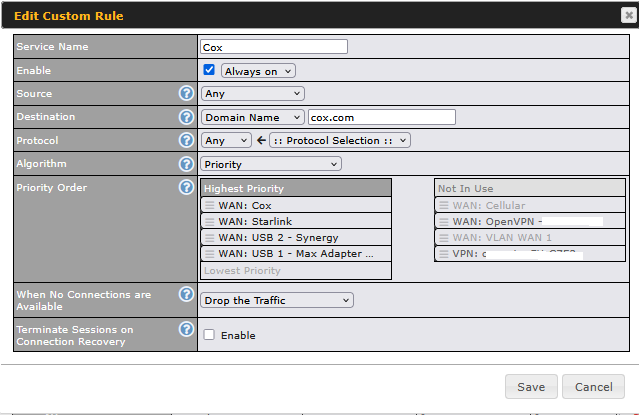
Have you tried the “Priority” option in the Outbound Policy?
WAN 2 at the top, then WAN 1?
If my Cox WAN goes out it will use Starlink and then so on.
You will probably need to adjust your “Source” to match your clients where your clients are coming from VLAN, LAN network, IP address, MAC ID, etc. Destination should be “Any.”
1 Like
Hello,
Thank you very much for your response. Based on your proposal, I’m thinking of adding a second navigation link for users in the future. My idea is to balance the traffic across both links and have the primary link serve as a backup in case the other two links go down.
If I’m not mistaken, your proposal wouldn’t apply if I have more than one navigation link, correct?
You can have multiple outbound policies that get executed from top to bottom.
Services: Priority - WAN 1 > WAN 2
Users: Priority: WAN 2 > WAN 1