Device 2 IP 192.168.50.11
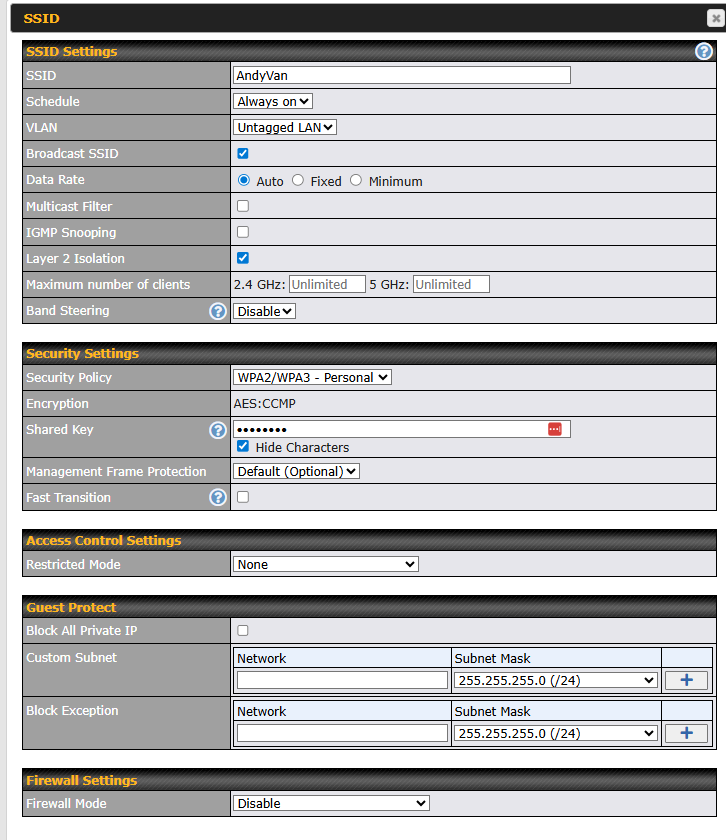
SSID: “AndyVan”
Wifi Frequency: 2.4hgz.
These two devices cannot ping each other. Any attempt from 50.10 to connect to 50.11 gives “no route to host”.
I have fixed this by forcing both devices to use a 2.4ghz network. However, when I connect with my Android device at 5.0ghz, I can’t send any traffic to the 2.4ghz devices.
It appears that Peplink can’t route between the two radios? That is very surprising. Are there settings that I’m missing somewhere?
Oddly, when It turned Layer 2 Isolation off, connectivity was established, and lasted for a day. Skeptical, I waited, and on day 2 once again I’ve lost connectivity.
Now I don’t get that ‘no route to host’ error, but Ping doesn’t give any response at all.
➜  ~ ip addr | grep 192
    inet 192.168.50.10/24 brd 192.168.50.255 scope global noprefixroute wlan0
➜  ~ ping 192.168.50.11
PING 192.168.50.11 (192.168.50.11): 56 data bytes
^C
--- 192.168.50.11 ping statistics ---
71 packets transmitted, 0 packets received, 100% packet loss
And I have full connectivity to both machines from the WAN (wifi)
L2 Isolation should certainly be off for this use case as isolating clients within the same L2 domain is exactly what that should be doing when enabled.
I’d start with layer 2 debugging first anyway.
Do all the devices, including the Peplink have valid ARP entries for each other, and other things that you’d expect them to see?
Can the router itself ping each of the devices?
Can the devices ping the router?
Once you ping the router from each device does stuff magically start working for a period of time, that might point again to some odd ARP related / L2 adjacency issue here.
Essentially the router has two discrete wifi radios - one for each band - that will be hitting an internal bridge interface, so it could be a bug and would need you to open a support ticket with Peplink (the fact this works when you put both devices into the same band would suggest it is something internal that is not working quite as it should).
Other than that is there any other configuration you’ve done that might impact the traffic flow, again wouldn’t expect it as this is all within one L2 domain in theory so things like firewall rules etc. shouldn’t apply unless you’ve got some L2/MAC based rules in there somewhere?
> support arp
-> ? (192.168.1.153) at <incomplete>  on Wi-Fi WAN on 5 GHz   (peplink router)
 ? (192.168.1.1) at 94:2a:6f:d0:6f:30 [ether]  on Wi-Fi WAN on 5 GHz
? (192.168.50.49) at <incomplete>  on Untagged LAN
? (192.168.100.1) at 26:12:ac:1a:80:01 [ether]  on Starlink
? (100.64.0.1) at 26:12:ac:1a:80:01 [ether]  on Starlink
? (192.168.50.141) at <incomplete>  on Untagged LAN
-> ? (192.168.50.10) at 2c:cf:67:df:20:43 [ether]  on Untagged LAN
? (192.168.1.120) at e2:ac:c2:1f:1e:e1 [ether]  on Wi-Fi WAN on 5 GHz
-> ? (192.168.50.11) at 68:4e:05:44:47:b3 [ether]  on Untagged LAN**
? (192.168.1.165) at f4:c8:8a:43:e6:21 [ether]  on Wi-Fi WAN on 5 GHz
? (192.168.50.172) at <incomplete>  on Untagged LAN
? (192.168.1.150) at d8:3a:dd:b6:43:64 [ether]  on Wi-Fi WAN on 5 GHz
? (192.168.50.207) at <incomplete>  on Untagged LAN
? (192.168.50.192) at <incomplete>  on Untagged LAN
? (192.168.1.1) at 94:2a:6f:d0:6f:30 [ether]  on Wi-Fi WAN on 2.4 GHz
? (192.168.1.116) at c2:8e:ef:2d:ca:b2 [ether]  on Wi-Fi WAN on 5 GHz
? (192.168.1.120) at e2:ac:c2:1f:1e:e1 [ether]  on Wi-Fi WAN on 2.4 GHz
Yes.
yes.
Yes. . It has magically started working now, my logs show the devices started talking 20 minutes ago. I’ve been multitasking this morning so I can’t say definitively if either the pings or pulling the ARP table from the CLI helped.
I think my install is fairly vanilla for Peplink. I have not added any firewall or rules anywhere.
Interesting problem - this feels similar to an issue I’ve been chasing down, in which devices on the same network (but different interfaces, e.g. WiFi vs. Ethernet) lose the ability to talk to one another.
In my case the setup is quite different (I’m using a Balance One, the devices are on VLAN) but the “no route to host” error, and the sporadic nature of the issue (it comes, and goes) is quite similar to what you are seeing.