Hey there,
I recently acquired a used Balance 1350 HW2 and am in the process of experimenting with settings. I have been using an openMPTCPRouter, installed on an old workstation of mine, that I have upgraded with a PCIx 4-Port ethernet card to expand the port count.
Both with the openMPTCPRouter and the Balance 1350 I connect to a virtual server that acts as bonding server. (FusionHub Solo and the OMR VPS, 2.5G uplink, 4vCPU, 8GB RAM each)
My use case for that is to bond multiple WAN connections to one faster link, for mobile use in live event production environments or for filmsets to upload data over accumulated upload speeds.
With the openMPTCPRouter this actually worked very well and I was able to add up my single WAN connection speeds without a lot of loss due to tunnel overhead.
In my testing environment I have a landline internet connection with 100/40 and two 5G routers with around -85dBm signal strength, which give me around the same bandwith. sometimes more, if the cell is not heavily loaded. With the openMPTCPRouter I achieved linkspeeds of 350/150 peak performance, which are roughly an addition of my available WAN connection speeds, which is a great result I think.
Now… I struggle to achieve the same thing with my Balance 1350 for now. I experimented a lot and found out already, that the vpn profile on router and server do not have to be configured the same way, which seems obvious to me now, after I found that out 
The best results so far I achieved with these settings:
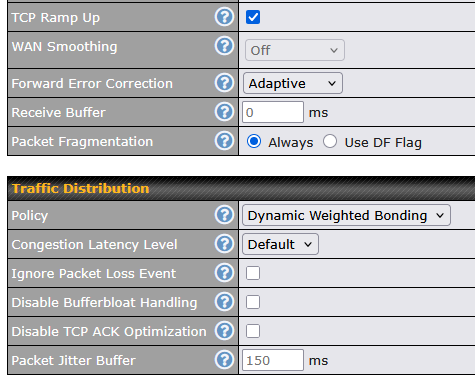
- TCP Ramp up: active
- WAN Smoothing: Off
- Forward Error Correction: Adaptive
- Policy: Dynamic Weighted Bonding
- Congestion Latency Level: Default
When I had the same settings on the server side, link speeds were bad, probably because both sides enforce those rules even though that does not seem to be neccessary, because it already is a bidirectional link anyways. Then again only the router side has to handle multiple WANs, whereas the servers job is mainly to reorder packets and blow them into the web. (Is that a correct assumption so far?)
With that setup I reached 250/110 linkspeeds, which is good, but not as good as what I achieved with my openMPTCPRouter setup.
I already tried out settings for redundancy for another usecase, where I want the uplink to be “unbreakable” for live streaming purposes (with WAN Smoothing on and higher values for FEC), and this works as expected.
But this is of course optimized for high availability rather than high speeds.
I would now like to know how to configure the SpeedFusion VPN to have the maximum possible throughput for my other usecase. Do any of you guys have experience with that kind of twiddleing? What can I do to improve actual throughput?
What I can observe is, that the WAN links are not operating at full capacity. Sometimes they are, sometimes they are not. Of course 5G and other mobile connections have a lot of variance in their actual throughput, but I expected my landline to be utilized fully at any time, but this is not the case.
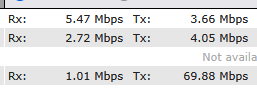
The image shows my 3 WAN connections during a speed test while uploading. The uppermost being my landline, and as you can see, It is not really utilized while the most traffic is transported by one of the 5G links.
I know of TCP congestion and “starving” of TCP links when packet loss becomes too big or when latency rises. (that’s why I activated FEC)
I also know that speedtests are somewhat theoretical and cannot be fully compared with actual real life workflows and data transfers. Still, with my openMPTCPRouter I achieved better speeds, in speed tests aswell as with real life data transfers.
I tested with speedtest.net, fast.com, speed.cloudflare.com and the inbuilt speedtest from peplink within the speedfusion VPN details window, all with the same results, so at least I would rule out the speed test itself as the issue. When using iperf I receive more stable results, but still not the same as with openMPTCPRouter
I experimented with the other settings aswell (Congestion Latency Level, Ignore Packet Loss Event, Disable Bufferbloat Handling, Disable TCP ACK Optimization and buffer sizes).
A bit of insights and knowledge input would be greatly appreciated!
Thanks in advance!
Julian