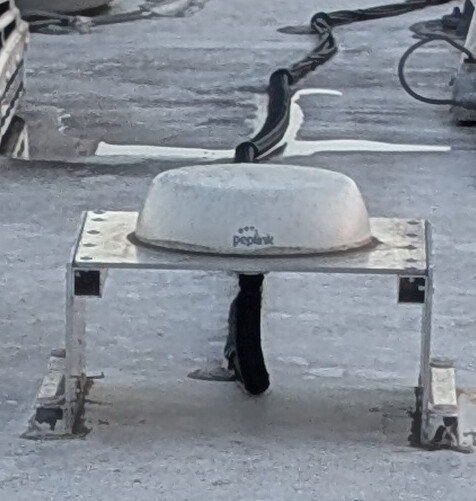
I got a MAX BR1 Pro 5G with 42G antenna in my motorhome. I recently started noticing issues with the WiFi connectivity. Some devices indicate rather weak WiFi signal strength, and during video calls sometimes the feed drops out.
Today, I investigated a little bit more and found that from inside my camper I get a stronger WiFi signal on the 5GHz band from the RV park’s network (-55dBm) than from my Peplink router/antenna (-65dBm), although their nearest access point is a few lots down the row. Then I climbed onto the roof of my motorhome and standing right in front of the Peplink antenna the best signal I could get on 5GHz was -50dBm.
Unfortunately, I didn’t take note of the WiFi strength when I first installed the router and antenna about a year ago, but I don’t remember ever having any issues. So I’m wondering is the signal strength I’m seeing recently to be expected or is it possible my equipment has gone bad?
Output power is set to “Fixed: Max”. Power cycling the router does not help. Wired LAN connection seems fine. Anything else worth checking?
I tried changing the output strength as well as toggling “Boost” on and off but it’s hard to tell. Sometimes the signal strength goes up and down randomly. But no matter what I do it seems the access point from the RV park 150’ away has still a stronger signal.
Also if I go into the bedroom in the rear of the motorhome (the antenna is mounted in the middle of the roof maybe 20’ or less away), the signal drops down to -80dBm on 5GHz, while the signal from the park WiFi is still going strong.
I have it set to auto. Currently 5GHz channel is 36 and channel width is 80MHz.
Done, though it doesn’t seem to affect the signal level.
It’s an RV park, so kind of. There is like 30’ in between my RV and my neighbors.
I understand that this isn’t the most ideal environment for WiFi but I don’t understand why the park’s access point (150’ away) has a stronger signal inside my RV than my Peplink equipment.
I’m inclined to order another MAX BR1 Pro 5G, see if it performs the same (and if it does return it). Just to be sure that my equipment isn’t bad. It seems I wouldn’t be the first one whose MAX BR1 Pro 5G went bad.
May I share a couple of thoughts? I agree with the suggestions made by @Captain_Nik, FWIW.
Let me suggest something else for your consideration.
I did not read anything about the construction of your roof – but that’s the first consideration. If it is metallic it’ll likely make an excellent ground plane which will increase the gain of the antenna slightly. However, that surface will greatly attenuate the wi-fi signal to devices “down below.” The 42G is an excellent antenna but what happens if you install the OEM wi-fi antennas on the router? (Leave the cel antennas connected to the 42G.) Does that help your signal?
It’s standard RV construction, i.e. rubber membrane on plywood with aluminum frame. However, since there was no good option to run the cables inside the roof without damaging the interior finish, the antenna is seated on a aluminum saddle. I’m aware that this is probably not ideal but I don’t recall any connectivity issues when it was first installed like that.
That is an excellent question I have been wondering myself but unfortunately I left them at home 4 states away, and I won’t be returning there any time soon.
Another option is simply to install a small AP inside the envelope of the RV. Something like the APO-AC-MINI or APO-AX-LITE would be sufficient. Easy,
Added: And, if you use wi-fi-as-WAN, I’d separate that traffic from your LAN. One radio for the former and the other for the latter. Typically, I use 5GHz for wi-fi-as-WAN and 2.4 for LAN. The latter, in the cases I see often, is needed as many IOT/M2M devices can only operate on 2.4GHz, not 5. Using the same radio for local access (LAN) and wi-fi-as-WAN is not efficient.
Per Rick-DC re: add small AP inside ->> THIS!! In my experience with all Peplink wifi products, it is best NOT to mix WiFi as WAN and Client WiFi on the same radios. So if you use WiFi as WAN to connect your B One 5G to the park WiFi, you should have a separate AP One inside for clients to connect to. This is for signal as well as stability. When shared, pretty much every time the WAN WiFi changes in some way, the interior clients get disrupted at the same time while the router’s AP adjusts.
Definitely buy an AP One for interior use. I use an AP One AC Mini in my trailer and it’s “ok” but an AP One AX Lite would be far better.
Also, aluminum, steel, carbon fiber, etc block the wifi signal. Its very likely that the mounting plate is causing so of your issue, but also, it’s way up on the roof, outside, so the signal is starting from a disadvantage.
IF you don’t use WiFi as WAN at all, then disconnect the wifi cables from the router to the antenna (leaving the cellular cables connected) and install the standard wifi stick antennas directly on the router. But I suspect you ARE using WiFi as WAN, so the Additional AP recommendation stands.
As far as AP settings go, 80Mhz(5G), 20Mhz(2.4G, Fixed Channel. Max Power, try not to use Boost (best to get a larger AP like AX Lite) than try and boost the signal with boost mode. Boost mode increases TX signal from the AP to the device, but the signal from the client back to the AP is still limited and you may see connection issues even if the signal strength looks okay on the device.
Since I wish to be able to use Wifi-as-WAN, I dedicate the Wifi in the roof antenna (and the Wifi antenna jacks on my Peplink router to WiFi as WAN only. I have a Peplink AP-One-AC-Mini inside the RV. In our case, the RV is a RAM ProMaster-based Winnebago Travato, which is a nice, metal Faraday cage, so having the separate access point inside works really nicely. A really inexpensive way to address the RV use case.
It has been my experience that the routers are rarely the reason for degraded Wi-Fi. The issues usually stems around congestion of frequency spectrum with other 2.4/5.8 GHz devices. These bands are used by a lot of different services, not just other Wi-Fi users but also Bluetooth and a lot of IoT devices. Higher quality antennas and use of APs closer to the areas you need it. Couple these specifically with putting as much of your electronic needs onto Ethernet (directly connected CAT6 cables) and you will reduce your congestion. Also, if you can get away with not using the 2.4GHz band and force all your devices over to 5.8GHz you will have an improved experience. This isn’t possible with a lot of IoT devices, but you can setup dedicated SSIDs for these. As an example I have the following setup:
RV-Internet (2.4 & 5.8 WPA3)
RV-IoT1 (2.4 WPA3)
RV-IoT1 (2.4, WPA1 Short Passcode) Wyze cameras are picky.
RV-High Bandwidth (5.8GHz WPA3)
Hi mate, if you haven’t already, It may be time to look at your physical installation…
How long is your cable run from antenna to router?
Are there any extensions in the cable run? (please say no)
Was it kinked during installation at any point…?
Are there any tight bends in the cable run.
Does the cable run pass next to something like an AC unit or Microwave oven. (these devices have most impact when they’re on)
Are your connectors to the router either too loose or overtightened (both are bad)?
Also noted the observation when you’re directly under the antenna you get weaker signal. (that’s actually normal so I would t fret too much).
If you haven’t already check the Voltage Standing Wave ratio VSWR on each of the cable runs using a Cable Antenna Tester. (may need to hire one - the ones I use are highly expensive).
Sorry for the dump of questions… I’m in the Wireless Mesh Industiry and deal with heavy heart moving equipment. RF installations and coax integrity are key factors on vibrating moving equipment… Keen to hear if and whether any of this helps mate.
I will consider it. But I still don’t understand why the park WiFi from an access point 150’ away gets a stronger signal on my client devices inside my camper than the antenna on my own roof.
I’m not using Wifi-WAN at this time but I have used it in the past and having the option is nice. Another potential reason not to use the paddle antennas is that the router is in a cabinet all the way in the front, so it’s kind of far with a bunch of obstructions in the way to the back of the coach where I’m trying to improve the coverage. But I will give it a try once I get a chance, and I’m not opposed to adding an additional AP either.
Sure, I’m aware that the WiFi frequencies are a bit crowded over here, and I’m not expecting to get anywhere near maximum possible throughput, just enough stability to have an uninterrupted video call. Also this doesn’t explain why I get a better signal to other APs than to my own router/antenna which is closest.
The problem seems to be specifically with the 5Ghz band. I get a decent signal strength on 2.4Ghz.
The run is 16ft using the cable harness the 42G came attached with, no extensions.
I did not do the install myself, so I can only hope that they handled the cable appropriately. I don’t see any tight bends where I can see the cable.
The run comes maybe as close as ~18" to one of the air conditioners. Whether the AC is running seems not to impact the signal strength.
OK some good insight.
16ft seems a bit long on the 5GHz side tbh.
The spec lists the cable loss of CFD200 as being 0.87dB/m
At 16ft of cable that amounts to 3.4db of attenuation… That’s going to have an impact on your link budget for sure.
Cable loss is never a good thing… I aim to keep antennas as close as physically possible to the Transmitter/Receiver or when that isn’t achievable to use lower loss cable… Which can be painful when running LMR400 and higher.
In this case your approach is the best option… Live with the installation as is (it’s been like that since install) and install an AP inside the LV.
@snoak, Another thing to consider trying, put one paddle antenna on the router, and leave the other one on the external. It could mess up any MIMO advantages but will affect signal strength. Just try it as a test. But ultimately, if you aren’t using WiFi WAN, use the paddles entirely. If you plan to use WiFi WAN, a second AP is recommended anyway.
I will consider it. But I still don’t understand why the park WiFi from an access point 150’ away gets a stronger signal on my client devices inside my camper than the antenna on my own roof.
Well, if you can tell me the antenna gains on both ends (or at least make/model of antennas), transmission line losses (or at least types and lengths of line and connector losses), antenna hts (so I can estimate Fresnel zone), TX/RX power and sensitivities, etc – I’ll be glad to work the math and give you a quantitative answer. (As a wise man one said, “it’s only math.” ;<) ) In the interim, I’ll say I appreciate what you are dealing with but I’ll stick with the answers I and others gave thus far. Or, restated, “I dunno,.”