What’s happening?
Following an investigation with Verizon network team, we’ve identified that Peplink devices running older cellular module firmware are failing 5G connection negotiation on their C-Band sectors. These failed setup attempts generate signaling load on the cell, degrading service for every device connected to it - not just yours.
Who is affected?
Peplink routers with a -5GH (Sierra Wireless EM9191) cellular modem with Cellular Firmware version 03.09.06.00 or older.
What should I do?
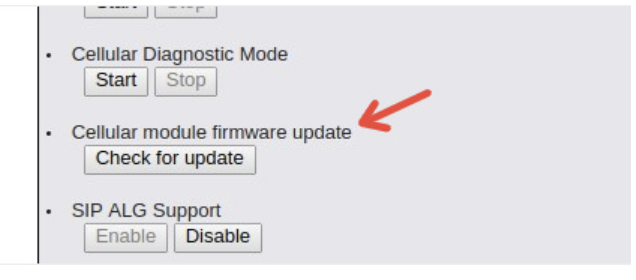
Update the cellular module to latest firmware on your affected device. You can do this through InControl 2 (guide) or via the device’s local web configuration page. The latest available Firmware version will be shown automatically.
Need help?
If you have any questions or run into issues during the upgrade, please reach out to your Peplink partner or open a support ticket - we’re happy to help.
Thanks for your attention, and thank you for keeping your devices up to date.
For local configuration, you need to open support.cgi page.
If you are logging into the device locally you’ll see:
<IP_ADDRESS>/cgi-bin/MANGA/index.cgi
Then you need to change index.cgi to support.cgi as shown below:
<IP_ADDRESS>/cgi-bin/MANGA/support.cgi
This will open you a new page, where you can find option below. From there it should be straight forward
IMPORTANT: Before starting the update, we recommend confirming that a reliable secondary WAN connection is available. Also, please do not perform the update over a cellular connection.
Something else I see is that SO often I get 1mb download speeds everywhere and have to turn off the currently connected cellular channel off to get the modem to change to another channel.
Say the cellular modem is currently stuck on channel 2 and 14 on AT&T. I have to turn channel 2 off to get the cellular modem to get off the congested channel.
It saves, reconnects to say… 12 and 66 and now I have 60-80mbs rates.
Is this micro management something that supposed to be auto negationated by the Pepwave modem?
I’m having to do this sometimes three and four times a day.
Band selection is negotiated between the cellular modem’s internal firmware logic and the base station. Through the Peplink router, we can restrict certain bands or modes (e.g., disable 5G), but we cannot prioritise which bands should be used.
I’m not looking to prioritize, but I’m hoping there’s some basic logic to renegotiate channels when a channel gets crappy data rates. Is there any logic at all?
Unfortunately, the cellular networks make the band and roaming decisions for the client. All we can do is the band selection trick, which is far from perfect in a dynamic environment like yours.
People with more demanding requirements and higher budgets will use multiple radios with multiple SIM cards and then lock each device to a single band for that carrier, then bond them all with SpeedFusion. This is how customers like broadcasters deal with the gameday slowdowns that cause problems just like what you have described.
Pat, what you are asking to do is exactly what the carrier is doing. As we all know, RF spectrum is at a premium. As we have advanced from 3G to 4G and now 5G, the radios (as in those on a cell tower) and 3GPP specifications are designed to move UEs (your cellular client devices) to lower cost spectrum/channels. You will notice this on your phone: in standby, your phone may be on 5G, but after doing a few seconds of youtube or netflix streaming, you may be “upgraded” to 5G UC/UW. This is usually evident on a speedtest a well.
Depending on your data plan, carrier, radio in your device/Peplink, the RAN (radio access network) will make its own decisions about how your device associates and stays associated with the network. Band locking is possible, but it doesn’t always solve the problem.
What I see is that the Pepwave is grabbing a channel… Then sticks with it no matter what. Even when data gets crappy. I see channel 2 often (guessing its the service/DHCP channel?)
I block 2 and next channel is very fast. 20- 75mbs (vs the 500kbs-1mb.) What ever channel I get I seem to stay with until dhcp expires? I’m no cellular eng but guessing…
If the Pep Wave router had a means of block current cellular chann if data rate is below X kbs. Then reset to all channels if data stops. Repeat… Pepwave would always have the fastest data rates!
b2/n2 is a the PCS / 1900MHz band. DHCP has zero to do with your layer 1 connection to the RAN. b2/n2 is not a ‘service/DHCP channel’ but rather one of the most common cellular bands used in the United States.
As previously mentioned, doing band locking/exclusion (what you seem to be alluding to) can be effective but also a hinderance.
Peplink devices without any band locking settings do not choose their own bands, it is controlled by the RAN components of the cellular network.
Lastly, there is no way to “block current cellular chann if data rate is below X kbs.” I mean, I guess you could do that, but you would find your devices offline at the end of every day.
“Band adaptation” and “beamwidth adaptation” are the concepts that I’m describing: your Peplink device doesn’t get to decide how the tower talks to it (beyond band locking/exclusion), the Radio Access Network (tower) does.