I’m trying (with no luck) to set up my Peplink B One to use Starlink data when in Standby mode (ie, the new “Pause”) but allow another WAN to supplement for those times when I need more then 500kps. I’ve tried bandwidth limiting the Starlink, all combinations of priorities, etc to no avail. To keep it simply, I’m willing to use SpeedFusion for everything but still can’t get it to use both at the same time. Thoughts on how to do this?
The best solution is to configure Load Balancing Algorithm
- Go to Network > Outbound Policy
- Add a rule
- Source, Destination, and Policy should then be Any
- Set algorithm to Overflow
- Give Starlink higher priority weight and the other WAN connection set right below it.
How it works: All traffic will use Starlink first. When Starlink reaches its bandwidth limit (500 kbps), additional traffic automatically overflows to your second WAN connection. Both connections can work simultaneously when you need more than 500 kbps.
Note: Make sure you’ve set a bandwidth limit on the Starlink WAN connection download and upload (under Dashboard > WAN) to around 450-480 kbps so the router knows when to trigger the overflow.
Hope this helps!
1 Like
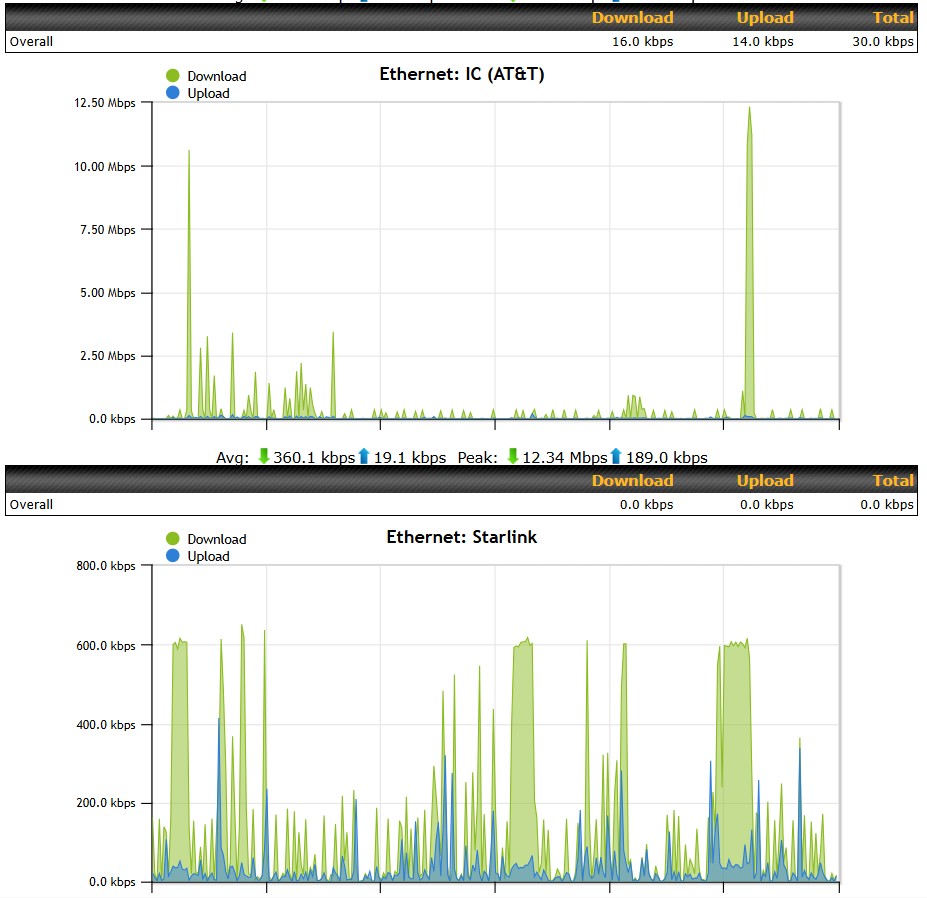
Wow, thanks for the quick, complete, and clear instructions! Just now able to play with it and it seems to be working!! I had never tried the “Overflow” algorithm but that makes sense. I set the Starlink limit of 480 up and down, but it seems to be working until 600kbps which is fine but unexpected. Sorry for not getting back to you earlier - finally got back into a situation where I could try it.

2 Likes