Hello All,
Could you please share the preferred method to optimize upload speeds and reliability for live streams outdoors? I am using a Peplink Br1 Pro 5G (with the latest firmware) and an external high-gain antenna ( 42G Antenna Frequency range: 600-6000MHz). My upload speeds using Starlink, internal 5G eSIM, and even an extra 5G connection via Ethernet, are consistently below 10 Mbps (even when the cell tower is not crowded). I even conducted a test at home, feeding the Peplink with my home fiber (1 Gbps) instead of the Starlink, and the measurements are consistently below 14 Mbps. Thanks a lot for your help!
Can anyone offer help here? Thanks!
Hi…
Try a dumb switch … use it between the WAN port of the br1pro5g and the Starlink.
Thanks Marcelo, I will try. If I have 2 incoming ethernets (mifi and starlink), how will I handle the dumb swithc? (currently using a LAN as virtual WAN). Do you mind sharing the logic (for me to learn). Any other suggestions?
Mode: Dynamic Weighted Bonding (DWB)
WAN Smoothing: Normal (packet duplication)
Forward Error Correction (FEC):Adaptive
Somethis on WAN Health Checks? thanks
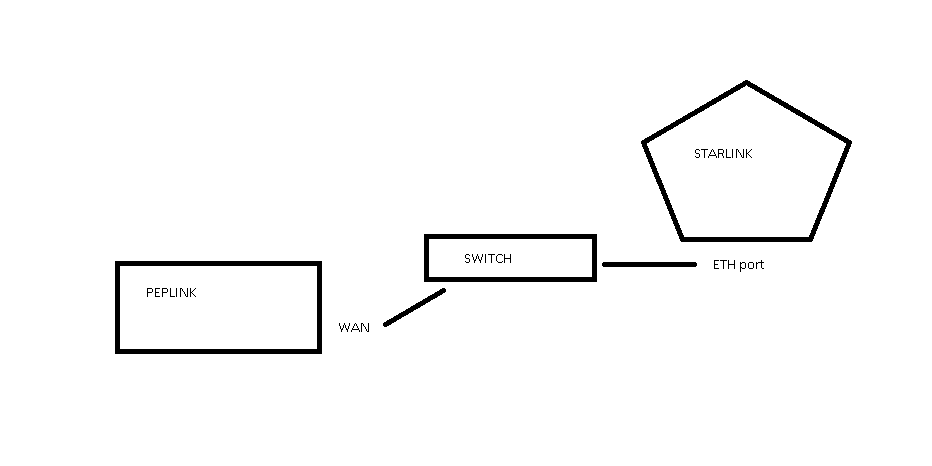
Thanks. I understood that part. What if additionally to the starlink, I am feeding the peplink through an external mifi via ethernet using one of the LAN ports (used as a virtual WAN)?
Thank you
Can you do a draw about your topology?
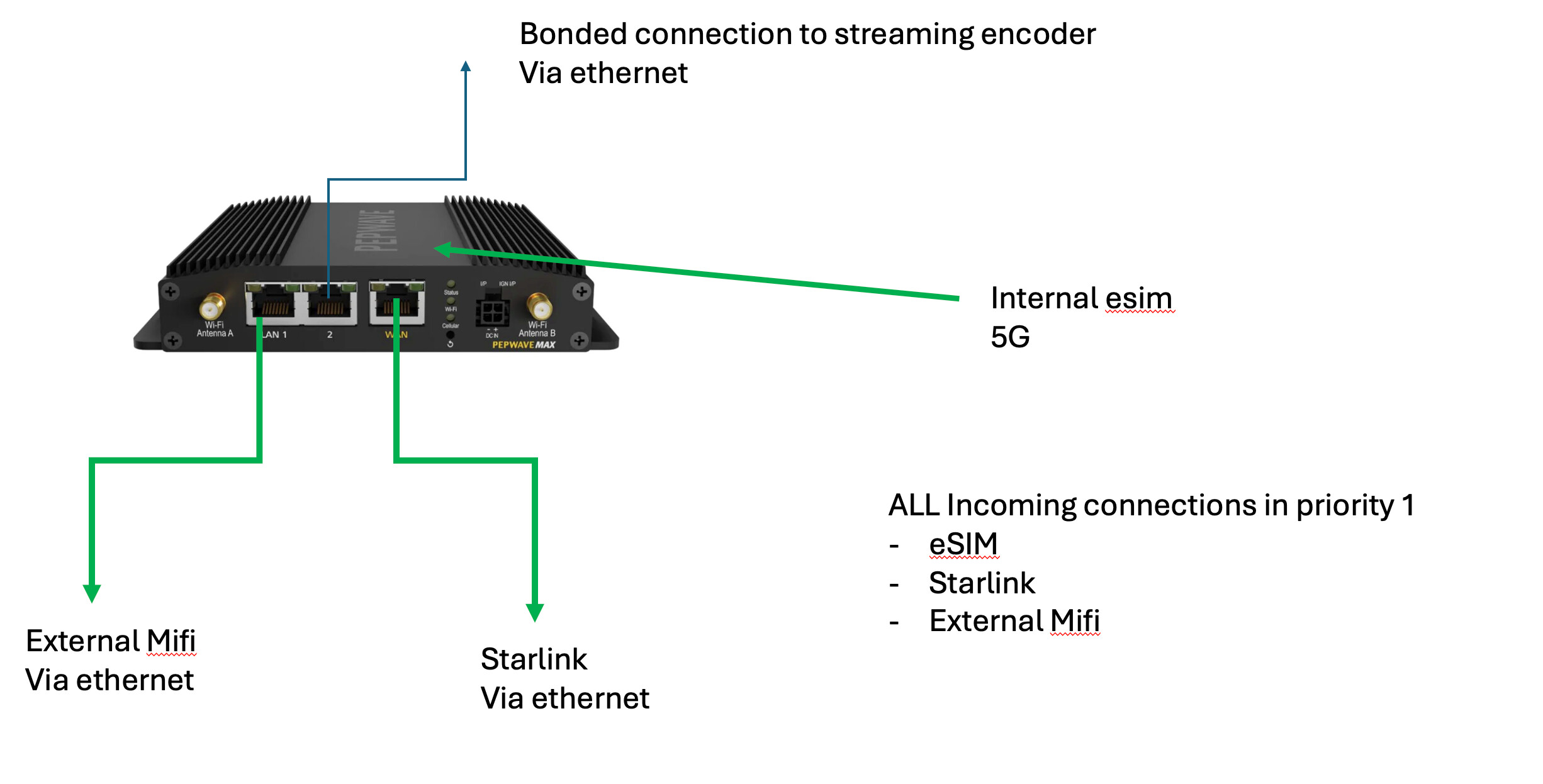
Okay…
Nice picture. Thank you.
But… Check my picture and try the ethernet switch between the Peplink and Starlink WAN eth port.
Using VWAN license, that already have at your device, have you setup the LAN_1 as WAN?
Are you using SFC (Peplink Cloud solution for SpeedFusion) or do you have an encoder (h.264/h.265) at LAN port and your another external encoder to get signal from the encoder behind Peplink?
I did use the license to set up the LAN1 as virtual WAN, yes.
I am using speedfusion, to get the bonded signal directly from the Peplink LAN to my computer (which is my encoder when broadcasting from home), or to my portable encoder (no computer added, since it broadcast directly) if I am remote. Thanks
But…
When you are in a remote locations, using your portable encoder… and don’t use another Peplink… You don’t have bounding!
Marcelo, my Peplink is feeding the portable encoder, and of course, I do have bonding. What do you mean?
Do you have tips to improve the upload speeds?
Thanks
How you setup de speedfusion at both devices?
all wan links at priority one?
Can you see all links, at speedfusion status, working togheter?

sample…
Speed Fusion Connect is in the cloud. Why do you say I need another Peplink?
Yes, all wan links at priority one.
I genuinely don´t understand what you are saying. Sorry
please…
Watch this https://youtu.be/OjofNRpEuxw?si=UGKK856eVOlW1_69
or read about Speedfusion at
Hi Pablo
If you are using group QoS in your router then check the upload and download speeds set in each of your WAN interfaces as the max bandwidth will be rate limited to those values.
thanks. I do not use QoS groups; my understanting is tha the entire traffic management engine still depends on those values to make correct decisions.
If I overstate them (e.g. set Starlink to 100 Mbps up when it’s really 18), the router will assume I have headroom and won’t shape or queue properly (leading to latency spikes and dropped frames)
If I understate them too much, I’ll artificially throttle yourself, so I assume it is important. In Peplink, QoS prioritizes packets (who goes first) while WAN bandwidth limits and Group QoS control how much total traffic is allowed.
If my per-WAN uplink is set too low, that will cap the throughput for every tunnel or policy using that WAN (even if QoS is off).
FWIW, just an observation based on a single sample point:
Setup:
Max BR2, two cellular lines + 1 Starlink line
Speedfusion Cloud.
Smoothing (medium or not at all)
Significant bandwidth difference between the Starlink and the cellular lines (the latter being 1/2 (upload) and 1/10 (download) of the Starlink line.
Observations:
When all three lines are at priority 1 the Starlink component is significantly underutilized, particularly for the download (which you probably don’t care about). The overall aggregated upload bandwidth is still better than the Starlink by itself, presumably because the cellular lines aren’t that bad, the overall SpeedFusion connection bandwidth being pretty much 3 x cellular bandwidth. The download bandwidth is a lot lower than for the Starlink by itself.
When the Starlink is in prio 1 and the cellular lines are in prio 2 the download bw is much better, while the upload bw is limited to that of the Starlink (which in our case is less than 3 x cellular).
Suggestions:
- Try having a descending priority for the three components of the SF connection. See how well the SpeedFusion connection does with the Starlink as the sole active component and the other two as backups. Test that v. having them all as prio 1.
That provides you with a baseline. - Then test the various settings to reflect your priorities - such as smoothing, FEC, failover scenarios and priorities of the three lines within the SpeedFusion connection etc.
FWIW:
In our use case we employ SpeedFusion with aggregated uploads (all three lines) and the Starlink line alone for downloads (the cellular lines simply being backups within the SpeedFusion connection).
Cheers,
Z
Thank you, very helpful. I will try.