GPS Receiver - NMEA location debugging

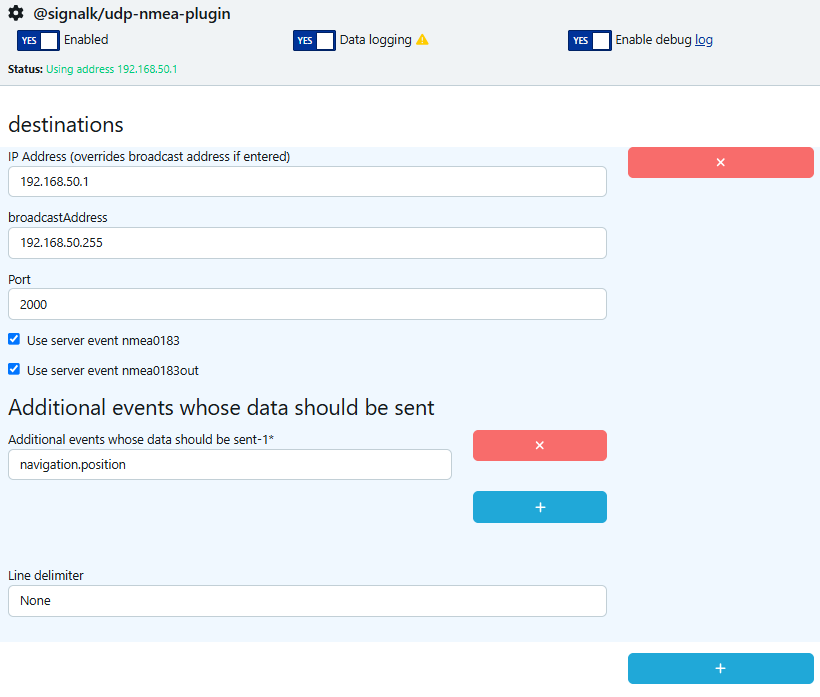
The BR1 Mini 5G does not have it’s own GPS antenna. To substitute, I have NMEA 0183 data being sent over UDP from a reliable NMEA datasource, I can capture this on the network.

tcpdump: verbose output suppressed, use -v[v]... for full protocol decode
listening on enp6s18, link-type EN10MB (Ethernet), snapshot length 262144 bytes
11:09:23.944093 IP 192.168.50.11.46055 > 192.168.50.255.2000: UDP, length 37
E..A$.@[email protected].$GPGLL,3358.0076,N,08419.4238,W,,A*3D
11:09:24.158410 IP 192.168.50.11.46055 > 192.168.50.255.2000: UDP, length 37
E..A$$@[email protected].$GPGLL,3358.0076,N,08419.4247,W,,A*35
11:09:24.158544 IP 192.168.50.11.46055 > 192.168.50.255.2000: UDP, length 15
E..+$%@[email protected].........$IIZDA,,,,,,*5F...
11:09:24.943273 IP 192.168.50.11.46055 > 192.168.50.255.2000: UDP, length 37
E..A$a@.@./...2...2......-_.$GPGLL,3358.0074,N,08419.4247,W,,A*37
11:09:25.155667 IP 192.168.50.11.46055 > 192.168.50.255.2000: UDP, length 37
E..A$n@.@./...2...2......-_.$GPGLL,3358.0074,N,08419.4247,W,,A*37

I have my Peplink MAX BR1 Mini 5G configured to receive GPS using
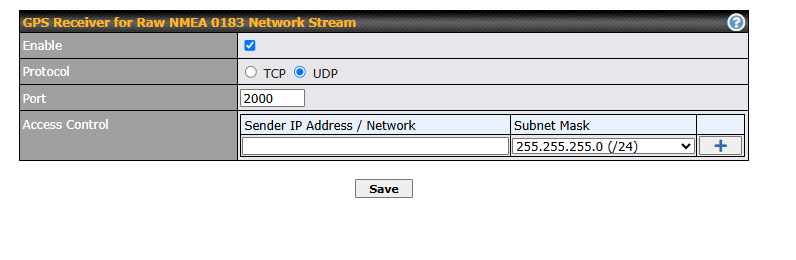
However I do not see any sign of GPS data, nor any logging nor status information.

I tried the Peplink API for info.location and received

{
    "stat": "ok",
    "response": {
        "gps": false
    }
}

Can anyone suggest troubleshooting steps on how to configure the GPS Receiver?

Thank you.
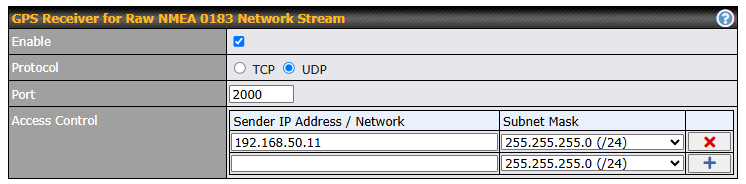
You haven’t entered the sender’s address in Access Control. Also, if that doesn’t fix it, it’s being sent to the broadcast address, not sure if the BR1 will like that - try with its unicast address.

Yes, it was going to the broadcast address. Thanks for the suggestion.

I’ve updated the access control :

And the sending config to use the Peplink IP Addr: (Signal-K)

Annoying that I can’t see any debug or activity through the Peplink UI. Is there any logging capability on the peplink? I can’t capture the UDP from my other devices anymore since it isn’t Broadcasting…

I’m still getting “False” from the API and a very stale (starlink) location is shown in InControl.

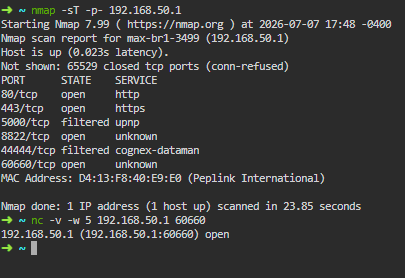
For units with internal GPS, the NMEA sentence stream is duplicated on port 60660. Open a raw TCP port to that to see if it shows anything. PuTTY will do that.

I am not able to connect on 60660.

I can view it using Nmap, but can’t connect using NC. I’ll mention I’m not a networking expert.

Are you sending the right strings? I would expect GGA strings for positioning.

GGL is indeed also a proper format, but with GGA I don’t have problems receiving the position in InControl. Maybe a bug in the Peplink software? I know initially, I had the same issue using an older Trimble GNSS sending slightly different strings, where a fix in the firmware was made by the Peplink team to also correctly process these strings.

I see you’re using GP prefix instead of GN or GA ones. That might be the issue, requiring a fix in the firmware. Maybe you should open a ticket, or try to emit GA or GN prefixes.

I don’t have sufficient data for a GGA message, but I don’t see why GGL wouldn’t work.

On a whim I asked Google what is the best message to send, Gemini is suggesting GPRMC ** Provides recommended minimum specific GPS/Transit data, including time, date, latitude, longitude, and speed.

So now I’ve started sending GPRMC per the gemini recomendation

$GPRMC,A,3358.0174,N,08419.4179,W,0.2,146.0,5.7,W*75

Still no sign of location in peplink. Or any error messages…

Interesting. Tons of learning for me, but these prefixes are :
GA: Galileo
GB: BeiDou
GP: GPS
GL: GLONASS. When more than one constellation is used.
GN: Combined GNSS position, for example, GPS and GLONASS.
GQ: QZSS

I don’t think I have any control over the Prefixes.

I’m chaining a number of systems together here:

  1. Cheap “MGears” USB dongle from Amazon (Amazon.com: Mgears USB GPS Receiver Antenna for Navigation Laptop PC Car Marine (USB A-Type) : Electronics)
  2. Victron Cerbo GX running Signal-K
  3. Peplink Mini.

Curious if anyone has a better approach.

I will try opening a support ticket.