We are pleased to announce that Firmware 8.5.3 Beta 1 is now available.
5 Likes
BR1 mini HW3 and br1 pro 5G working fine. No issue yet.
2 Likes
I’ve lost the ability to connect to the starlink management IP 192.168.100.1 From the lan or from the router itself (B20X)
support ping 192.168.100.1 wan 1
PING 192.168.100.1 (192.168.100.1) from 192.168.100.10 wan0: 56(84) bytes of data.
ping: sendmsg: Operation not permitted
ping: sendmsg: Operation not permitted
ping: sendmsg: Operation not permitted
ping: sendmsg: Operation not permitted
ping: sendmsg: Operation not permitted
rolling back to 8.5.2s067 build 5596 works fine
1 Like
@Paul_Mossip , I’m checking on this.
1 Like
Just to confirm, have you enabled the management setting for the Starlink WAN?

When using the Starlink Integration option (DHCP Option 121), the management IP is not required. I just tested this with the Engineering team and found that when the management IP is added, it may cause ping issues—specifically, the WAN may fail to ping 192.168.100.1.
Could you remove the management IP and retest?
This will be addressed in the upcoming beta release, which will restore the same behavior as in version 8.5.2.
1 Like
Yes, switching to using DHCP only works.
Thank you for the update.
The management IP is no longer required, as DHCP Option 121 will be used to obtain the route.
Thank you for verifying the beta firmware. If you notice anything that is not functioning as expected, please contact us here.
1 Like
I am particularly happy with this one:
[Beta 1] [Virtual WAN on VLAN] Added support for Virtual WAN on VLAN in OSPF/RIPv2 settings
as I was having this issue before… Peplink + Rajant - #11 by PeterDedecker
Rather unlogic not to have OSPF possibility on every WAN device, whether it’s virtual or not. Glad it has been fixed.
We also got a bug where WiFi WAN 2.4 GHz and the WiFi AP were competing for the right band to use, causing the device to crash and reboot. It has been fixed in Firmware 8.5.2s056 build 5930 but I don’t see it listed in the changelog here?
2 Likes
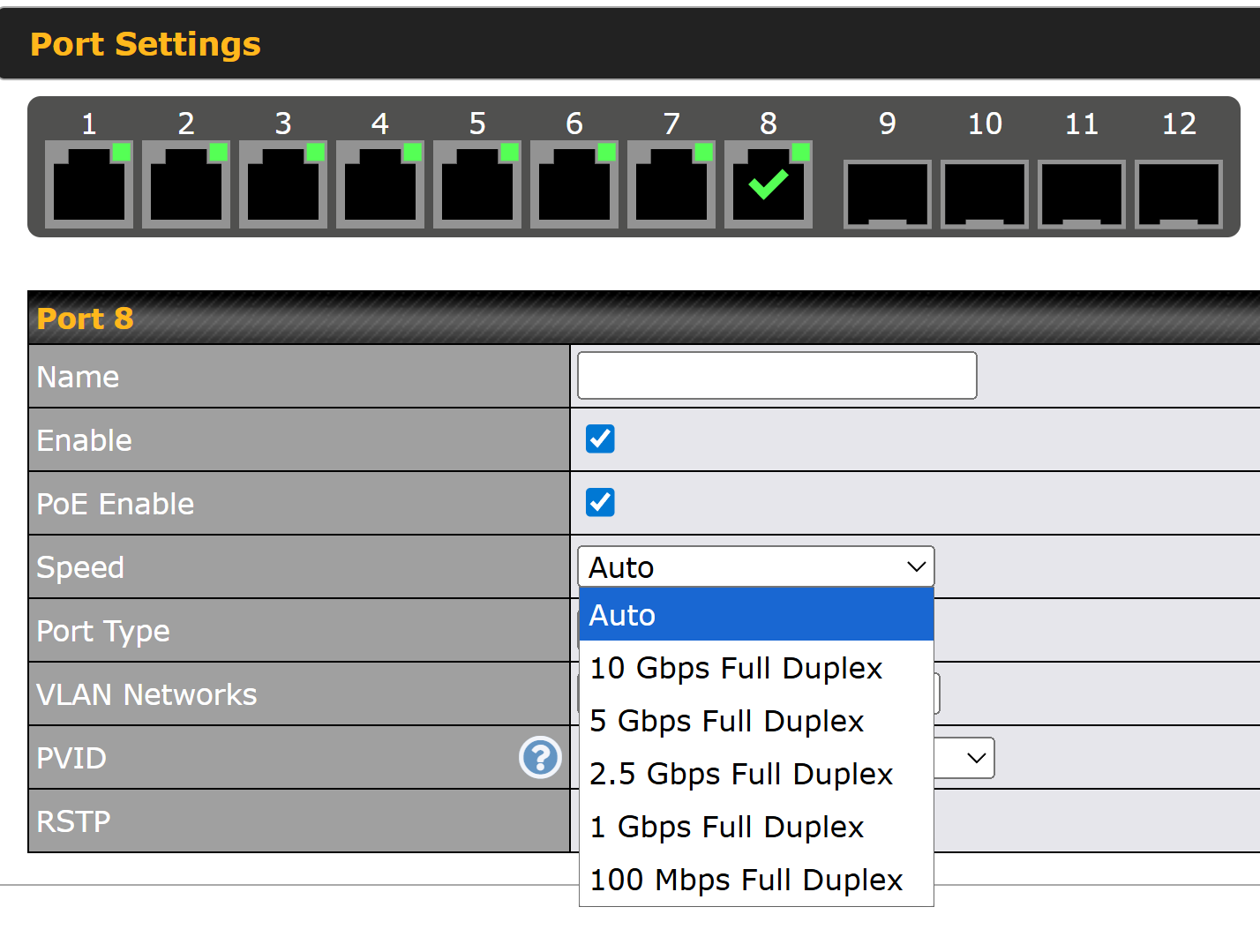
This may require a future firmware update for the switch, but the only settings that appear to work correctly when choosing Port Speed is: Auto, 1Gbps, and 100Mbps.
10Gbps, 5Gbps, and 2.5Gbps settings do not appear to lock the port to that rate.
This is in reference to RJ45 ports on the 8 PoE 10G Switch
Anyone tried this 8.5.3 beta 1 with visible+ yet ? Curious if the modems report as allowed or blocked devices.
8.5.0 = allowed
8.5.2 RC2 = report as blocked
8.5.3 beta 1 = ???
(Details here Firmware 8.5.2 RC 2 - #4 by Jeff_C)
I see some more work on APN being sent to carriers via modems in this release.
(33683)
[Beta 1] [Cellular] Fixed an issue where incorrect APN was used on some global roaming SIMs
What stability issue does [Beta 1] [Captive Portal] Fixed a stability issue in
Captive Portal refer too? Could someone please elaborate? @Lai @sitloongs
wouldnt that depends on the modem firmware versus device firmware?
Per visible+ blocking —> modem firmware was my exact thought too but was disproven.
Have run on various firmware including 8.5.0 for 2+ years connecting to and paying visible+ across several different plans all with good speed and zero complaints from visible+.
Updated to 8.5.2 got automated msg from visible that device would be blocked after being online 5 mins as not on allowed list (but could still connect)
Rolled back to 8.5.0 and ran another week (no block no further msg). Rebooted in 8.5.2 and 5 mins later got another warning message.
Now … given visible+ support is via chat and mail only it’s kinda hard to troubleshoot but 1000% clearly a change in what the Max BR1 Pro 5G is sending to visible while on 8.5.2.
I noted all this in the 8.5.2 beta forum (link in prior post) and was given a lecture from one of the retailers on here about getting away with using visible+ for this long etc. While the lecture was unnecessary they did point out a few ideas that 8.5.2 might have changed what billing info was being transmitted to visible (my words).
Given this a a paid device $180/year and a paid visible+ account with zero spoofing or hacking going on I’m kinda frustrated peplink would ignore it. Then again if I do all the work and open a fresh ticket and do more work (like test this beta copy) maybe it gets figured out …?
do you have a peplink ticket open? if so post ticket #?
Hi, Gentlemen…
Please… about openvpn configuration file…
Do Peplink have update the CA on this new release of firmware?
I am getting the following error when using the latest stable release 8.5.2S042
2273 Tue Aug 12 17:34:01 2025 daemon.err openvpn(inst1)[23225]: VERIFY ERROR: depth=1, error=certificate has expired: C=US, O=Peplink, CN=OpenVPN CA/[email protected], serial=113312633782089673523167257842976496637911551509
Thank you.
updating…
Checking the 8.5.3beta1… same issue with CA at the openvpn file, generated by Peplink.
Model: Peplink MediaFast 500
Firmware: 8.5.3b01 build 5393
Uptime: 6 minutes
2 Likes
Will 8.5.3 address the cellular (Thales) interface issues that have plagued 8.5.1 and 8.5.2? Interfaces take 20+ minutes to connect if they even connect at all.
I’ve got a whole fleet of BR2 Pro’s hanging on 8.5.0 because of it.
1 Like