We have a Peplink B One router with built-in WiFi access point along with 2 Peplink AP One AX Lite access points.
We have 2 ISPs with download speeds of 200 Mbps and 50 Mbps. Router is configured to only use the 200 Mbps connection and keep the 50 Mbps connection on standby.
With firmware version 8.5.3 build 6030 we see frequent drops in the download speed over WiFi to 1 Mbps. This is on a Macbook Air located about 3 feet from the B One access point. We saw similar behavior on other WiFi devices when running speed tests.
We also tried unplugging the 200 Mbps ISP and we see similar behavior where the download speed works for a little while close to 50 Mbps and then drops to about 1 Mbps.
Reverting to firmware 8.5.2 build 5862 resolves the problem and we see download speeds in the range of 100-200 Mbps. It’s great to be able to revert the firmware within the router’s reboot function on the web interface.
The problem manifests itself in streaming video applications that require 4 Mbps download, which shouldn’t be a problem for either of our ISPs.
We did not see any problem with download speed when using hard-wired Ethernet connection to the B One on both 8.5.2 and 8.5.3.
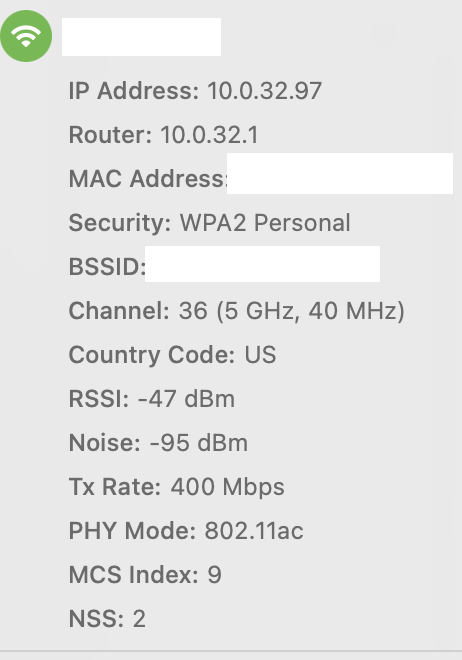
Next time this speed drop happens, on your Mac, hold down the Option key and click the WiFi icon in the menu bar, and you’ll see some debug info which looks like this:
I reported this to Peplink and of course they could not reproduce the issue in the lab. I was hoping some other people might have seen this.
We were not having any issues running 8.5.2 for the past 2 weeks or so. Just now I switched back to 8.5.3 and of course there doesn’t appear to be any problem.
I’ll stay on 8.5.3 until we encounter the problem and then try to work with Peplink to remotely diagnose the problem.
Focus on checking the System Log for any Wi-Fi driver or channel errors around the time of the speed drop, as this provides crucial context for Peplink support.
I think that all I had to do to fix the problem was reboot the B One router. It didn’t matter whether it was 8.5.3 or 8.5.2 firmware. My best guess is that the access point in the B One wasn’t working until we rebooted and this caused devices to connect to one of the other access points on the other side of our house.
If you login to the router web interface, select the AP tab and the select Wireless Clients to show all of the wifi devices and which access point they are connected to.
Thanks for the suggestions, and I will keep in mind if there are any issues in the future. This is one of those intermittent problems that may never be able to be reproduced, but it’s helpful to learn more about information available on the router and client side.
This is interesting. I also have been having issues with my internet speed being limited. On both 8.5.4 and 8.6 my download speed tops out at like 300-400mbps upload at 20mbps. I should get 1300mbps down and 300mbps up. I’ve tried everything I can think of! It is very frustrating. Oddly 8.6 firmware caused other issue with our sip phones not being able to stay connected to our server.
I have created a ticket but wanted to post so they know this is an issue for others as well.
If anyone knows the fix I would greatly appreciate it!