We would like to request the ability to configure DNAT directly on Peplink devices without requiring a dummy IP WAN connection. In our case, we are using an M2M SIM with a BR1 Pro, and a LAN device needs to reach a remote server through DNAT. Currently, the workaround is to create a dummy WAN for it to be recognize by the BR1 Pro and force it “UP,” but this adds unnecessary complexity when no actual WAN interface is present.
Use Case / Benefits:
-M2M deployments rely only on cellular connections, with no WAN ports connected.
-Allowing DNAT directly on the cellular interface would simplify configuration and reduce the need for dummy IP addresses workarounds.
-This feature is already supported by other vendors such as MikroTik, Robustel, Fortinet, and Cisco, where DNAT is straightforward and easy to configure.
-Adding this capability would make Peplink more competitive and better suited for M2M use cases.
We have lost a project opportunity with a local police department when testing failed against DNAT enabled devices from both robustel and Mikrotik
It is important to have this feature in future firmware to enable us to compete when DNAT is a mandatory requirement
3 Likes
This is interesting. I realise I don’t understand the issue at all. Can you share a diagram or maybe screenshots showing what you have to do today? What is the dummy IP WAN connection you speak of?
Are you saying that the LAN device needs to have the IP address assigned to the cellular WAN on its own interface? Is it the only device on the LAN?
1 Like
Thank you for your response Martin. Let me clarify the current situation and the workaround Peplink Support suggested.
Our setup:
- The BR1 Pro with Antenna Max is running on an M2M SIM (cellular WAN only).
- A LAN device connected to the BR1 Pro needs to reach a remote server that sits behind the cellular network.
- The server is only reachable through cellular network (M2M SIM side).
What Peplink Support advised:
- Since DNAT cannot be configured directly on the cellular interface, they suggested creating a dummy WAN connection.
- This dummy WAN does not need Internet access; it only needs to be shown as active/UP so the router recognizes it in the IP table. For example, this can be done by simply connecting the WAN port to a switch or another Ethernet port.
- Once the dummy WAN is up, we can then create a NAT Mapping rule so that any traffic from the LAN device destined for the remote server is translated through the cellular connection.
The dummy WAN exists only to “trick” the BR1 into recognizing the IP of the Remote Server as an inbound IP so that NAT mapping can be applied. Without this, DNAT isn’t possible as the support team say.
And to your last question: yes, in our case there is only one LAN device that needs this access.
1 Like
John Paul, you are making me feel stupid which I appreciate as I like learning about issues I have not seen myself, forgive me asking more questions.
A LAN device on the Peplink BR1 accessing a Server IP on the M2M cellular WAN over NAT normally works fine. The server on the WAN sees the source IP of the peplink cellular WAN and knows how to route back to that, the peplink cellular WAN then manages NAT between it’s WAN IP and the LAN IP of the device requesting the server resource.
Why is the dummy wan needed or I suppose the question is why is inbound NAT on an IP different to the one used on the cellular WAN needed?
1 Like
Hi John
I think I am missing something in this and it might be the how the M2M part comes into it.
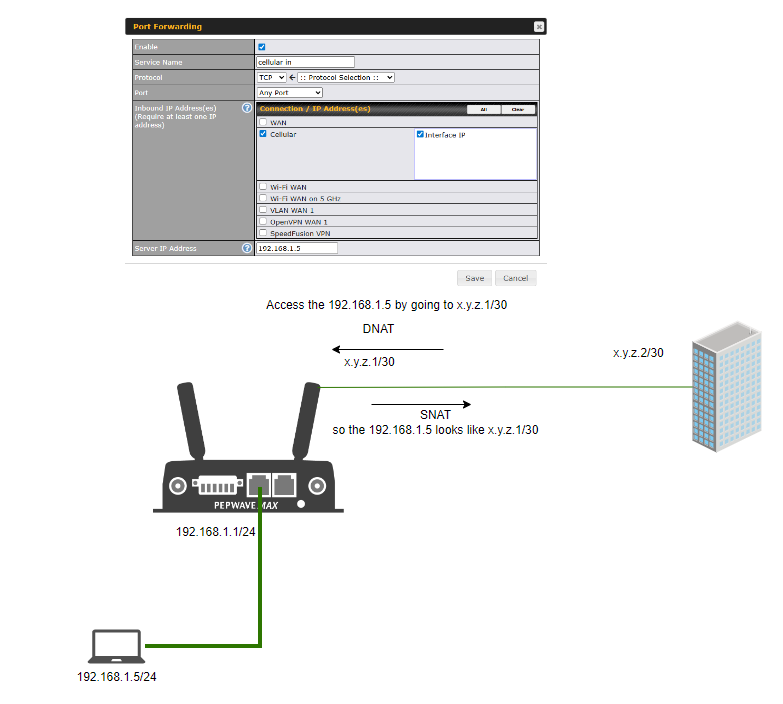
The image is how I would expect it to work with the outbound traffic from 192.168.1.5 (I made up addresses for this) getting SNAT on to the x.y.z.1/30 network so the other end knows what to respond to, and then set an inbound port forward for all to the 192.168.1.5 from the cellular network.
Do you mean that you need the 192.168.1.5 address preserved onto the cellular network with outbound dnat?
1 Like
The OP stated DNAT in relation to an outbound session. That tells me the LAN device is trying to contact for example 1.1.1.1 but the OP needs it to be 2.2.2.2 so he needs DNAT (and maybe SNAT too). I am just assuming so it would be good to get clarity and maybe a diagram.
1 Like
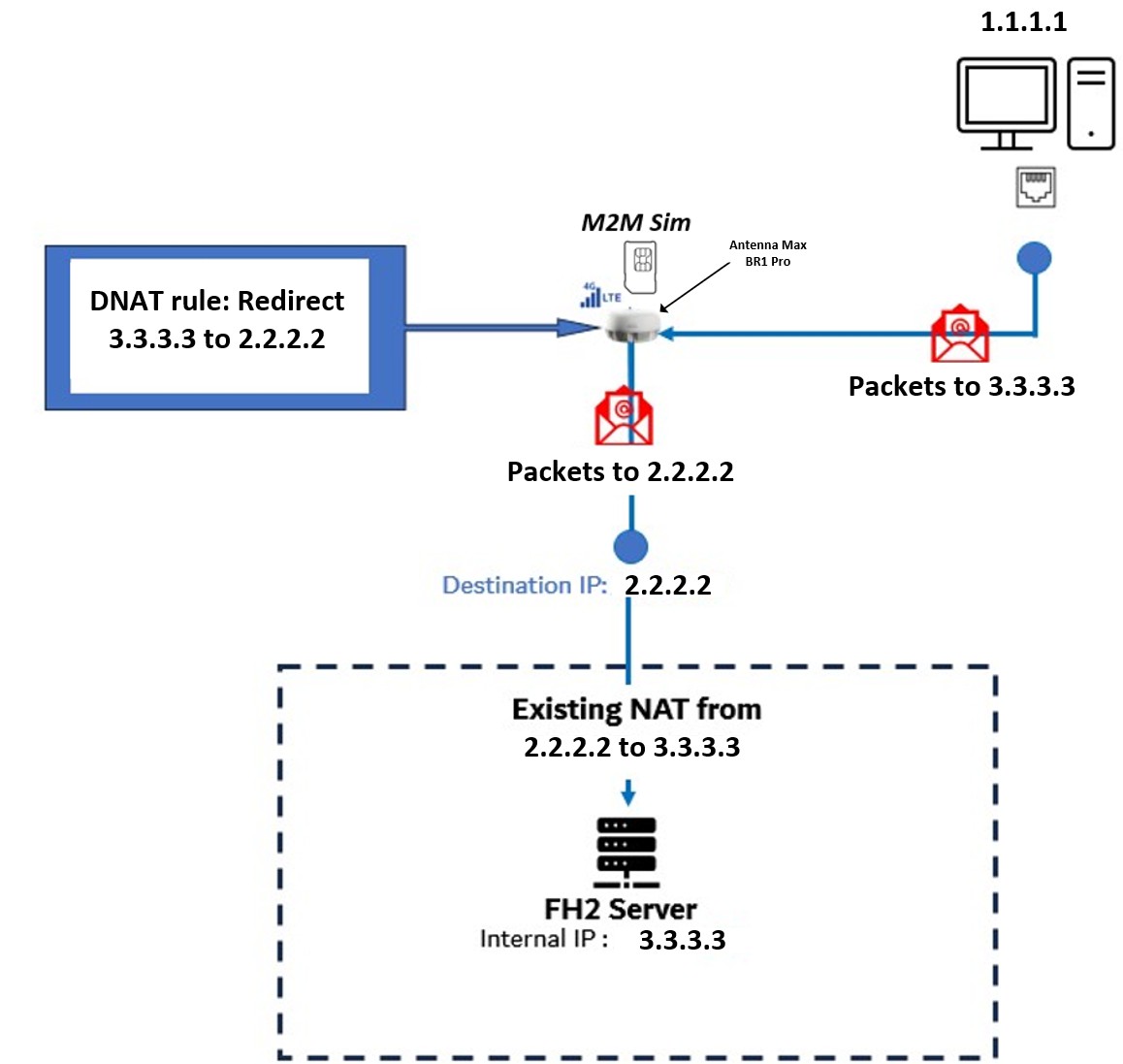
Hi Team, thank you for your response. Im attaching a diagram that may help to understand the requirement and below is an explanation on what we are trying to achieve.
Scenario Explanation:
- LAN Device (1.1.1.1)
- This is a laptop/PC connected to the LAN side of the BR1 Pro.
- It needs to communicate with the FH2 Server (3.3.3.3).
- Target Server (3.3.3.3)
- The FH2 server is reachable only through the M2M network (2.2.2.2).
- There is already an existing NAT rule in the remote network that translates traffic from 2.2.2.2 → 3.3.3.3.
- Peplink BR1 Pro with M2M SIM (2.2.2.2)
- The BR1 receives traffic from the LAN device destined for 3.3.3.3.
- However, the Peplink cannot natively DNAT this traffic directly on the cellular interface.
- Required DNAT Behavior:
- Any packet from the LAN device destined for 3.3.3.3 should first be DNATed to 2.2.2.2 at the BR1.
- Once NATed to 2.2.2.2, the M2M network will forward it using the existing NAT rule to reach the server at 3.3.3.3.
- Workaround from Peplink Support (Dummy WAN):
- Configure a dummy WAN IP for 3.3.3.3 so the router recognizes it as inbound traffic.
- Disable health check so the WAN shows as UP in the IP table.
- Add a NAT Mapping rule: inbound traffic to dummy WAN (3.3.3.3) → forward to 2.2.2.2.
- This allows the BR1 to apply DNAT, but it requires a physical WAN port to be brought up even without Internet access.
Let me know your thoughts and if you have other work around that we can try.
1 Like
Ok I understand your DNAT requirement. Thanks for the diagram.
To be certain is the dotted line showing a NAT router? Is that where the existing NAT is applied?
Or does the FH2 (a Fusionhub server is it?) have a WAN interface of 2.2.2.2 and a LAN interface of 3.3.3.3?
If the latter then you could set the Fusionhub to IP forwarding and add a static route to the BR1 Pro for 3.3.3.3/32 > 2.2.2.2
1 Like
To clarify, the FH2 server in the diagram is not a FusionHub. It is an application server that sits behind an existing NAT device.
- The external IP of the NAT device (2.2.2.2), which is reachable via the M2M SIM and is pingable from the BR1 Pro.
- The NAT device translates traffic from 2.2.2.2 → 3.3.3.3 (the internal IP of the FH2 server).
- The LAN client (1.1.1.1) needs to reach the FH2 server at 3.3.3.3, but to get there, the BR1 Pro must first DNAT the traffic.
- From there, the existing NAT device will handle the translation to 3.3.3.3.
So yes, the dotted box represents the existing NAT in front of the FH2 server, not a FusionHub setup.
2 Likes
@MartinLangmaid , thanks for helping on this. Do you think there might be another work around apart from the dummy WAN? The customer is against this work around.
1 Like