Hello,
We have a customer where we use the Peplink MAX BR1 and BR2 routers.
Peplink MAX BR2 Pro
Peplink MAX BR1 Mini 5G
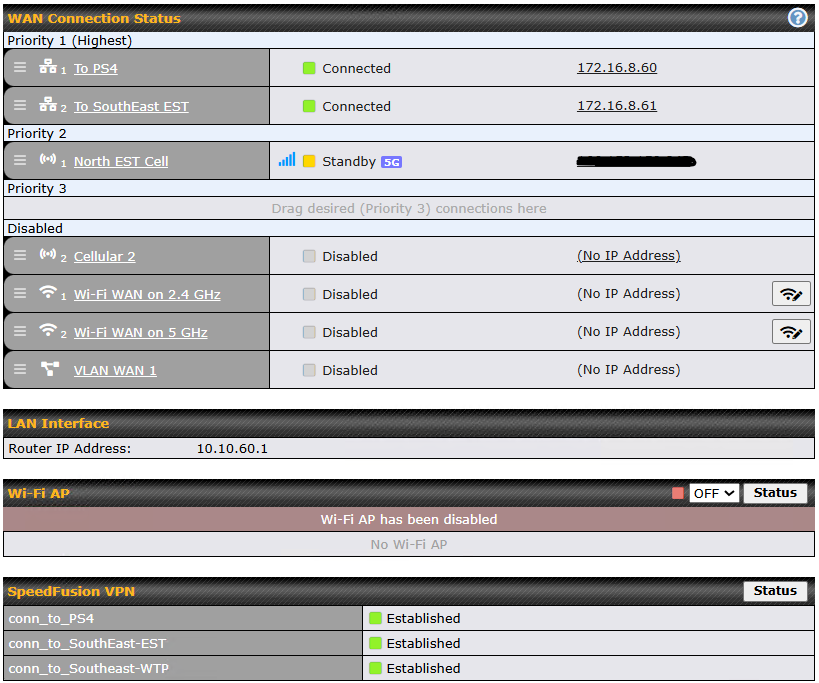
We connect each WAN port to a Radio. This is a PTP connection to another radio connected to another router in a different location. This is a closed network, all PTP radios. We are using the health checks to check the radio connection on the “other” side. These WAN connections are assigned Priority 1. This is working very well.
We have added a Cellular connection to each router as a “backup” function should a radio goes offline/fails health check. We are using PTP SpeedFusion VPN connections to connect PTP to each router. These are in Priority 2 “Standby” mode. We originally have these in the Dashboard as Priority 1 (to always be available), but we seem to have created possible routing loops as both the WAN and Cellular connections remained ON at all times. We would think this is the case.
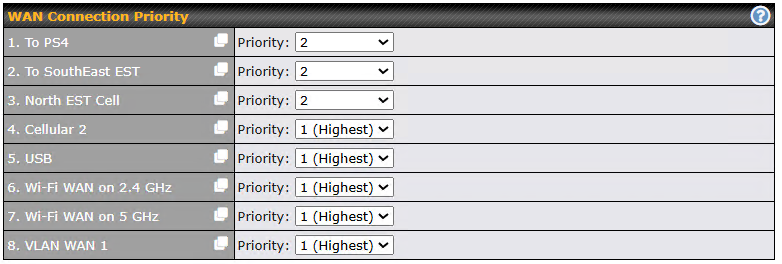
OK, if appears we need to adjust the SpeedFusion WAN Priority (most all are set to 1). We have tried different priorities inside the SpeedFusion config menu.
The idea is we want the main WAN 1/2 to be ON at all times. IF only 1 of these WAN ports goes offline (fails Health Check), we need the SpeedFusion VPN connection to be used as backup, then return to normal when the main WAN port is available again.
Here is our main issue. With the Cellular connections in “Standby”, if a router resets/power loss, this router is NOT able to reconnect the SpeedFusion VPN connection. We have to manually move the Cellular into Priority 1 section on both ends, allow the SpeedFusion VPN to connect then move the Cellular back to Priority 2 “Standby”.
Now if we leave the Cellular connection in Priority 1 - Connected, we appear to get into a routing loop where we keep losing connection/availability of the router. I feel we need to adjust the WAN Priority correctly in the SpeedFusion menu, then move the Cellular back to Priority 1, we should be good. Maybe we also need to create an Outbound Policy?
This is where we need some advise and direction. I can provide a config file as well if it helps. We purchase many of the devices for customers over the year, but yet to use these routers in this fashion. Some of the confusion is the SpeedFusion WAN priority where it lists the WAN and the CELL ports you see from the Dashboard.
1 Like
Would it be possible I do not just yet understand SpeedFusion VPN? We have the following WAN ports setup:
MAX BR2
WAN1 - Radio
WAN2 - Radio
WAN3- Cellular
MAX BR1 Mini 5G
WAN1 - Radio
WAN2 - Cellular
The Radio connections are point-to-point to another Radio/Router. The Cellular is obviously connected to the local cell tower. As the Radio-to-Radio links are established, I wanted to create a PTP Cellular SpeedFusion VPN connection from router to router to match the connection made with the radios. This is to act as my fallback, when a Radio fails, that SF VPN link will take over and provide packet delivery from router to router.
As I understand this, the Radio WAN links are in Dashboard Priority 1. We currently have the Cellular WAN link in Dashboard Priority 2.
Created a SF Cellular/VPN connection for each radio link, set the priority as follows within the SF Config menu:
MAX BR2
WAN1 - PTP Radio - P1
WAN2 - PTP Radio - P1
WAN3 - Cellular P2
MAX BR1 Mini 5G
WAN1 - PTP Radio - P1
WAN2 - Cellular - P2
So, originally we had set the Cellular WAN link in the Dashboard Priority 1 section and in the lab, this worked fine, so we thought. We managed to create a routing loop and was losing visibility and connections. Once we moved the Cellular WAN link to Dashboard Priority 2, the network stabilized. However, this presented a new problem. In this position, if a router loses a SF VPN connection due to power loss or router reset, the router will NOT reconnect the SF Cellular links. We must move the links up to P1 in the Dashboard on both ends of the link, wait for connection, then we can move the links back to P2 on the Dashboard.
We are not bonding, smoothing, etc. We just want the Cellular SF link to be a back up/fail over link when a radio goes down.
I feel I need to move the Cellular links back to Dashboard Priority 1 so they are “available”. We are confused about the WAN Connection Priority section inside the SF Config menu. Also, do I need to make use of Outbound Policy to ensure that only the Radio WAN links have top priority and IF 1 of those 2 WAN links goes down, the mirrored Cellular SF VPN link will take over.
Any ideas?
1 Like
Hi…
Please…
Correct me if I am wrong.
DEV_A
Have HIS own SIM Card (INTERNET?)
Have HIS own WiFi/RADIO Connection (INTERNET?)
Don’t have WAN
SHARE WiFi it is on. ( because at support.cgi, will be enable when it have Internet)
DEV_B
Have HIS own SIM Card (INTERNET?)
Have HIS own WiFi/RADIO Connection (INTERNET?)
Don’t have WAN
SHARE WiFi it is on. ( because at support.cgi, will be enable when it have Internet)
DEV_A
LOST his connection HIS (1st priority) connection to RADIO of DEV_B
Bring UP the SIM CARD to connect to DEV_B!
- Are you using SFC RELAY?
- The SIM CARD of DEV_B, have a public tcp/ip address and have a DDNS service working?
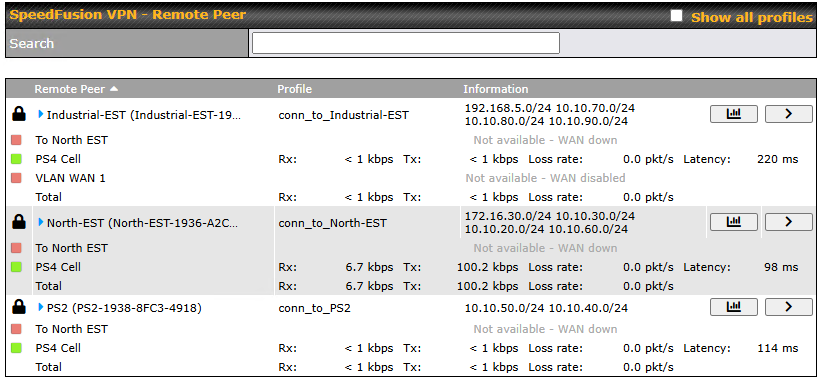
Part 3: I have noticed in my SpeedFusion Status that ONLY the Cellular lines are showing available. Should I also see the Radio (WAN) links as well? So my Priority selections works as prescribed?
You can see the PS4 Cell links are all available where the To North EST are all down. Now I only entered the Cellular IP address into the initial SF configuration box for remote peers. Some documentation shows I should enter all of the IP addresses? But some say just need 1 IP address of a WAN port, the Cellular is a WAN port. I am wondering if this is my issue?
Any new ideas?
Hello, thanks for replying. Each router has a SIM with a Private IP address. I just made another post where I think I may be going wrong. My SF that I setup only has the Cellular Private IP address of the remote peer, so I am not showing any other WAN ports online/available. Wondering if I need to enter the IP addresses of the WAN Radio Links? The documentation say I only need to enter 1 WAN IP, but does not specify.
This is a closed network, no Internet access allowed here. So all of the connections are local PTP.
Hi…
A private mobile network tcp/ip address. Don’t allow you to connect one sim card to another sim card, even when both are in the same cell antenna.
The have a simple words of explain a function called L2 isolation.
They have a endpoint tcp/ip address in this closed network, where every station can connect to it?
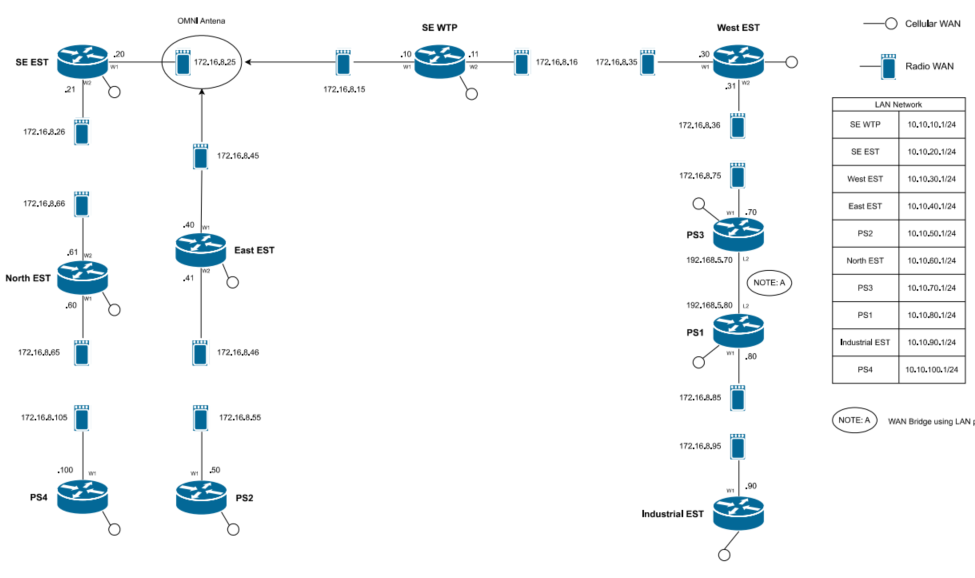
I can share the layout:
These routers are spread out across a city and the connections are PtP Radios connected to the WAN Ports. 2 Radio WAN ports, is a MAX BR2. 1 Radio WAN port is a MAX BR1 mini 5G.
I am also noticing something. I created the SF VPNs, seems some are reporting correctly when I look at the SF Status, some are not. Showing Radio WAN ports not connected, when they are connected.
Hi…
Let me ask…
Nort EST (BR2) need to route connection from/to PS4 (BR1) to SE EST (BR2)?
The SCADA reference point is the SE WTP, this is where the servers are located. All data must flow to this point, and all devices must be seen/available to the SE WTP. The Radio network is using RIPv2, the Cellular network is using OSPF.
I can be wrong…
But… You will need a reseller to better support you at this project.
This kind of support… Is a layer three support. That should be done by an engineer from a reseller.
1 Like
We have been able to figure most of the issues ourselves. Basic PepLink OS knowledge is always helpful. We are actually good now on how SpeedFusion is supposed to work and control the Priorities.