Connecting two MAX BR1 Pro 5G

Hello,

I have 2 “MAX BR1 Pro 5G” routers.

  • Router 1

    • SSID “PEPLINK_0001” with IP Address 192.168.1.1
    • 1 Host PC connected as 192.168.1.211
    • 1 IP camera connected as 192.168.1.64
    • Static route settings as below
  • Router 2

    • SSID “PEPLINK_0002” with IP Address 192.168.50.1
    • Connected to Router 1 as 192.168.1.83
    • 1 Client PC connected as 192.168.50.25

They both have the firmware 8.5.2 build 5862 running

Router 2 was able to connect to Router 1
Ping to 192.168.1.1 from Client PC works just fine.
Client PC cannot Ping to 192.168.1.211

Why my client PC cannot access to the Host PC?
Any suggestions would be appreciated.
Thanks,

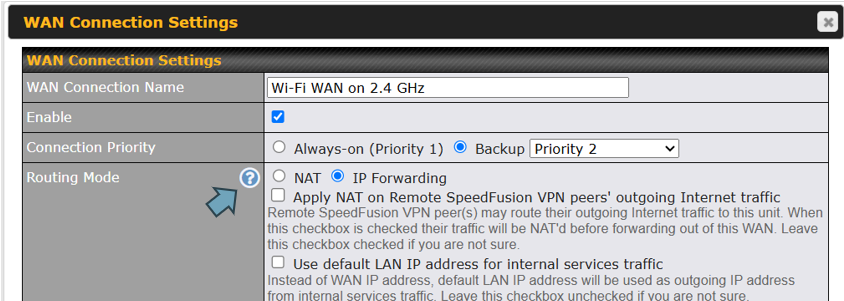
The static route on router 1 makes me think you want to disable nat on the wan of router 2? If so you should have the destination network set to 192.168.50.0 with a gateway oof 192.168.1.83. then you should set router 2 wan to ip forwarding and not nat.

Right now you have nat on router 2 wan, there is no obvious reason as to why ping wouldn’t work. can you ping 192.168.1.211 from router 1 web admin? maybe the device has a firewall enabled blocking ping?

Hi @MartinLangmaid
Thanks for your help.
I changed the destination ip to 192.168.50.0 but didn’t work.
And finally worked after changing the routing mode to IP Forwarding by clicking the (?) mark there.


Don’t know why such option is hidden that way.
Hope peplink fix this later.

1 Like

Also noticed when no connection is available,
“tracert” was the magic to find the devices in different layer.