Hi all - does anyone know how to adjust the default handshake port (usually 32015) when creating a SpeedFusion VPN in InControl2? I can see where I can adjust the data port (usually 4500) but I can’t find anywhere to adjust the handshake port.
1 Like
Hi, @Justin_Hayes
Just answered you at the reddit community.
https://www.reddit.com/r/Peplink/comments/1u10usb/changing_default_speedfusion_handshake_port_when/
I just check… Don´t find a way to do this, using IC2.
But… You can do it, when do a SF directly at the device.
Maybe… Can you try?
Build your SF cloud, using IC2 and after this… Try to change the default ports to your choice?
Directly at the devices.
1 Like
Thanks! I can see the option to change the port when making a SF VPN directly on device. The issue is I need multiple tunnels between the same devices, which you ccan only create with InControl2. It seems odd that there isn’t a way to change this port in InControl - is this a bug? Can this be fixed?
1 Like
You always can ask to Peplink…
Have you try to open a ticket at https://ticket.peplink.com ??
It is just a suggestion…
choose Type of Inquiry to be a Incontrol2.
Ask to a Peplink Engineer.
1 Like
Hello @Justin_Hayes,
Thanks for reaching out to Peplink Support (Ticket 26060376) and Rising Connection. We will take on getting this resolved for you ASAP.
Have a good day,
Marcus 
Hi Justin,
The data ports are defined on a per-profile setting, so are changeable as part of the SpeedFusion VPN profile.
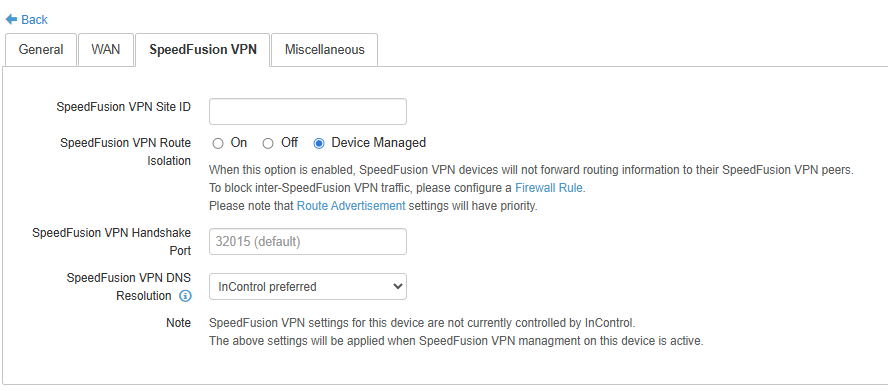
The handshake port is, however, a device-wide setting, and can be found on the device level overview page for the specific device. Please see:
2 Likes