I have a B One running 8.5.1 firmware with no issues.
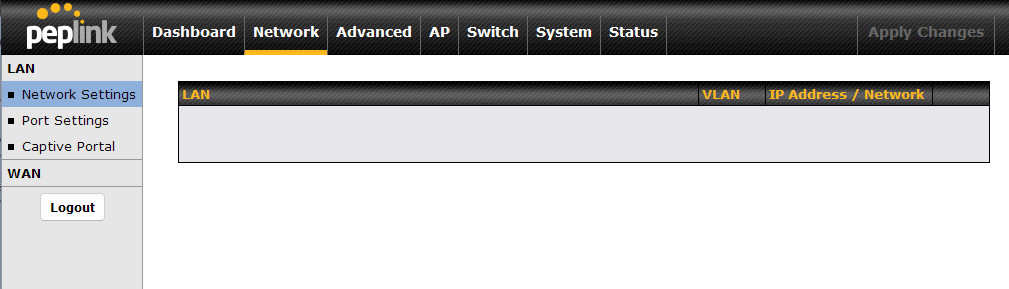
I updated firmware tonight to 8.5.4 build 6264 and after rebooting into the new firmware, the Network Settings page (where it normally allows you to edit and create vlans under LAN, etc.) is blank. See screenshot attached.
I rebooted back into the older firmware 8.5.1 and all is normal again. On firmware 8.5.1 under LAN it shows three vlans, Untagged LAN, a VLAN for secondary computer, and a wireless VLAN.
How should I correct this with firmware 8.5.4?
Have you tried rebooting to 8.5.4? I’ve occasionally seen glitches and they tend to go away after a reboot.
No, I will give it a try.
Rebooted from working 8.5.1 to 8.5.4
No Change from before in 8.5.4 - still no Network Settings page
Rebooted from 8.5.4 to 8.5.4
No Change - still no Network Settings page
Rebooted again from 8.5.4 to 8.5.4
No Change - still no Network Settings page
Rebooted to 8.5.1 (firmware slot 2)
Network Settings page ok
Checked for updates, Update to 8.5.4 again and Rebooted
No Network Settings page now in 8.5.4 again
Rebooted from 8.5.4 to 8.5.4
No Network Settings page still
Rebooted back to 8.5.1
Network Settings page working again
Hi aquablue,
I would suggest you submit a ticket for our team to check what could be the issue here.
Best regards,
Simonas
It looks like firmware 8.6.0 will be released soon; maybe I’ll try going to firmware 8.6.0 first, and if the issue persists, I’ll open a ticket.
Have not had a firmware issue such as this since beginning with peplink ~7 years ago. The dual firmware slot architecture is nice to have in this case.
It turns out this was a browser issue. I guess something changed with the way the network page html is rendered where it is no longer simply plain html. I didn’t see anything that looked like it had changed in terms of the final page, but there must be something dynamic going on now and so the latest palemoon (firefox derrivative) can’t render that one page now. Some of the features palemoon has had for a long time I find useful, but as current html becomes more specialized it looks like I’ll have to switch to chrome, edge, or mainstream firefox.
1 Like