I have a peplink B One and three AP One Minis. I’m trying to adjust the AP output power, and notice some user interface (UI) discrepancies.
Here’s what I see:
B One AP Control / Profile
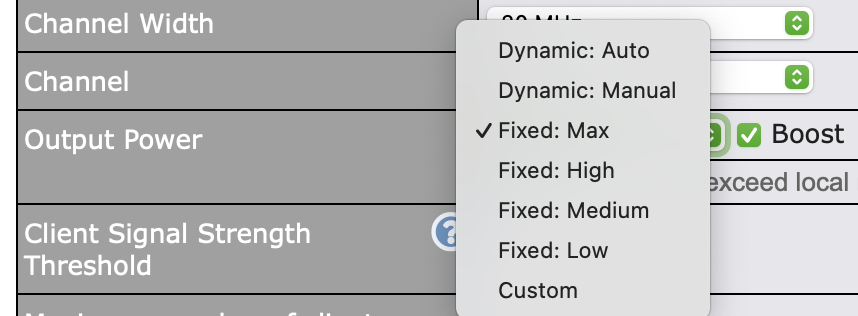
AP / Settings / Default AP Profile / Output Power gives a range of options (Dynamic: Auto, Dynamic: Manual, Fixed: Max, High, Medium, Low, and Custom) as well as a Boost checkbox:
B One AP Status / Access Point
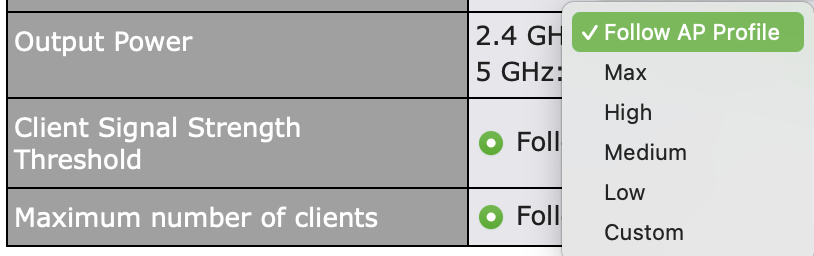
Looking at an individual AP, you can override settings on a per-AP basis, by clicking the Pencil icon for ‘AP Details’
This gives you a different UI for changing output power. Here you get “Follow AP Profile, Max, High, Medium, Low, and Custom”. Notice that the Boost option is missing.
I will SPECULATE first and also pass this on to the engineers to confirm… but I expect most of this is at least close:
AP Controller: This is the most advanced way to deploy APs, there is a true enterprise grade controller enabled on the router that adds capabilities the AP cannot do on their own: dynamic power control as well as enhanced roaming control. This is why you have extra things here.
AP Status: This is an override from the controller, to revert the AP to one of it’s own settings, which do not include the controller assisted power control.
AP UI: Same story here, as a standalone AP, it lacks the dynamic power capability.
AP Power Boost: This one I’m less clear on, but I suspect you may be correct in that the AP One Mini doesn’t support it. It’s been a few APs since I’ve used it but in the past I found it to generally reduce the overall throughput on the network for clients that already have a good signal, so it’s surely a tool of specific use cases and not generally a good thing to use.
Hello @ChristopherSpitler ,
In our experience, InControl2 offers even more capabilities beyond what @Travis has already covered.
We moved all of our managed Peplink customer Wi-Fi systems to InControl2 many years ago and have not looked back. There is a new feature between InControl2 and the latest Firmware that allows InControl2 to manage the interap router WAP manager as an option, though none of our deployments has utilised that option yet.
Yeah, this is something that I’ve struggled to get a clear answer on for… quite awhile.
Client roaming management generally requires a controller and my question is (even before 8.6.0) does IC2 do the same client roaming management that the local controller does?
Still waiting for engineering to chime in but what I believe is that IC2 only supports 802.11k and r, while using the local AP controller also enables 802.11v.
Credit to Travis for pointing this out; his explanation is clear. Here is the supplementary information regarding how the power settings and roaming protocols function.
Power Settings & UI Differences:
AP Controller - Profile (Group Settings)
This is where you set rules for a group of APs.
Dynamic - Auto : The controller automatically update an AP’s transmitting power based on the signals of nearby managed APs.
Dynamic - Manual: The controller only changes the power when you click a button to trigger it.
Boost: This option is always here. However, it only works if the specific AP model supports the “Power Boost” feature.
AP Controller - AP Status (Single AP Settings)
This is where you set rules for a specific AP.
This AP transmitting power setting overrides the profile setting. AP controller will exclude the AP radio from “Dynamic” power updates mentioned above.
The “Boost” setting is not provided here, AP will follow the corresponding settings in AP Profile.
Local AP UI (Logging directly into the AP)
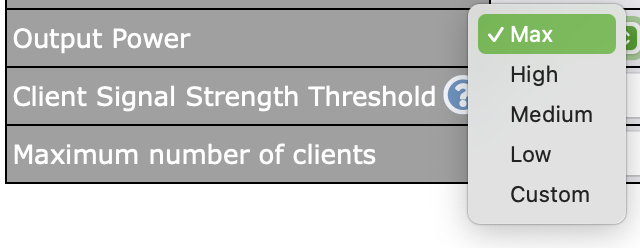
It only shows Max / High / Medium / Low / Custom.
The “Boost” option only appears if the AP model supports “Power Boost”.
Power Boost Mechanism:
When Power Boost is enabled, the AP ignores regulatory transmission limits and uses the board’s maximum hardware capacity for the “Max” setting.
The lower settings decrease in 3dB increments from this new maximum:
High: Max - 3dB
Medium: Max - 6dB
Low: Max - 9dB
Roaming Standard Support (802.11k/r/v):
802.11r (Fast Roaming): You can use it on a standalone AP, AP Controller, or InControl2. It will be enabled when you check “Fast Transition” in your Wi-Fi security settings (WPA2/WPA3).
802.11k and 802.11v: As Travis noticed, these are limited. Both k and v only work if the AP is managed by an AP Controller.
Thanks @Lewis_Kong ! I do have one pedantic yet important question. From your quote above, is AP Controller defined as on-device AP Controller (such as BR2 Pro, B One, Balance series, etc.)? If so, can you confirm that .11k/.11v do NOT work when managed by InControl2?
Currently, AP One managed by InControl2 do not provide actionable 802.11k/v data to help client roaming, even when the features are enabled.
We will address this in an upcoming AP firmware update (after 3.9.8) to ensure the same 802.11k and 802.11v functionality no matter the APs are managed by AP Controller or InControl2.
What are the benefits of 802.11k and 802.11v versus other? Which AP hardware support these standards? If you select k/v and the device does not support does it fall back to earlier standard or does it not function at all?
802.11r can/will break your environment with non-compatible clients. In short, it changes the way authentication is done and will cause hard handoffs (full disconnect and reconnect).