Hi
I have configured a router with the following IP address: 192.168.50.1/24
DHCP is set up for Wi-Fi devices in the range 192.168.50.100–200.
I am trying to connect a DJI RC Pro drone controller to the Wi-Fi network.
I am getting an address conflict message with the following IP address ranges: 192.168.41.0/24, 192.168.50.0/24, 192.168.100.0/24, 192.168.101.0/24, 192.168. 120.0/24, 192.168.121.0/24, 192.168.130.0/24, 192.168.131.0/24, 192.168.140.0/24, 192.168.141.0/24.
I assume I need to change the router’s VLAN addressing and DHCP settings. I think the 10.168.50.0/24 addressing would be correct?
Could you please advise where in the menu I should do this?
Thank you
Hi…
yes… You can setup 10.168.50.1/24 to be the lan address of the peplink lan.
Do this at
dashboard > Network > LAN >
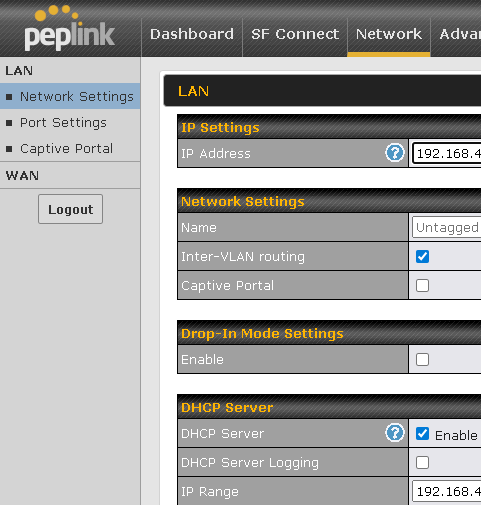
2 Likes
Hi Tomek,
This is a known issue caused by DJI’s limitations. Unfortunately, Peplink MAX default network settings (192.168.50.0/24) collide with DJI’s internal networks.
Please use any subnet excluding the ones you pasted. We mostly use 192.168.0.0/24 or 192.168.1.0/24.
Drop me a DM if you have any further issues. We have a lot of experience with Peplink and DJI setups.
2 Likes
Hi,
I’ve changed the device’s IP address and now the DJI controllers are connecting to the Peplinka access point.
Thank you very much for your help.
Regards,
Tomek
1 Like