I have two Starlink units connected to WAN1 and WAN2 on a Balance 30 Pro running 8.5.4 firmware. In my LAN I have a host that needs to access the gRPC API for both Starlink units, but I can’t seem to make this work. I’ve tried the Starlink API proxy setting, but I’m unable to connect via either of the proxy ports (9201 and 9202) using any of the Peplink’s two LAN interface IPs. I AM able to access one of the units via 192.168.100.1:9200, but of course that is just one unit (whichever is active).
Are there any other settings required to make the proxy feature work? Or is there a better way to do this?
Thanks!
Kurt
1 Like
Hi Kurt,
I have ran into the same problem.
You will need to have 2 clients. Those 2 IP addresses you need to enforce with Outbound Policies the IP over the specific WAN. That is currently the only way to reach the Starlink dish API.
The problem is that both dishes have the same IP address 192.168.100.1 
Hope this helps.
1 Like
Hey Joey,
Thanks for the response. I definitely see how that would work, but I’m trying to do this from a single client if I can (a Home Assistant server). It seems like the proxy feature is supposed to address this. Do you have any experience with that?
-Kurt
1 Like
Hi Kurt,
I have not tried that my self yet.
Maybe give it a try to enforce the TCP port number to the WAN port?
1 Like
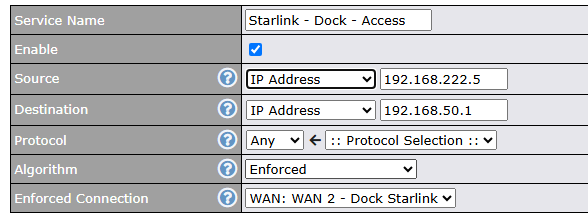
Yep, I tried that as well. I created the most inclusive rule possible and put it at the top of the list, but no joy.
I wish there was more information about how the proxy feature is supposed to work. I tried using the packet capture (from the support page) and can see the incoming SYN in the LAN capture, but the only response I see is a SYN-RST. If the proxy feature is truly a proxy, I would expect to see an immediate SYN-ACK from the LAN interface.
Did some digging and the Peplink router API documents don’t mention anything on the Starlink API proxy.
I will build a tool on docker and run it on a multi Starlink setup with proxy enbaled to see if I can find some information about this and report back.
Stay tuned.
Sounds good, thanks!
Here is an example of my LAN packet cap (I was trying to connect to one of the other LAN interfaces, 192.168.222.1).
1 Like
I have just seen the destination IP in your printscreen is not the 192.168.100.1 any reason why this is at 192.168.50.1?
And I just find that the Peplink exposes the 9201 port on the router LAN IP.
In my case 192.168.1.1 is my router LAN and the Dish IP 192.168.100.1 is porxied to 192.168.1.1:9201
Try and remove your OBP and use on your client your router untagged LAN IP and add :9201 after that IP.
Hi Joey,
I have a few different VLAN’s, so part of my confusion is which interface(s) should be listening on the proxy ports. The only documentation i’ve seen for the proxy feature was another forum post from 2024, where sitloongs stated that the unit would be listening on the “LAN interface.” His example was using 192.168.50.1:9201, not the 192.168.100.1 IP. So I’ve been trying the default 192.168.50.1 as well as one of my other VLAN interfaces, 192.168.222.1.
My local networks:
| LAN |
VLAN |
IP Address / Network |
|
| [Default_LAN] |
None |
192.168.50.1/24 |
|
| [SWITCH_MGMT] |
1 |
192.168.0.3/24 |
|
| [Primary_LAN]) |
222 |
192.168.222.1/24 |
|
| [CAMERA_LAN] |
254 |
192.168.254.250/24 |
|
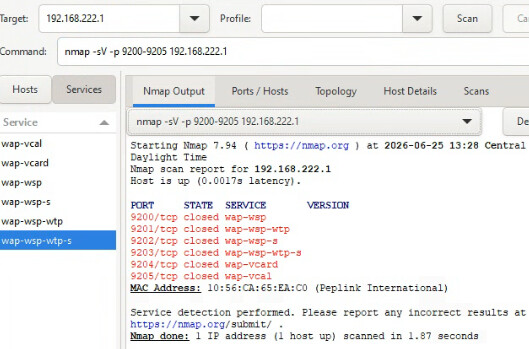
I disabled my OBP as you suggested and still do not have any luck with 192.168.222.1:9202 or 192.168.50.1:9202. Both interfaces are pingable from the machine.
I am testing via Postman, HomeAssistant Integration, and NMAP.
NMAP output:
Hi Kurt,
That is interesting.
Just checking, hav eyou tried disable the proxy → save → enabled the proxy again?
Or do a reboot in between disable and enable the proxy?
I would check if there is any updates pending on the starlink dish.
Also what starlink dish version are you using? I’m using the GEN3 HP version.
Also I’m using 8.6.0 RC3 beta firmware.
Let me know if any of these help.
Hey Joey,
Yes, I just tried turning the proxy feature off > rebooting > turning back on > rebooting with no difference.
One dish (on WAN 2) is a “standard 4”, the other (on WAN 1) is an older gen2 actuated. No pending software updates. The unit on WAN 2 is in bypass mode, WAN 1 is not. WAN 2 is priority 1 and currently connected, WAN 1 is second priority and currently disconnected (obstructed by a roof while the boat is docked).
Home Assistant seems to be successfully connecting to 192.168.100.1:9200 and pulling API data, but of course will not connect via any proxy port or LAN IP.
Hi Kurt,
Interesting.
I’m reaching them from the untagged LAN. Is InterVLAN routing enabled?
Also if you do a WAN check are the WAN ID’s actually comming back as WAN ID 1 for ETH 1 and WAN ID 2 for ETH 2?
I don’t have a Balance 30 to check unfortunately.
Correct, Inter-VLAN routing is enabled on the untagged LAN (192.168.50.1) and my primary VLAN (192.168.222.1).
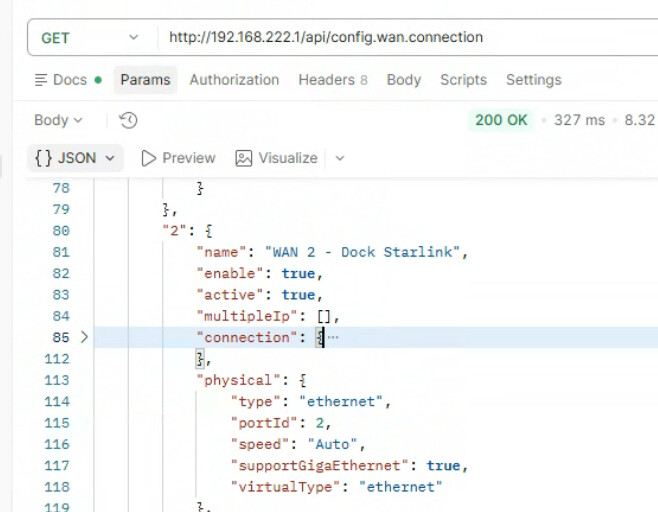
Good question on the WAN ID, but I believe WAN 2 is WAN ID 2 based on this:
That looks indeed like WAN ID 2.
Have you tried doing the call from the untagged LAN?
Maybe untagged LAN is hard coded in the proxy settings?
Hey Joey,
Good thought. I’ll give that a try when I’m on site later this week.
Is there anyone from Peplink that could confirm how the gRPC proxy feature is designed to work?
@Kurt-CCS ,
Using any of the device’s LAN IP addresses together with the configured gRPC proxy port is the correct way to access the gRPC proxy service.
My main concern is understanding why your device is not working with this configuration.
Just to confirm, after enabling the gRPC Proxy feature on the support.cgi page, did you return to the Dashboard and click Apply Changes ? The setting will not take effect until the configuration has been applied.
If you’re still unable to get it working, could you please create a support ticket so that our Support team can review the issue directly on your device?
You can submit a ticket using the link below:
https://ticket.peplink.com/ticket/new/public
If possible, please include the device serial number, firmware version, your current configuration, and any error messages or screenshots. This will help us investigate the issue more efficiently.
Thank you
2 Likes
Correct, I did return to the dashboard and applied configuration.
I have created case 26061191.
For anyone else that may experience this issue in the future: The support team investigated and stated that my configuration was correct, but the gRPC Proxy feature only works on devices with an active Care subscription.
We do not have an active subscription on this device due to its age, so we’ll have to figure out another solution.
Thanks to @JoeyJanssen and @sitloongs for their help.
2 Likes