Dear Peplink Team.
Does the MAX BR1 Pro 5G SMA Cellular Connector x4 support MIMO ?
Dear Peplink Team.
Does the MAX BR1 Pro 5G SMA Cellular Connector x4 support MIMO ?
Ahoy there!
The Peplink BR1 Pro 5G supports 4x Cellular antennas (4x4 MIMO).
As for Wi-Fi it is only 2x2.
See below details of the unit,
BR1 Pro 5G Spec Sheet
Cheers !
Dear Sir.
I found that Wi-Fi supports MIMO, but there’s no specific mention of MIMO capability on the cellular antennas. Is there any other documentation to confirm this?
Hi There
The 5G system on this model consists of 4 antennas which support 4 Connections. Therefore 4x4 MIMO.
It also requires a 4x4 MIMO antenna that supports the frequencies the modem can recieve.
The guys over at Mobile Internet have a great guide about MIMO,
Understanding MIMO (Multiple Input, Multiple Output) - Cellular Speed & Booster Implications - Mobile Internet Resource Center
So, the answer is YES the BR1 Pro 5G supports MIMO (4x4 = 4 antennas).
The Wireless is also MIMO, but only 2x2 (2x antennas)
Cheers
Dear Sir.
Can I understand that the BR1 Pro 5G itself supports satellite MIMO, but it depends on the specific antenna used? Is that correct?
Does Maritime 10 have the capability to meet MIMO requirements in a maritime environment?
Hello, Bit.Gao.
The device MAX BR1 Pro (MAX-BR1-PRO-5GN-T-PRM) use the Quectel RM520N-GL (LTE MODEM)
Yes… It can support MIMO.
You can read about at
https://forums.quectel.com/uploads/short-url/1zkjPRnxF5BZ2woox386baCZx4g.pdf .
5G NR SA
DL 4 × 4 MIMO: n1/n2/n3/n7/n25/n30/n38/n40/n41/n48/n66/n70/n77/n78/n79
5G NR NSA
DL 4 × 4 MIMO: n1/n2/n3/n7/n25/n30/n66/n38/n40/n41/n48/n70/n77/n78/n79
Hi Guys, jumping on this old thread with follow up question.
I recently purchased the Max BR1 Pro 5G (X65) and Parsec Husky Pro 7-1 antenna.
For the 4x4 MIMO to work correctly my understanding is that the antennas should be paired correctly but my question is that the Husky has cables labeled Cellular 1, 2, 3, 4 while the BR1 has connections labeled A, B, C, D.
From the above comment, I looked into the literature for the Quectel LTE modem and I see the internal device has antenna connections ANT0, ANT1, ANT2, ANT3, and based on the layout I presume those align with the BR1 Pro, A, B, C, D.
The Husky literature says Cellular 1= Main, Cell 2= Div, Cell 3= MIMO1, Cell 4= MIMO2. I dont know what it means, but I believe this is saying 1= Primary, 2= Diversity, 3= MIMO1, 4= MIMO2.
Anyhow, back to my question…is there any difference between the antenna connections on the BR1 Pro, ports A, B, C, D? thanks
Hi, @Gripster
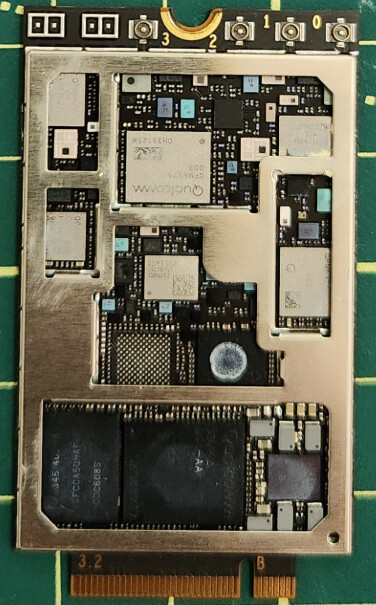
I don’t have, at this moment, a picture of the LTE MODEM of BR1PRO5G (x65), but…
By standard… the connections, I believe, will follow the connections of the LTE MODEM inside of the device.
Sample below… a QUECTEL MODEM from the BR1MINI5GN
so… I believe… Your are correct.
Hi Gripster,
Welcome to the forum.
For most antennas it doesn’t matter what antenna is connected, only if there is a difference between the (internal) antennas then it does matter.
So if you want to dive deeper in this and carefully select the best antenna to the best chain here is a deep dive:
From my experience with the RM520N-GL (5GN) and the FN990A40 (5GK) version, both have different mapping on the connectors. It all comes down to what bands are available on the antenna chain/connector. And bear with me I have put it in an excel sheet for you, here are the snap shots for the 5GK modem  :
:
The 4G B-bands:
Few other notes:
The 4x4 MIMO only works on the download. You have 2x2 MIMO on upload. this is also depending on what is available from the carrier side.
The 5G versions don’t have the MAIN and AUX chains anymore.
Hope this helps
Thank you for the replies. I will just stick with Cell 1= A, 2= B, 3= C, 4= D. I don’t know what the Husky antenna internals are or how they may be different. The WiFi is not very good with this combination, but that is a different thread. thanks again! G