I recently purchased a Max BR1 LTE (hardware 3) and am quite happy with it. When I was shopping, I was also considering the 5G model, but it’s quite a bit more expensive, so I went with LTE.
I tend to camp in fairly remote sites, often with just a tiny bit of signal.
My question: supposing I’m in an area with very weak signal (5G and LTE) - would the 5G peplink router have any advantage vs. LTE? I know 5G makes some improvements over 4G (for example, lower latency) - but does 5G have any advantages in very weak signal areas?
If you have knowledge, either theoretical or experience, I’d love to hear.
Hi, @soylentgreen
at least… over LTE (4G) will be getting more simultaneous channels…

I would love to know how to find band signal strength and quality in my connection. Have been unable to find it anywhere in the incontrol menu which as an amateur, I find it very difficult to use. I have a Peplink Esim in a fringe cell coverage area and recently installed a Waveform antenna
I have useable signal on roof of about -84dbm pre antenna. Antenna gain =12dm m, cable loss (40 ft) +8 dbm, and I should see -80dbm at B one 5g router…its approx -110dbm at router. I have checked connections and alll are tight.
Hi, @thomsoni
Have you try an directional antenna? Maybe work better for you.
Do all Peplink devices support this?
Hi, @soylentgreen
OLD LTE (CAT-4) devices… just one channel.
not too old LTE-A (CAT-6) devices… up to to two simultaneos channels
new LTE-A (CAT-12) devices… up to three simultaneos channels
LTEA/5G (CAT-20) devices… up to four simultaneos channels.
But… This is also must be supported by mobile operator.
1 Like
I have been working with a waveform
4x4 directional MIMO antenna and have tested
signal pretence, near antenna for
aiming at nearest tower as well as on cables 1-4 entering cellular ports A-D. I measure <-80dbm on the end of cable
one just pre router. all other cables are showing similar band strengths.
Peplink on the other hand reports -110dbm leading me to wonder if somethings wrong with peplink esim
Anyway—i gave up on using
Waveforms quad antenna. it needs a 4x4 booster on incoming cables pre router. FYI I am
in a fringe cell strength area.
So i ended up re-attaching peplink blade
antenna and am finding they pick up better signal strengtth from the Bolton Long Ranger antenna on the cottage roof which is boosted
by Wilson pro 70 and rebroadcast by a panel antenna in the cottage——-with rare
dropped calls unlike via
Peplink hooked
up to Starlink which drops
frequently because i am in the tree belt.
Peplink seems
to pick up
a slightly better quality signal from Wilson DB 70
pro.I don’t use Peplink Starlink Wifi, because calls
still
drop!
Crazy ideas? But works!
MOB40G with a huge antenna.
I ended up getting rid of Waveform 4X4 antenna, and used my Bolton Technical Long Ranger antenna on the roof, which is fed into my Wilson 70 Pro booster. I tapped off the line to my indoor panel antenna and ran it into the Peplink B One 5G router. I have -62db signal, but the latency is >100ms.
Speed fusion has been a bust and it has used a lot of data up on the Peplink Esim’s. Grok has advised the high latency could be the result of the multi carrier Peplink Esim. My cell phone signal still drops!
1
Hi, @thomsoni
Is this guy?
Have you check the LTE supported by this device?
Band 12 700 MHz
Band 13 700 MHz
Band 5 850 MHz
Band 4 1700/2100 MHz
Band 25/2
I understand the reasons to use this kind of the device… but it amplify the signal and also can maybe amplify some trash interference.
I never use the Peplink eSim…
But… I tried a multi carrier option here at my country and never worked fine!
Having 5G gives it the option to use the 5G or LTE signal, which ever is best (using the auto band setting). My B One 5G hops around between 5G and LTE.
They propagate differently, so you never know which is going to be best, and not all towers have both anyway.
1 Like
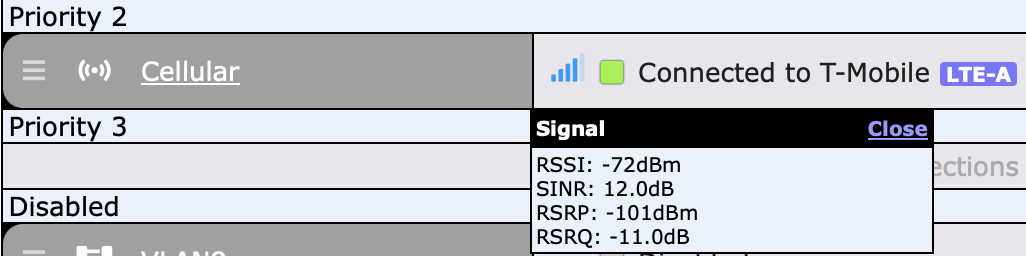
On the web interface you find the signal strength by clicking on the bars icon, which is a totally inobvious way to do it. I don’t know if incontrol has the same thing, but you can always connect to the web interface via incontrol.
Like this: