PVID confusion and what is best for Peplink APs?

I’m confused about the role of PVID on trunked ethernet ports. Should I have it on or off? Or said differently, what bad things happen if it’s on or off? Does setting the PVID to the “untagged LAN” have any specific advantages/disadvantages?

And more concretely, what is recommended for a LAN ethernet port that is dedicated to Peplink APs?

By default, the LAN ports on Peplink routers are configured as Port Type: Trunk, VLAN Networks: Any, and PVID: Untagged LAN (1).

This default configuration is suitable for connecting a Peplink AP, as the AP uses untagged traffic through its WAN port to establish its management connection with the Peplink router’s AP Controller.

Therefore, no changes to the default LAN port configuration are required when connecting a Peplink AP using the default management settings.

The PVID determines which VLAN incoming untagged traffic is assigned to on the router’s LAN port. This is similar to the behavior of an access port, where untagged traffic is assigned to a specific VLAN, except that a trunk port can also carry traffic from other tagged VLANs.

For a LAN port dedicated to a Peplink AP, the recommended configuration is:

  • Port Type: Trunk (default).

  • VLAN Networks: Any (default).

  • PVID: Untagged LAN (1) (default).

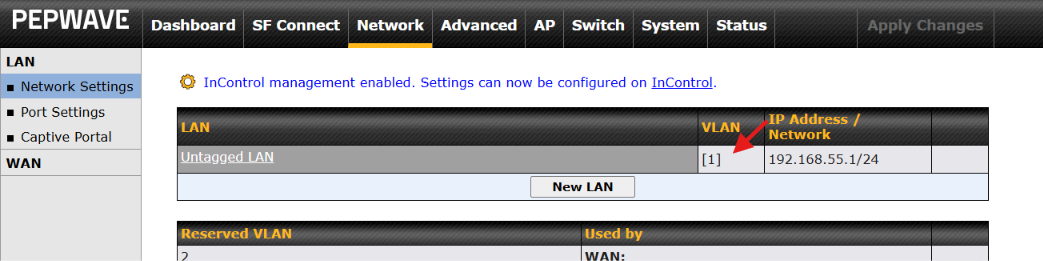
The Untagged LAN uses the reserved VLAN identifier [1], which cannot be changed.

This allows the AP to communicate with the Peplink router’s AP Controller through the untagged management network while carrying traffic from different SSIDs using their respective VLANs.

For example:

  • Untagged LAN (1): AP management traffic.

  • VLAN 20: Staff SSID.

  • VLAN 30: Guest SSID.

With the default Trunk / Any configuration, the LAN port can carry traffic for the configured VLANs without requiring additional VLAN assignments on the port.

What if you prefer to use a tagged VLAN for AP management?

By default, the Peplink AP uses an untagged management connection through its WAN port to establish communication with the Peplink router’s AP Controller.

If you prefer to use a tagged VLAN for AP management, the recommended procedure is:

  1. Keep the router’s LAN port at its default configuration (Port Type: Trunk, VLAN Networks: Any, PVID: Untagged LAN (1)). This allows the AP to establish its initial management connection with the AP Controller.

  2. Configure the desired Management VLAN ID on the Peplink router under:

    • AP Controller (Full Version): AP > Profiles

    • AP Controller Lite: AP > Settings

  3. Ensure the new management VLAN is configured on the router and can be carried through the LAN port connected to the AP.

  4. Allow the AP Controller to synchronize the updated management VLAN configuration to the AP.

  5. Once synchronization is complete and the AP is confirmed reachable through the new tagged management VLAN, the original PVID setting can be disabled if it is no longer required.

Important: Do not disable the initial PVID configuration before the new management VLAN settings have been successfully synchronized and connectivity through the new VLAN has been verified. Otherwise, the AP may lose its management connection with the AP Controller.

In general, keeping the default Trunk / Any configuration with PVID assigned to Untagged LAN (1) is the simplest and recommended approach for a Peplink router’s LAN port connected to a Peplink AP using the default management settings.

Another advantage of keeping the default PVID configuration is that if the Peplink AP is factory reset in the future, it can still establish its initial management connection through the untagged network and be managed again by the Peplink router’s AP Controller without requiring changes to the LAN port configuration.

Hope the above explain your concerns
4 Likes

Thanks! This covers my practical concerns. But I’m still confused about the theory of PVID and how Peplink routers handle untagged packets:

  1. If the untagged LAN is actually modeled as VLAN 1 internally, then what happens on egress when PVID is disabled on a trunked port? Do VLAN 1 (“untagged??”) packets stay tagged?

  2. Similarly, let’s consider ingress with PVID disabled. If an untagged packet arrives … then what? does it get dropped? Or does it quietly get treated as if it were a part of VLAN 1, the “untagged” LAN?

  3. Lastly, and perhaps this is the simplest question: does PVID treat VLAN 1 (the “untagged” LAN) special at all?

@DaveZ,

Sorry, I missed your question earlier.

This is really a good question and allow me to answer as below.

For firmware versions that display the Untagged LAN option as shown in the screenshot below, you should have no problem disabling PVID Untagged LAN (1), provided that the connected switch port is configured to carry VLAN 1 as tagged traffic on the trunk for egress traffic.

My recommendation is to always treat the default “Untagged LAN (1)” as untagged traffic. This makes the configuration easier to understand and remember, especially since we normally connect untagged devices to this network.

This is also why the default trunk port has PVID “Untagged LAN (1)” enabled. In other words, if you want to access the default Untagged LAN (1), I recommend using untagged traffic.

For APs, the default WAN connection does not have VLAN tagging enabled, so they can connect without requiring any special VLAN configuration.

Besides that, please note that not all switches support carrying VLAN 1 as tagged traffic on a trunk port. Therefore, before disabling PVID “Untagged LAN (1)”, please check what device will be connected to the port and make sure it supports the required VLAN tagging configuration.

The device will not be able to access VLAN 1 if PVID “Untagged LAN (1)” is disabled, as the port will expect incoming traffic to be tagged with VLAN 1 instead of accepting untagged traffic for VLAN 1.

You are right. Since PVID configuration was introduced as a supported feature, “Untagged LAN (1)” is no longer treated as a special VLAN.

However, some devices may still be running older firmware versions, so I cannot simply say that it is no longer a special VLAN in all cases.

The key point is that we need to configure the PVID based on the device connected to the port, particularly whether it sends untagged traffic or VLAN 1-tagged packets.

I hope the above explanation helps answer your challenging questions and clarify the “Untagged LAN (1)” configuration behavior.

2 Likes