Confusing, Disappointing Peplink Pepwave Equipment Performance

Of course you count, @mldowling :blush: So does everybody else who’s commented. I appreciate it from all of you!

I was speaking directly of the “Why did it go so badly from bad to worse when the antenna was placed twenty-five feet up in the air.” I was curious to see if somebody would key on the metal roof possibly influencing the antenna’s radiation pattern. And, no: It wasn’t a test. It was because I wanted a sanity check without my hypothesis influencing it.

And, yes: It is a hypothesis–born of what I know of RF propagation and antenna design theory. I could easily be completely wrong. (But I think not.)

As for calling-out my vendor: I hadn’t planned to. Yes: Anybody can make a mistake. I don’t even entirely blame the vendor. I’ve enough experience with propagation, antenna, and transmission line theory and practice that I should have known what I was being told was wrong. So I blame myself, to a degree, as well.

I don’t see it as necessary to talk to Peplink about it. I’ll take it up with the vendor, directly.

2 Likes

One reason I like Omni in some locations is in case a Cell on Wheels (CoW) is deployed. They are not always in the same direction as the cell tower. Could be for a big event, natural disaster, etc. Or if there are multiple towers, and the closest one happens to go offline, but can still get a little signal from further away. Or multiple carriers in different directions. Or mini cells deployed in various spots/neighborhoods. In Rural I can perhaps understand the directional but in more dense areas that are ever changing it would be hard to keep up IMO.

2 Likes

@mystery, I had initially spec’d a a MAX BR1 Mini Core, because our application didn’t need, couldn’t use, WiFi integrated into the modem. Nor did it need the GPS. I initially spec’d an IoT 20G because I figured the gain realized from a directional antenna would be necessary.

My vendor informed me the Mini Core would give us less performance than the Nighthawk was getting because it was Cat 6, whereas the Nighthawk was either Cat 12 or Cat 16, depending upon which version it was. He spec’d the Maritime 40G… I dunno… perhaps because it’s the only 4x4 MIMO antenna Peplink has?

I went along with the Maritime 40G for one of the same reasons you enumerated: In case the best cell tower went down, perhaps the modem could grab another. But I all along I had this niggling little concern about how that antenna would perform mounted just above a big metal roof–for the reason stated in my earlier post.

Apparently my initial thoughts on an antenna and concerns about the omni-directional antenna were warranted.

So the Maritime 40G, at least, is certainly going to have to go back.

Where we’ll go from here will depend upon the outcome of this coming weekend’s tests.

As an aside: What this particular installation really needs is a (non-existent) MAX BR1 Pro 20 Core or (non-existent) MAX BR1 Pro 5G Core and that 4x4 MIMO antenna Peplink developed, but never produced.

With that kind of distance, I wouldn’t even try with an omni antenna. Especially in an area that has lots of trees. I’m not sure if you’re able to get a line of sight to the cell towers from on top of the shed, but you might also try the Poynting LPDA-92, it has even higher gain and a more focussed signal, so can get you even further/stronger signal, but aiming it is a lot harder. It is a SISO antenna, so you’d need 4 of those for this modem type. We use the BRKT-033 per two antennas to get a cross polarized signal.

We use these antennas especially in areas where the radio towers are far away or where we want to use the further radio towers to get towers outside an event area.

I checked the specifications of the Thales MV31-W that is used inside the BPL-310-5GD-K-T-PRM (we don’t have other models with 5G, so not sure if the same chip is used for the BR1/BR2 Pro), and it specifies all four are used for all LTE/5G up to 6Ghz frequencies, for a real 4x4MIMO signal. So it is different than the CAT18 solutions and you can get more performance out of it, if the radio towers are compatible with 4x4 MIMO.

2 Likes

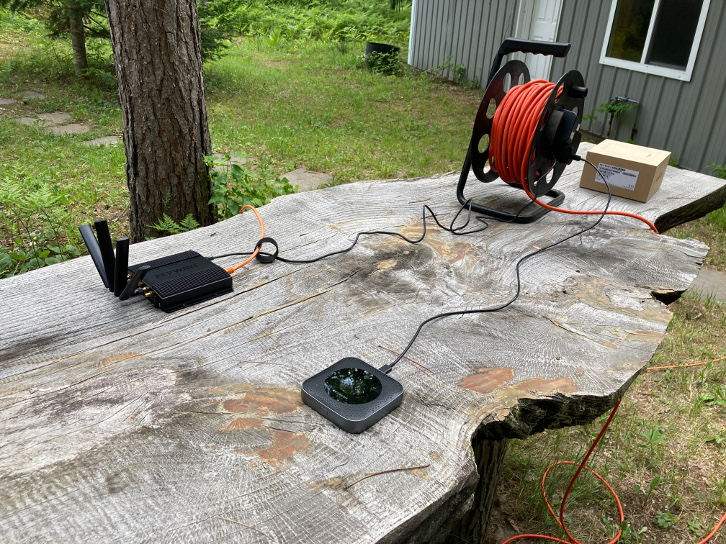
Depending upon the outcome of this coming weekend’s tests I suspect we’ll be fine with the XPOL-2-5G’s. After all: That little NetGear Nighthawk, sitting on a waist-high table, not more than fifteen feet from the cabin and maybe thirty feet from one of the pole barns, was getting 35/5 pretty consistently.

Considering the XPOL-2-5G’s polars, it’s just possible I’ll be able to point them midway between the two best towers–if the two best are adjacent to one another, get both of them adequately, and get us a degree of tower redundancy.

Plus, being directional antennas, the XPOL-2-5G’s should be relatively immune to those big sheets of steel mostly behind them.

I really should have done this more extensive homework up front . I got lazy. Won’t make that mistake again.

Somebody please correct me if I’m having a brane phart :slight_smile:

Some comparative antenna + coax gain/loss calculations:

Peplink Maritime 40G Gain With Cable Loss

                                   Gain/Loss (dBi/dB)
AT&T Band    Frequency (MHz)    Antenna    6 Feet   15 feet    Total

    2           1900              5.3       0.9       4.5      -0.1
    5            850              3.8       0.6       2.9       0.3
   12            700              3.8       0.6       2.7       0.5
   14           2300              5.3       1.0       5.0      -0.7
   66           1700              5.3       0.9       4.3       0.1
                2300              5.3       1.0       5.0      -0.7

Notes:

    For 6 feet of coax at the mfgr's listed loss, 15 feet of
    LMR-200 coax at TMS' specs.

    Does not include connector insertion loss

Pointing XPOL-2-5G (v3) Gain With Cable Loss

                                   Gain/Loss (dBi/dB)
AT&T Band    Frequency (MHz)    Antenna       15 feet    Total 

    2           1900               10          2.3        7.7  
    5            850                9          1.6        7.4
   12            700                9          1.6        7.4
   14           2300               10          2.4        7.6  
   66           1700               10          2.3        7.7
                2300               10          2.4        7.6  

Notes:
    For 15 feet of coax at the mfgr's listed loss 

    Does not include connector insertion loss

IIRC, dB and dBi, both being dimensionless, can be directly added and subtracted.

@James_Seymour

Could you please let us know how did you get number in the “15 feet” column for MR-40G and for XPOL-2-5G?

1 Like

Certainly, @Giedrius. In the case of the XPOL-2-5G I used the manufacturer’s dB/m specification. I assumed that notation meant dB/meter. (I did the same for the six foot 40G cable.) For the fifteen feet of TMS LMR-200 I used TMS’ loss calculator, which allows you to enter the exact frequency and length in feet.

Btw: I find it somewhat interesting that the loss specifications for the coax included with the 40G and XPOL-2-5G are about half those for the LMR-200. That’s a pretty significant difference.

@James_Seymour

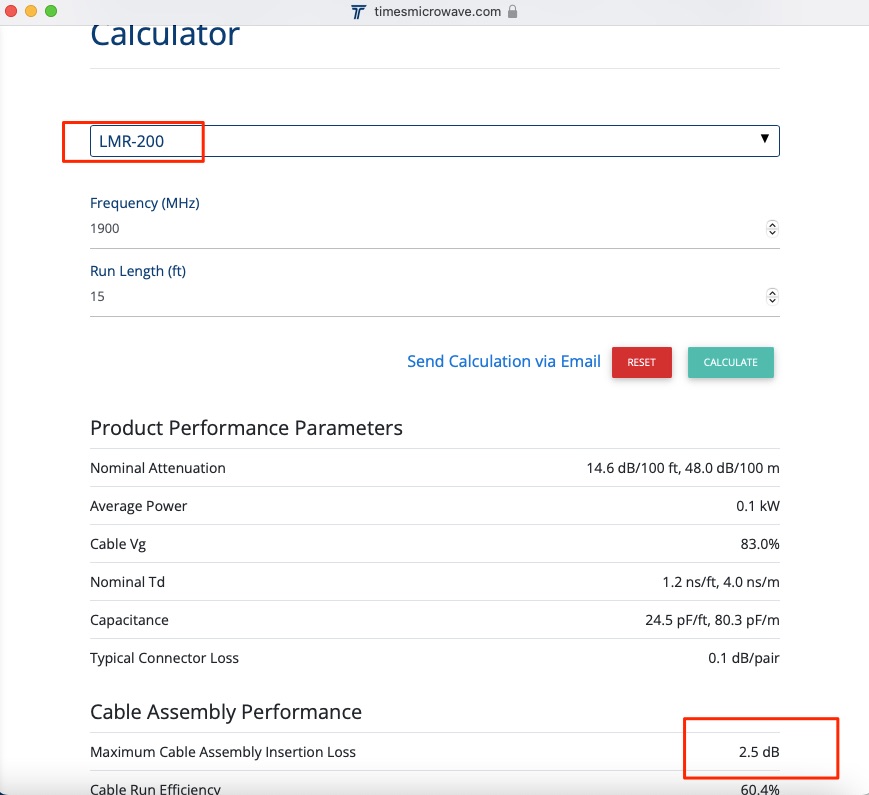
I checked with TMS loss calculator and got 2.5dB attenuation for LMR-200 @ 1900MHz for 15ft cable. Please double check this part, just in case I made a mistake somewhere :slight_smile:

BTW, some advises from my personal experience. For Peplink we typically use CFD-200 cable, but it is actually same as LMR-200. There minor differences but you can neglect it. Poynting is using HDF-195 and very likely the specs should be close to LMR-195. The “195” actually stands for jacket diameter in inches.

Another thing to share. If you have a fixed location and far away from the tower, then definitely fixed and directional antenna is the way to go and others wrote in the forum. Also if you use longer cable runs, I would recommend considering to choose antenna with short cable and N-Type connector and using LMR-400 to run cables down. This would give you the minimal loss (especially for higher frequencies). I made some calculations and you will get lower loss with LMR-400 even you will need to use additional pigtails and connectors. If did calculations in the past and if needed can search for this.

From personal experience sometimes it helps disabling certain bands, but this is more like a manual tuning if you have time and patience :slight_smile:

Your case is the interesting one and please share what will eventually help to solve your problem.

2 Likes

Wasn’t your mistake, @Giedrius, it was mine. When I hit the “Calculate” button for LMR-200 on TMS’ site it opened the dialogue for a completely different coax, and I’d failed to notice that.

Correct numbers:

Peplink Maritime 40G Gain With Cable Loss

                                   Gain/Loss (dBi/dB)
AT&T Band    Frequency (MHz)    Antenna    6 Feet   15 feet    Total

    2           1900              5.3       0.9       2.5       1.9
    5            850              3.8       0.6       1.6       1.6
   12            700              3.8       0.6       1.5       1.7
   14           2300              5.3       1.0       2.8       1.5
   66           1700              5.3       0.9       2.4       2.0
                2300              5.3       1.0       2.8       1.5

Notes:

    For 6 feet of coax at the mfgr's listed loss, 15 feet of
    LMR-200 coax at TMS' specs.

    Does not include connector insertion loss

Still quite a difference from the XPOL-2-5G.

Cabling and connectorization recommendations noted. Thanks!

Re: Disabling certain bands. I will definitely be experimenting with that.

Interesting that our use case is interesting :slight_smile: I will definitely keep y’all updated on the progress and results.

Btw: If y’all have one of those 4x4 MIMO + GPS antennas you developed (directional, I assume?), but have not yet fielded, laying about, and you want it tested in an interesting use case: Feel free to send it along :smiley:

Sure we will and I have thing in mind about the testing opportunity :slight_smile:

The design we have performance wise is OK, but we are not happy about the side and still not confident about the demand. These are the main reasons stopping us from moving forward.

2 Likes

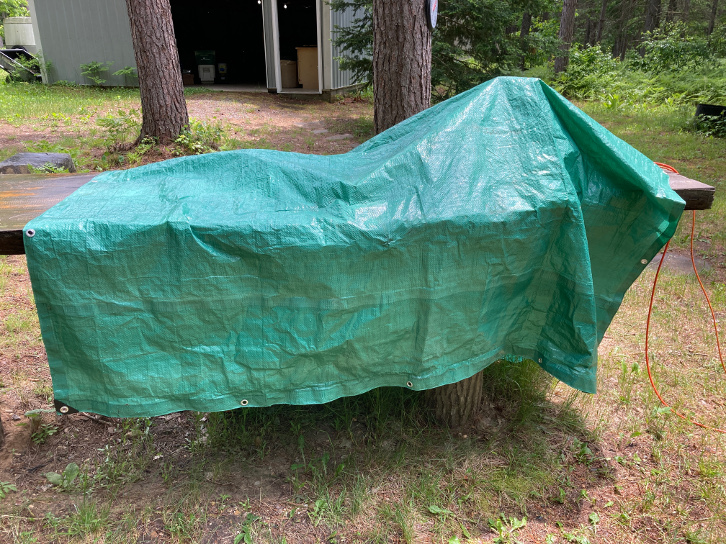
Got some testing done this weekend.

After about the third or fourth test, Mother Nature tried to interrupt me–again. “The hell you say!”, I told her, and…

:smiley:

What I did was switch back-and-forth between the NetGear Nighthawk and Peplink Pepwave MAX BR1 Pro 5G, switching bands on the latter each time. Here are the results (numbers are ping [ms]/download [Mb/s]/upload [Mb/s]):

Nighthawk

40/17/0.29
39/21/0.36
34/22/0.56
45/24/0.38
40/23/0.55

Avg: 40/21/0.43


Peplink

Band LTE Band 2 (1900 MHz)
RSSI: -93dBm SINR: 2.8dB RSRP: -123dBm RSRQ: -13.5dB

77/59/0.32

Band LTE Band 4 (AWS 1700/2100 MHz)
RSSI: -90dBm SINR: 4.2dB RSRP: -119dBm RSRQ: -13.2dB

49/24/0.61

Band LTE Band 12 (700 MHz)
RSSI: -74dBm SINR: 0.2dB RSRP: -109dBm RSRQ: -17.2dB

42/4/1.7

Band LTE Band 14 (700 MHz)
RSSI: -81dBm SINR: 10.2dB RSRP: -107dBm RSRQ: -9.4dB

48/28/1.05

Band LTE Band 66 (AMS 1700/2100 MHz)
RSSI: -93dBm SINR: 4.6dB RSRP: -122dBm RSRQ: -11.3dB

42/20/0.53

Avg: 52/27/0.78
Avg w/o Band 12: 54/33/0.63

I subsequently left the Pro 5G on Band 14, as that seemed to yield the best compromise between acceptable download and tolerable upload speeds, and did several more speed tests. That one result for B14, above, was pretty consistent.

I am curious as to why Band 2 (1900MHz), with some of the worst signal numbers, yielded the best download speed, by a factor of 2-3, over the other bands, but one of the worst upload speeds. That’s repeatable, btw.

I am also curious as to why two different 700MHz bands (12 and 14) had such widely-varying signal numbers and performance. Tower selection, perhaps?

Another thing: Why do I only very rarely see “LTE-A” displayed on the Pro 5G? Even at home, where AT&T towers are all over the place?

I suspect testing like this on a weekend or evening doesn’t reflect the true capabilities of either device, due to tower congestion. We have seen up to 36Mb/s down on the Nighthawk, placed just where it is in the photo above, up to 90Mb/s down on the Pro 5G in a worse location, up to 3Mb/s up on the Nighhawk and up to 5Mb/s up from the Pro 5G. But that was on a weekday, prior to the end of the workday.

Nonetheless: While the full capabilities of both devices probably weren’t realized, I think those tests do show the Pro 5G handled congestion better?

In fact: The next morning, with the Pro 5G sitting in a window in the cabin, I saw 20/3 from it. When I later replaced it with the Nighthawk, so I could bring the Pro 5G back with my for antenna testing at home, it got no better than 3/0.2.

Conclusion: The Pro 5G is probably capable of out-performing the Nighthawk. It’ll just depend upon getting the antenna selection and siting right.

Btw: During testing the Nighthawk did something odd. All-of-a-sudden it wouldn’t get more than about 3Mb/s down and 0.1Mb/s up. “This can’t be right,” I thought. Recalling watching Netflix on the cabin’s WiFi-connected TV the previous weekend, having it start buffering like crazy, and rebooting the Nighthawk fixing it: I rebooted the Nighthawk. Back to normal. Another thing that would make it unacceptable for any kind of serious, fixed installation like this.

Now I just need to decide what to try next for antennas.

Odd… I posted this before and it disappeared?

Before I pull the trigger: One last check (I hope):

The following antennas have been recommended, earlier in this thread:

  1. 2 x Poynting XPOL-2-5G (v3)
  2. 1 x Panorama 4x4 MiMo 4G/5G (WMM4G-6-60)
  3. 1 x Telco Antennas XPOL 4x4 MIMO
  4. 2 x Peplink Pepwave IoT 20G

The Telco Antennas product does not appear to be available in the U.S., so I haven’t really looked into it.

Panorama does not appear to publish polars (azimuth and elevation radiation patterns), so I wouldn’t really know what I was getting.

The Peplink has lower gain than the Poynting in the higher frequencies, and is not cross-polarized. Plus the Poynting has a slightly less-narrow directional pattern, which means we may have a better chance of grabbing two adjacent towers on one bearing.

So it looks like a pair of Poynting XPOL-2-5G (v3)'s would be our best bet?

LTE frequency bands - Wikipedia

LTE B12 and LTE B14 are both in the 700Mhz band, but they differ quite a bit in the actual frequency part of the spectrum. The lower the actual frequency the further it will travel.

Band | Duplex | Band Mhz | Common Name | Uplink | Downlink | Channel bandwiths
12 | FDD | 700 | Lower SMH | 699-716 | 729-746 | 1.4, 3, 5, 10
14 | FDD | 700 | Upper SMH | 788-798 | 758-768 | 5, 10

I don’t have information on how big the spectrum used per cell tower is on your network. Which might be why B14 is performing so much better than B12.

The Netgear will just switch to any band it finds, so the performance can differ quite a lot when you connect.

With the Peplink you can control which bands it may use. Not sure which combinations work in US, in EU/NL we can have like 5 bands connected at the same time on the 5G modems, which gives lots of performance.

2 Likes

@James_Seymour

Another thing I would offer is to check this post.

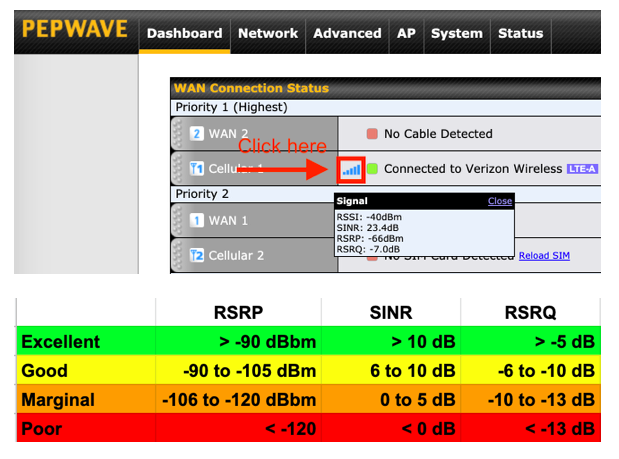
It provides some guidance about RSRP and RSRQ values. This will also help to answer why some bands are working better than others.

2 Likes

@Giedrius, I got “Oops! That page doesn’t exist or is private” for that link.

1 Like

ups, my mistake. Please see a screenshot below:

screenshot-2022-06-15-at-19.png

3 Likes

That’s excellent, @Giedrius. Thanks!

Update.

After a bunch of research, discussion, and pondering I chose to give the XPOL-2-5G (v3) antennas a try.

After receiving them I set them up on a ten foot mast in the backyard, then did tests with both the blade antennas and the XPOLs. Created a spreadsheet. Extrapolated the improvements I saw with the XPOL antennas to the results I logged for the blade antennas up north.

That extrapolation suggested we should see marginal to good signal values with the XPOL antennas up north.

And, sure enough: That’s exactly what I’m seeing. I’m watching the modem via the InControl2 page. SINR tends to stay well within the “good” range, sometimes even getting into “excellent.” RSRP and RSRQ float back-and-forth between just into “marginal” and just into “good.”

E.g.: Current numbers are:

RSRP: -104 dBm
RSRQ: -9.8 dB
SINR: 9.6 dB

This is on Band 14 (700MHz), btw. The higher frequencies were very bad (Bands 66 and 2).

Another note: The antennas are aimed about 30° off the bearing of the best tower–to about midway between that tower and the adjacent tower. I felt the slight signal degradation acceptable in favor of tower redundancy.

I had planned to cut the 15 foot jumpers we’d bought with the Pepwave antenna down and re-terminate them. But, once I had one of those fiddly little SMA connectors in front of me I decided not to tackle that. Instead we just put the jumpers in, as-is, and I’ve five- and six-foot LMR-240 jumpers on order.

My hope is the shorter jumpers and the better LMR-240 will keep the RSRP and RSSQ solidly in the “good” range.

As for performance: Never saw less than 25Mb/s down, usually 28-30Mb/s, and as high as 35Mb/s. Upload was nearly always between 4.5 and 5Mb/s - never lower than 3Mb/s. These were not as good numbers as we’d hoped to see when we started the project, but were acceptable to him.

(For comparison: His Nighthawk modem, sitting in a front window, was down around 1/0.3 Mb/s the night before.)

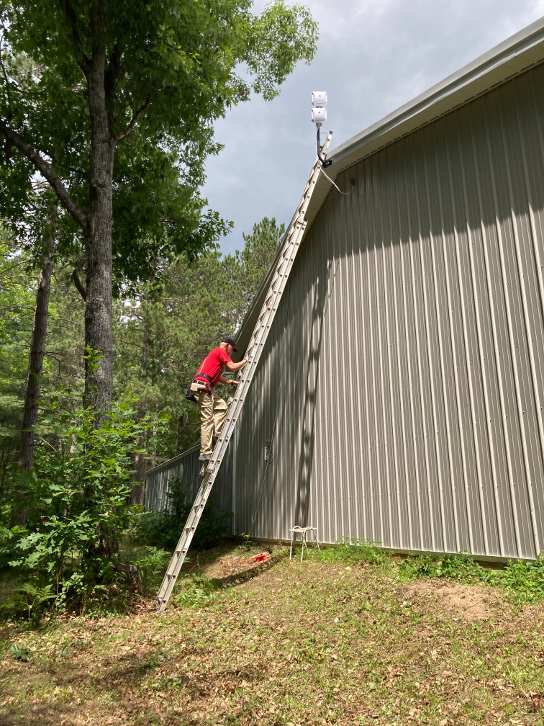
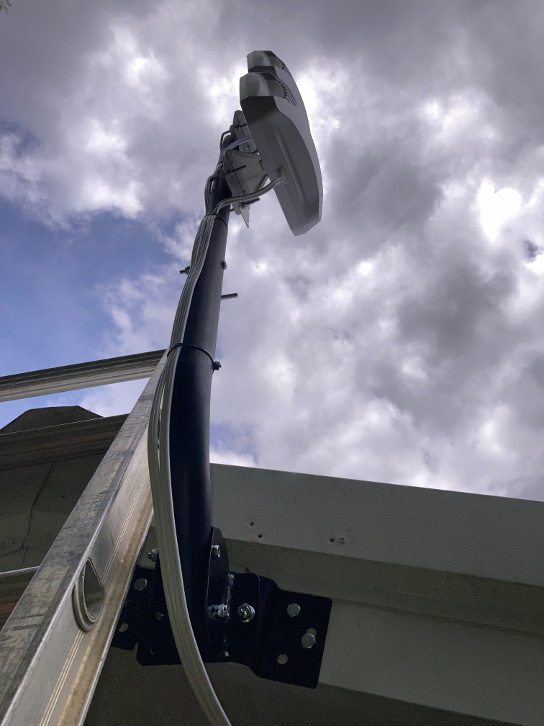
A couple photos from the installation work on Saturday:

Note: The coax was subsequently secured better than the photo, above, shows.

2 Likes

Nice job. Looks great!

1 Like